


Core Web Vitals Optimization: GCC INP Fix Guide
Core Web Vitals Optimization: GCC INP Fix Guide
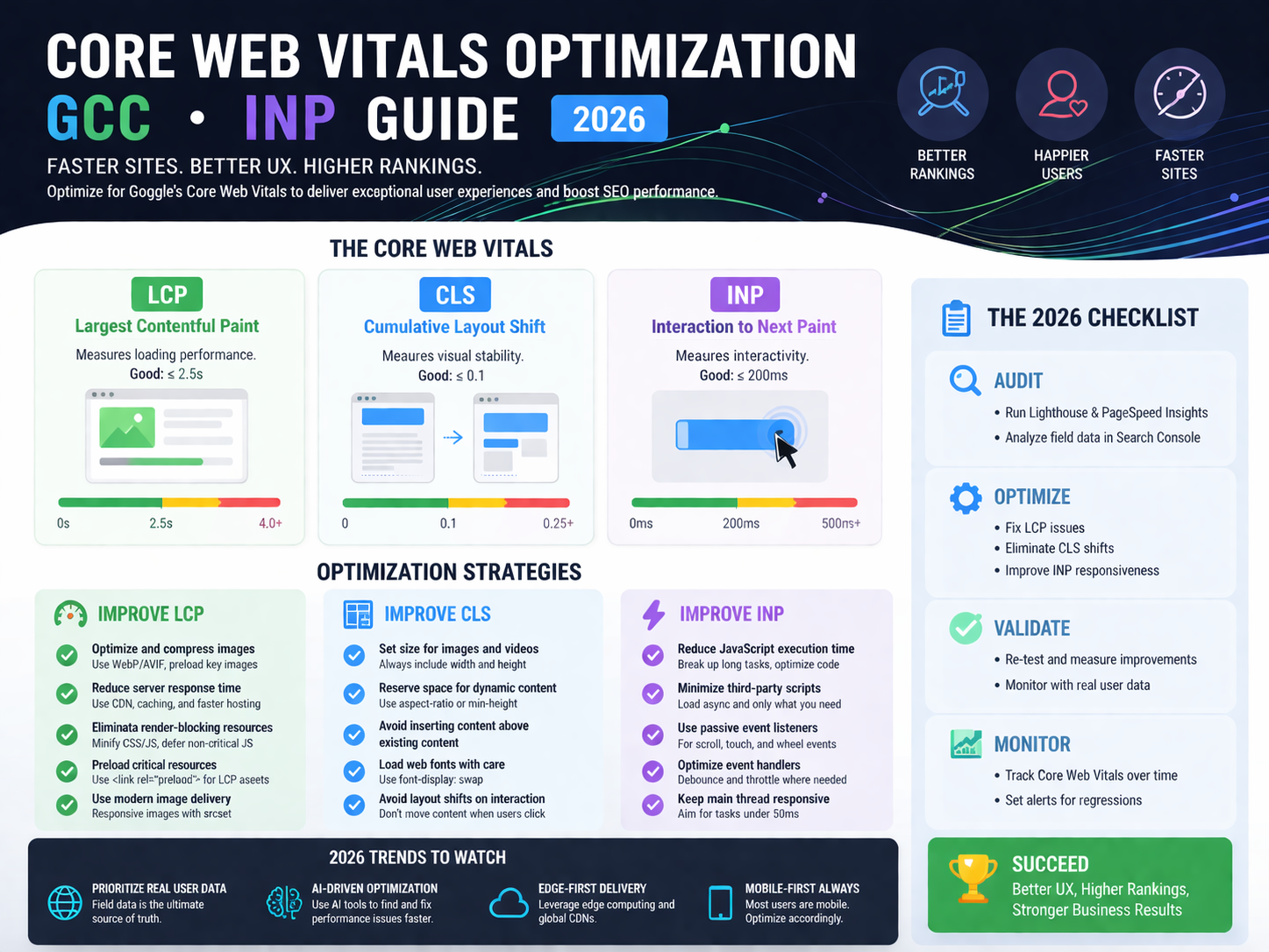
Core Web Vitals Optimization: GCC INP Fix Guide
Core web vitals optimization in 2026 is less about chasing a perfect Lighthouse score and more about making your site respond quickly when real people tap, click, scroll, and interact. For websites in Saudi Arabia, the UAE, and Qatar, that usually means fixing INP first, trimming heavy front-end behavior, and making sure Arabic-first or bilingual experiences do not create avoidable lag.
If your site looks fast but still feels slow, the problem is often hidden in real-user interactions. Chat widgets, consent banners, analytics tools, oversized Arabic fonts, and client-side JavaScript can all combine to hurt responsiveness even when a page appears fully loaded.
What core web vitals optimization means in 2026
Core web vitals optimization now focuses on how a website performs during actual use, not just at initial load. A page can paint quickly and still frustrate users if menus lag, filters freeze, or forms react late.
That is why INP (Interaction to Next Paint) matters so much. It measures how responsive a page feels throughout a visit. One delayed tap on a product filter, one sticky mobile menu, or one sluggish checkout interaction can drag down the experience.
For GCC businesses, this has direct business impact. Mobile-heavy browsing, bilingual content, and trust-sensitive sectors like fintech, healthcare, logistics, and retail all raise the bar. Users in Riyadh, Dubai, Abu Dhabi, Jeddah, and Doha expect sites to feel polished, stable, and immediate.
Why GCC websites often struggle with Core Web Vitals
Many Saudi, UAE, and Qatar websites do not fail because of one dramatic performance issue. They fail because of layers of small delays.
Common causes include.
Cookie consent platforms
Live chat widgets
Analytics and tag manager overload
A/B testing scripts
Heavy page builders
Large Arabic font files
RTL-specific CSS complexity
Bilingual assets loading on every page
On Arabic-first sites, typography alone can become expensive. Multiple font weights, decorative styles, and late-loading assets can increase render work and slow interaction handling.
Bilingual websites add another layer. If Arabic and English assets, layout logic, and UI components all load together, the browser has more work to do before it can respond smoothly.
In practice, that often shows up as.
Delayed mobile menu taps
Sluggish search or filters
Sticky headers that stutter
Checkout buttons that feel slow
Form fields that lag on lower-powered phones
Why INP is the hidden blocker for SEO and UX
A lot of teams still focus on visual speed alone. They improve image compression, tweak caching, and celebrate a better PageSpeed score. That helps, but it does not always solve the real problem.
If users can see the page but cannot interact with it smoothly, trust drops fast.
For GCC brands, that matters even more in sectors where credibility is tied to user experience. A fintech landing page in Riyadh, a healthcare booking journey in Dubai, or a logistics platform in Doha cannot afford to feel clunky after load.
Good responsiveness supports.
Better engagement
Lower abandonment
Stronger conversion paths
Higher perceived trust
Cleaner technical SEO signals
Why Saudi, UAE, and Qatar projects have different performance pressures
The technical issues may look similar across the GCC, but the context is not always the same.
In Saudi Arabia, enterprise and regulated-sector projects often work under stricter internal reviews around cloud use, third-party tools, and data governance. That can affect how performance fixes are implemented, especially for financial or public-sector platforms.
In the UAE, many companies move faster on product, growth, and experimentation. That often means more scripts, more tools, and more front-end complexity unless someone actively controls it.
In Qatar, hosting strategy and regional trust can become part of the performance conversation earlier, especially for organizations that care about data handling, resilience, and stakeholder confidence.
So while the metric is the same, the remediation path can differ depending on the market, sector, and hosting expectations.
How to diagnose INP, LCP, and CLS properly
The first mistake is relying only on lab tools.
Lab tools are useful, but field data tells you what real visitors actually experience. That matters most for INP because interaction problems often appear only after the page is loaded, scripts are running, and users start engaging with menus, forms, filters, and popups.
Start with.
Google Search Console
PageSpeed Insights field data
Chrome DevTools
Real user monitoring tools
Then look for patterns by page type, not just by homepage.
Focus on.
Templates with the worst field data
Pages carrying too many third-party scripts
Mobile interactions with the longest delays
Arabic and English versions separately
High-intent flows like product pages, lead forms, and checkout
This is where many teams find the real issue: the page is not slow everywhere. It is slow at key moments.

WordPress fixes for core web vitals optimization
WordPress sites can often improve quickly without a full rebuild.
Reduce plugin bloat
Too many plugins create front-end overhead, especially when several tools do similar jobs. Remove duplicate builders, sliders, review widgets, popup tools, and tracking add-ons.
Delay non-essential JavaScript
Not every script needs to load immediately. Defer what is not critical to the first interaction, especially marketing scripts and non-core visual effects.
Unload assets page by page
A contact form script does not need to load on every blog post. A booking widget does not belong on every service page. Selective loading can reduce main-thread pressure fast.
Rework chat and popup behavior
Live chat and aggressive popups are common INP offenders. Use lighter triggers, delayed activation, or fewer conditions.
Optimize Arabic font delivery
Subset fonts, reduce unnecessary weights, and preload only what is genuinely critical. On Arabic websites, font discipline can make a bigger difference than teams expect.
Strengthen caching and media handling
For WordPress sites, the usual wins still matter.
Full-page caching
Brotli or gzip compression
Properly sized WebP or AVIF images
Lazy loading below the fold
Cleaner CSS and JS delivery
For many SME and marketing-led websites in Dubai or Jeddah, these changes can produce meaningful gains without replacing the theme.
Next.js fixes for core web vitals optimization
Next.js gives more control, but it also makes it easier to ship too much client-side work.
Cut hydration cost
A page can look ready while still processing JavaScript. That is where delayed interactions come from. Hydrate only what truly needs to be interactive.
Use server components wherever possible
Move rendering work off the client when you can. Less client-side logic usually means fewer long tasks and faster interaction handling.
Shrink bundles by route
Not every page needs the same dependencies. Split bundles properly and audit shared packages that quietly inflate multiple routes.
Review third-party script timing
Payment helpers, analytics, chat, and marketing scripts can erase the performance gains of a modern stack if they run too early.
Measure production, not just staging
Staging rarely reflects real Arabic-English user journeys, mobile device limits, or true traffic conditions. Production monitoring is what reveals actual pain points.
For a custom e-commerce or SaaS experience in the UAE, these fixes often matter more than isolated lab improvements.
Hosting, compliance, and trust signals that shape performance decisions
Performance decisions in the GCC are not always just technical. They often sit next to compliance, procurement, and trust requirements.
For example:
Saudi projects may need to consider internal security reviews, cloud policies, and governance expectations
UAE organizations may weigh digital trust, regulatory fit, and sector-specific controls
Qatar businesses may care more about regional hosting alignment and stakeholder confidence
That does not mean every site needs local hosting. It means hosting and architecture choices should support both speed and trust.
For some businesses, regional cloud placement improves latency. For others, the bigger value is procurement alignment, resilience, or customer confidence. This is especially relevant in fintech, government-related services, healthcare, retail, and logistics.

Best practices for Arabic-first and bilingual GCC websites
This is where many teams either simplify too much or overbuild.
The goal is not to strip out Arabic richness. The goal is to deliver it efficiently.
A practical approach looks like this.
Use one design system across languages
Keep separate performance budgets for Arabic and English
Avoid loading every bilingual asset on every page
Test RTL layouts independently
Reduce font weights and decorative variants
Prioritize mobile interaction quality over visual extras
For GCC audiences, mobile responsiveness matters more than a long list of front-end flourishes. A fast tap, a smooth filter, and a stable form are usually worth more than another animation.
What to fix first: INP, LCP, or CLS?
It depends on what users are feeling.
Fix INP first when.
The page loads but reacts slowly
Menus, filters, and forms feel delayed
Mobile users complain about sluggish interactions
Fix LCP first when.
Hero sections or key content take too long to appear
Above-the-fold content drags on slower networks
Fix CLS first when.
Layout elements jump
Buttons move during load
Banners or images shift the page unexpectedly
For many GCC websites in 2026, INP is the hidden blocker because the site appears fast enough at first glance.

Typical timelines for WordPress vs Next.js remediation
The timeline depends on the source of the problem.
A WordPress site with plugin overload, weak caching, and poor script control can often show early improvement in a few days.
A Next.js site may take longer when the issue sits in architecture, hydration behavior, route bundles, or monitoring gaps.
A realistic priority order is.
Confirm field-data problems
Identify worst templates and interactions
Remove unnecessary scripts and assets
Fix stack-specific bottlenecks
Recheck production performance
Repeat monthly
That repeatable workflow usually works better than a one-time “speed optimization” sprint.
When to use your internal team and when to bring in a specialist
Your internal team can usually handle.
Plugin cleanup
Script removal
Image optimization
Basic caching and compression
Template-level fixes
Bring in a technical SEO or performance specialist when:
Field data stays poor after cleanup
Arabic and bilingual UX is creating complex issues
You need production monitoring strategy
Hosting, architecture, and compliance decisions overlap
Conversion-critical flows still feel slow
That is often the tipping point for larger Riyadh, Dubai, or Doha projects.

Wrap It Up
Core web vitals optimization is no longer just a technical box to tick. For GCC websites, it is part of user trust, SEO resilience, and conversion performance.
If your website in Saudi Arabia, the UAE, or Qatar looks fast but still feels slow, start with real-user data and fix the biggest interaction bottlenecks first. In most cases, that means reducing INP by trimming unnecessary scripts, simplifying front-end behavior, optimizing Arabic assets, and making smarter hosting and stack decisions.( Click Here’s )
You do not need to fix everything at once. You need to fix the delays users actually feel.
FAQs
Q : Is poor INP hurting SEO for Saudi business websites?
A : Yes, it can affect both user experience and search performance. If a Saudi business website loads visually but reacts slowly to taps, menus, or forms, that weakens trust and can hurt high-intent journeys.
Q : What is the best WordPress setup for core web vitals optimization in Dubai?
A : Usually, it is a lightweight theme, fewer plugins, strong caching, selective script loading, compressed images, and carefully managed Arabic fonts. The best setup is almost always the one with less front-end clutter.
Q : Do Qatar companies need local hosting for better website performance?
A : Not always. Regional or locally aligned hosting can help with latency, stakeholder confidence, and procurement fit, but the right decision depends on workload, audience location, resilience needs, and compliance posture.
Q : How do Arabic fonts and RTL layouts affect Core Web Vitals?
A : They can increase page weight, delay rendering, and create more layout and interaction work. The solution is better asset control, not removing Arabic design quality.
Q : Should UAE startups use Next.js or WordPress for better Core Web Vitals?
A : It depends on the business model. WordPress is often the better fit for content-led websites, while Next.js makes more sense for custom products, app-like experiences, and teams that need deeper front-end control.