


Automated Ticket Resolution with AI Support Agents
Automated Ticket Resolution with AI Support Agents
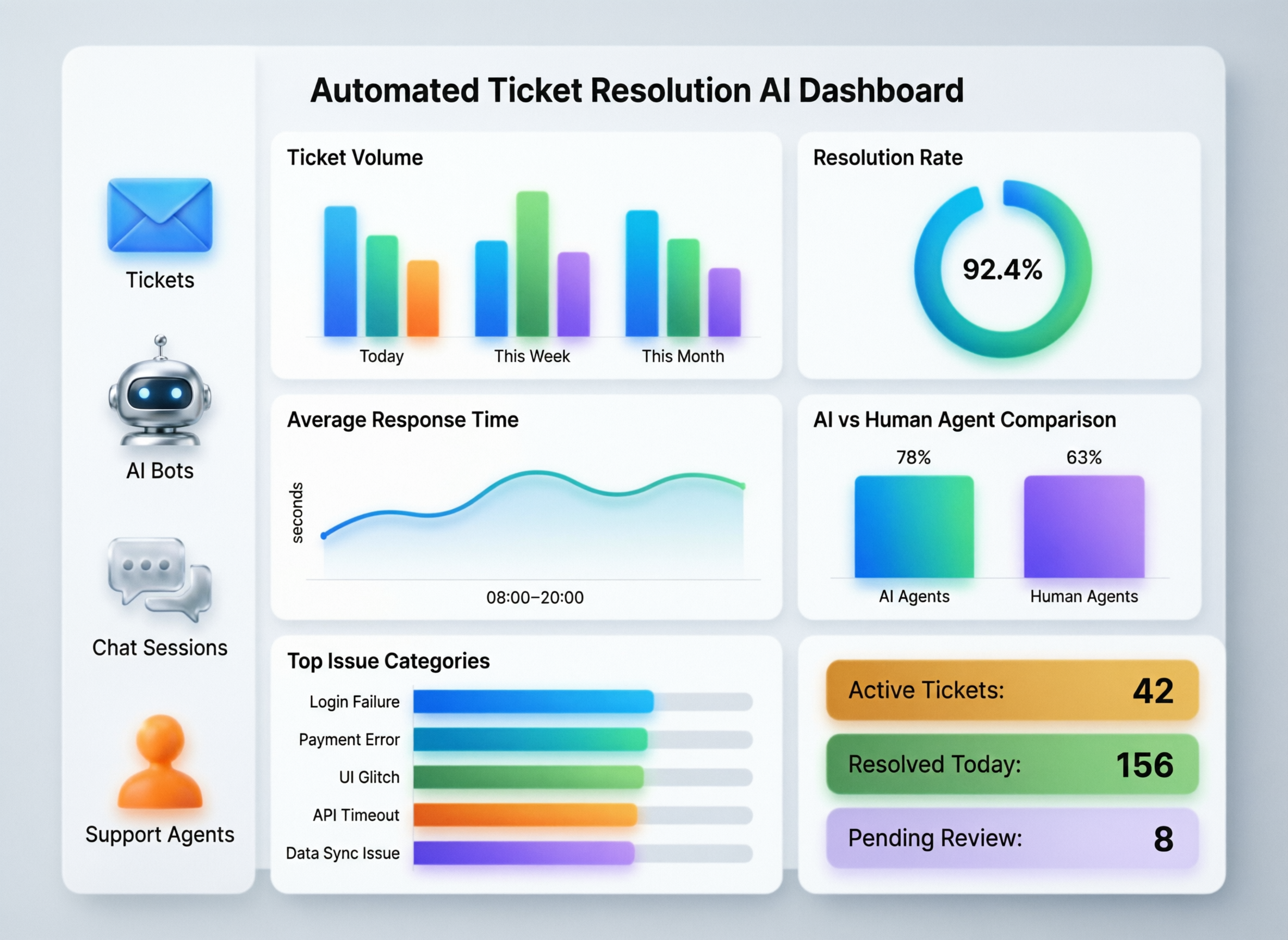
Automated Ticket Resolution with AI Support Agents
Automated ticket resolution uses AI support agents to fully resolve support tickets not just answer questions by understanding intent, taking actions in back-end systems, and confirming outcomes with the customer. In modern SaaS, IT and e-commerce teams across the US, UK and EU, it reduces resolution time, shrinks backlog and delivers consistent 24/7 support without sacrificing compliance or control.
Introduction.
Automated ticket resolution goes beyond “just a bot.” It’s the practice of using AI support agents and workflow automation to understand a customer issue, take actions in real systems, and close the ticket end-to-end often without a human in the loop, but always with guardrails. This is very different from simple FAQ chatbots or deflection widgets that only try to keep customers away from your agents.
For support leaders, operations and product owners in SaaS, IT and e-commerce, especially in hubs like New York, London and Berlin, automated ticket resolution is becoming a default strategy rather than an experiment. AI customer support automation and LLM agents can now safely perform actions in CRM, billing, identity and ITSM systems, while enforcing policy and escalating edge cases to humans.
In plain language, automated ticket resolution delivers.
Faster resolution
AI closes common tickets in minutes instead of hours or days.
24/7 coverage
Customers get real answers even at 2am, across time zones.
Lower backlog
Tickets that used to pile up (password resets, subscription changes, order updates) are resolved automatically.
As AI for customer service grows toward an estimated tens of billions of dollars in market size by 2030, enterprises in the US and Europe are shifting from basic deflection to autonomous customer support that can prove compliance and ROI.
What Is Automated Ticket Resolution in Customer Support?
Automated ticket resolution in customer support is when an AI system or workflow fully resolves a ticket from understanding the request to updating back-end systems and confirming the outcome with the customer. When people search for “what is automated ticket resolution,” they’re usually looking for this end-to-end capability, not just a chatbot that replies with knowledge base links. In other words, it is a form of AI customer support automation that can safely take actions on your behalf.
In a typical flow, an AI support agent ingests a customer message, classifies intent, gathers context from tools (CRM, billing, IAM, ITSM), decides what action to take, executes it via secure APIs, and then closes the loop with the user. The customer doesn’t see a “ticket routing maze” they see a fast, accurate resolution.
Automated Ticket Resolution vs Ticket Deflection and Macros
When teams ask about “automated ticket resolution vs ticket deflection,” they’re really comparing who owns the resolution and how much risk the system can safely handle. Ticket deflection tries to avoid creating a ticket at all; end-to-end resolution accepts the ticket and finishes it automatically.
At a glance, you can think of:
Ticket deflection
FAQ articles, self-service portals and community forums that aim to answer questions before a ticket is created.
Macros / rules
Templated replies and simple rules that help human agents reply faster or route tickets (e.g., “billing” → finance queue).
End-to-end ticket resolution
AI plus workflow automation that invokes tools and APIs (refunds, plan changes, password resets), logs the activity, and then confirms resolution with the user.
A simple way to position “ticket resolution automation vs macros” is: macros still rely on a human agent to think and click; automated ticket resolution lets the system think, click and verify, under your policies.
Key Benefits for SaaS and IT Service Teams in US, UK and EU
For SaaS and IT service teams, the benefits are tightly tied to KPIs, not just novelty.
Resolution time
AI agents can bring average resolution times for common issues down from many hours to minutes, especially in US SaaS startups running global support out of hubs like San Francisco. Leading AI-enabled teams already resolve tickets in well under an hour while slower peers still take more than a day
Backlog & capacity
Generative AI and automation can reduce support ticket volume handled by humans by as much as 60%, freeing agents in UK contact centres to focus on complex or emotionally sensitive cases (ServiceNow)
CSAT/NPS
When customers get accurate, auditable answers first-time, CSAT and NPS scores improve particularly for Germany/EU support teams where multilingual queries and GDPR-aware flows are the norm.
Cost per ticket
AI can reduce customer service costs by up to ~30% through automation and self-service, especially in high-volume sectors like e-commerce and telecom (Kaizo)
These benefits are increasingly visible in MSPs, ITSM teams and regulated sectors where both speed and compliance matter.
Designing an AI Support Agent for End-to-End Ticket Resolution
What Makes an AI Support Agent Truly “End-to-End”?
An AI support agent is only truly “end-to-end” if it handles the full lifecycle of a ticket: intake → understanding → checks → actions → confirmation. It doesn’t just write draft replies; it has the permissions and integrations to change real systems under strict controls.
In practice, that means:
It can authenticate users and understand context (plans, entitlements, history).
It has access to tools (via APIs) that let it reset passwords, update subscriptions, adjust invoices or change incident states.
It logs what it did, why, and what policies were checked along the way.
Modern LLM agents for support ticket workflows often use tool calling and policy engines to keep this safe: the model proposes a plan; a policy engine checks it; the platform executes allowed actions and escalates anything risky.
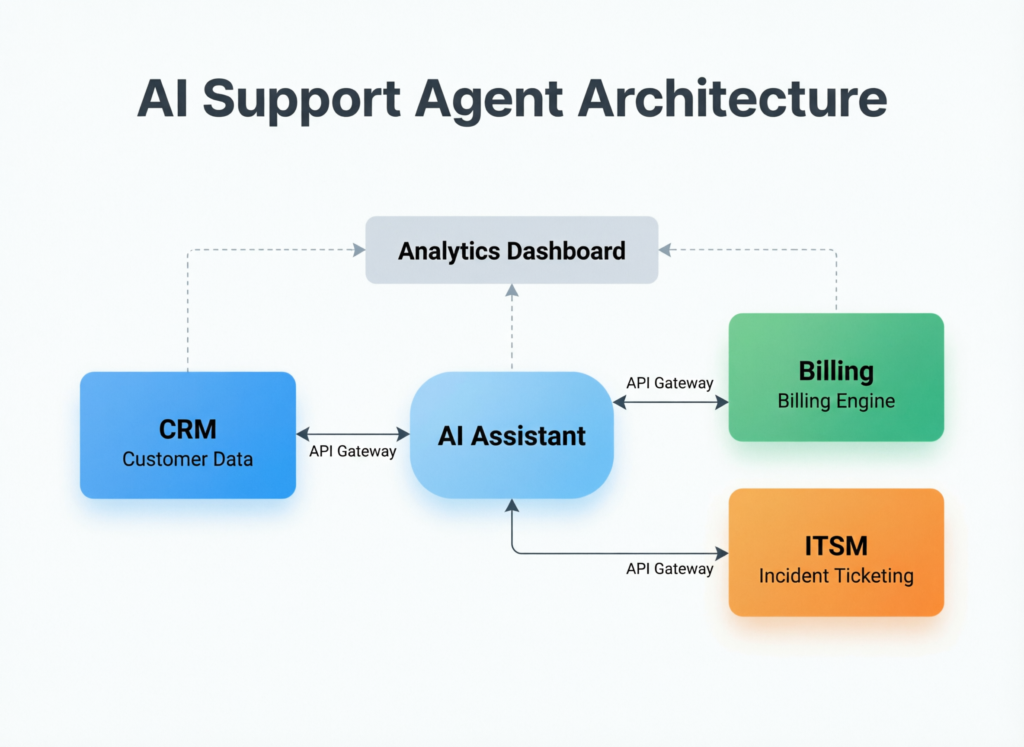
Architecture for End-to-End Ticket Resolution (Identity, CRM, Billing, ITSM)
When people search for “architecture for end-to-end ticket resolution (identity, CRM, billing, IAM, ITSM)”, they’re looking for a reference blueprint that they can adapt to their stack. A robust architecture typically includes:
Channels & intake
Web chat, in-app widgets, email ingestion, and sometimes voice or IVR for phone calls.
Identity checks (SSO, magic links, OTP) to tie a conversation to a user and account.
Orchestration / agent layer
An LLM-based AI support agent that interprets messages and chooses tools.
A policy/guardrail layer that enforces who can do what (e.g., no refunds over $200 without approval).
Conversation state and memory to manage multi-step workflows.
Connectors into operational systems
CRM (e.g., HubSpot, Salesforce) for account, contact and entitlement data.
Billing systems for subscription changes, refunds and credits.
IAM/identity for password resets, MFA and role changes.
ITSM tools like ServiceNow for incidents, changes and problems.
For a SOC 2–ready architecture for US B2B SaaS, you’d expect well-documented controls around access, logging and change management, aligning with SOC 2 trust services criteria for security, availability and confidentiality (AICPA & CIMA). For German teams, you’d speak explicitly about DSGVO-kompatible Ticket-Automatisierung and data residency in EU regions of cloud providers such as Amazon Web Services (AWS)
Guardrails, Escalation Paths and Human-in-the-Loop Design
No serious buyer implements AI customer support automation without robust guardrails. Common patterns include:
Safe vs high-risk actions
Password resets or plan downgrades may be fully automated; bank-detail changes, large refunds or changes impacting regulated data are always routed for manual approval.
Confidence thresholds
If the AI support agent is below a confidence threshold on intent or entity matching, it asks clarifying questions or hands off to a human.
Policy checks and approvals
Sensitive workflows (e.g., accessing PHI or cardholder data) may require explicit policy checks, step-up authentication or manager approval before proceeding.
Clear escalation paths
Every AI-handled conversation must have an obvious “escalate to human” path, with full context passed into tools like Zendesk so the human doesn’t need to start from scratch.
This approach directly tackles the main risk and failure modes of AI customer support automation: hallucinated actions, non-compliant data flows and opaque reasoning are mitigated by explicit policies, restricted tools and human review where necessary.
Support Ticket Automation vs End-to-End Resolution Platforms
Support Ticket Automation Basics (Triage, Routing, Prioritisation)
“Support ticket automation best practices” traditionally focused on triage, routing and prioritisation, rather than autonomous resolution. Classic support ticket automation includes:
Auto-triage & categorisation
Assigning issue type, product, region, language and sentiment automatically.
Routing to the right queues/teams
Directing incidents to the correct team (e.g., SRE vs billing) based on rules or machine learning.
SLA-aware prioritisation
Flagging VIP accounts, high-severity incidents or tickets close to breaching SLAs.
AI ticket triage and routing improves all of this, but still relies on humans to perform the final action. End-to-end resolution platforms extend these capabilities so that the AI doesn’t just send the ticket to the right queue it actually closes it when safe.
Why Companies Are Moving Beyond Simple Deflection
When answering “Why are companies replacing simple ticket deflection with automated ticket resolution platforms?”, the short version is: deflection doesn’t move the needle enough on CX or cost once AI can actually fix the core problem.
Deflection-only approaches struggle because.
FAQ chatbots have poor containment for complex issues and often just frustrate users.
Customers end up repeating themselves when they finally reach a human, tanking CSAT.
Operations teams still carry the full cost of manual resolution for the majority of tickets.
By contrast, automated ticket resolution platforms tackle the real work: subscription changes in SaaS, order lookups in e-commerce, and incident workflows in ITSM. As AI for customer service adoption accelerates with global market estimates in the tens of billions of dollars and strong ROI per dollar invested more boards are asking why their own CX orgs are still stuck at “FAQ bots.
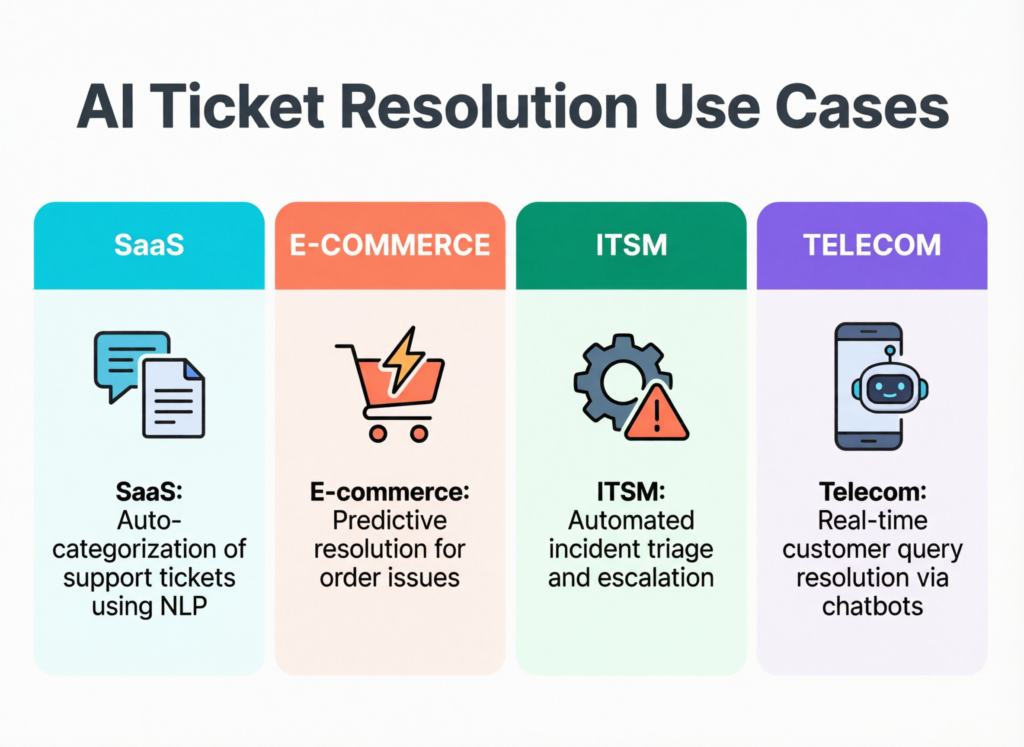
Use Cases by Industry: SaaS, E-Commerce, MSPs, Telecom
Concrete examples help teams see where autonomous customer support fits.
SaaS
Subscription upgrades/downgrades, user provisioning, role updates and basic configuration troubleshooting for US SaaS startups or EU B2B tools.
E-commerce / DTC
Shipping status, returns eligibility, label generation and simple refunds for merchants on platforms like Shopify, especially for Black Friday-scale peaks in the US and UK.
MSP / ITSM
Incident triage, password resets, access requests and standard changes for customer support AI agents for ITSM running on tools such as ServiceNow or similar.
Telecom
Outage triage, SIM activations, billing disputes and plan changes for German and EU telecoms with high inbound volumes.
Public-sector helpdesks in the UK (for example, NHS-style patient portals) are exploring similar patterns, but with stricter governance and explicit human-in-the-loop steps for sensitive cases.
Keeping Automated Ticket Resolution Compliant in US, UK and EU
Note
This section is for general information only and is not legal or compliance advice. Always work with your legal, security and privacy teams before launching automated ticket resolution in regulated environments.
Key Regulations: GDPR/UK GDPR, HIPAA, PCI DSS, SOC 2
The core question here is: How can US, UK, and EU companies keep automated ticket resolution compliant with GDPR, UK GDPR, HIPAA, PCI DSS, and SOC 2? The answer is to align AI workflows with existing privacy and security frameworks rather than treating them as something separate.
At a high level.
GDPR / UK GDPR
Apply whenever you process personal data of EU/EEA or UK residents; principles like lawfulness, minimisation, purpose limitation and security apply equally to AI support agents (GDPR, ICO)
HIPAA
Governs US healthcare entities and their business associates when handling protected health information (PHI) in support workflows (HHS.gov).
PCI DSS
Applies to environments that store, process or transmit cardholder data, such as billing and payments tickets (PCI Security Standards Council).
SOC 2
Provides a way for SaaS vendors to prove their security, availability, confidentiality and privacy controls to customers (AICPA & CIMA)
For each regulation, you’ll typically need a data inventory, clear data flows, written policies, audit trails and vendor agreements that explicitly cover AI tooling.
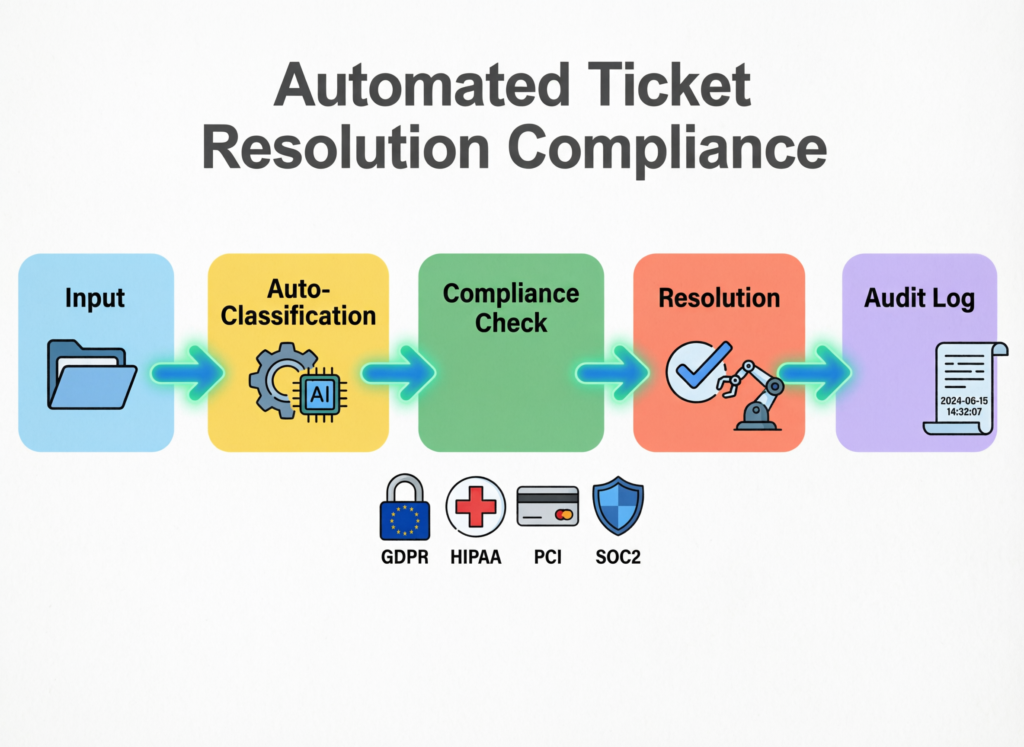
Designing Flows for Healthcare, Finance and Public Sector
In regulated domains like healthcare, finance and public sector support, patterns such as role-based access, least privilege and immutable audit trails are non-negotiable:
Healthcare
An AI support agent for NHS-style patient ticketing and appointment queries must treat PHI as highly sensitive, with strict logging and human oversight. Workflows should be designed so AI drafts responses while humans approve any action touching PHI.
Finance
For BaFin-regulated financial services in Germany, or Open Banking customer support flows in London, AI agents must not initiate payments or change bank account details without multi-factor checks and approvals. BaFin guidance and national law still apply even if an AI initiates the workflow.
Public sector
For citizen portals, keep a clear separation between “informational” flows (largely automatable) and “decision-making” flows that affect rights or benefits (often requiring human confirmation)
Across all these, immutable logs and strong audit trails are crucial so regulators and auditors can see what the AI did, when, and based on which inputs.
Data Residency, Cross-Border Transfers and Vendor Due Diligence
For EU/UK organisations, data residency and cross-border transfers are front-and-centre when evaluating AI support platforms.
Ensure customer data and ticket logs are stored in EU or UK regions when required, using region-specific hosting options from providers such as AWS.
Review whether any AI model processing involves transfers to third countries and, if so, whether appropriate safeguards (SCCs, TIAs, additional controls) are in place.
Ask vendors for DPAs, sub-processor lists, security whitepapers and SOC 2 reports, and have legal/security teams review them as part of procurement in the US, UK and EU.
For global brands like Apple, this kind of region-aware architecture is standard practice; mid-market SaaS and e-commerce companies increasingly need similar patterns as they expand into Europe.
Measuring Impact.
Resolution Rate vs Containment Rate and Time to Resolution
To answer “What metrics show that an AI support agent is safely resolving tickets end-to-end (and when to escalate to humans)?”, focus on a few core KPIs.
Automated ticket resolution rate
Percentage of total tickets fully resolved by the AI (no human touches) while meeting quality thresholds.
Containment rate
Percentage of interactions that stay within self-service channels (bot, portal, email automation) whether or not the ticket is fully resolved. This is less useful than resolution rate but still helpful.
Time to resolution
Average time from ticket creation to closure, broken down by AI-handled vs human-handled.
If automated ticket resolution rate is rising while CSAT stays strong and complaint/error rates remain low, your AI is doing its job. If resolution rate rises but error-driven escalations spike, it’s time to clamp down on certain workflows.
CSAT, NPS and Agent Experience Outcomes
AI for customer service is not just about speed; it’s also about customer and agent experience.
Track CSAT by channel (chat, email, phone) and compare AI-resolved vs human-resolved tickets.
Monitor NPS over time as you scale automation, especially in key markets like the US, UK and Germany.
Survey agents regularly on agent satisfaction: removing repetitive tasks and giving them AI-drafted responses usually improves morale and reduces burnout.
Well-run teams often see both higher customer satisfaction and better retention of experienced agents once repetitive L1 work is handled by AI.
Risk Metrics and Escalation Triggers
Governance-minded teams also define explicit risk metrics.
Error rates: Percentage of AI actions that require correction or lead to complaints.
Manual override frequency: How often humans cancel or amend AI-initiated actions.
Refund/reversal rate: If automated refunds spike or reversal rates increase, that’s a red flag.
You can define hard thresholds (for example, “If error rate for refunds exceeds 1% in a week, pause that flow and route to humans”) and roll these up into quarterly reporting for boards and C-level leaders across US, UK and EU operations.
Implementation Roadmap & Tooling for Automated Ticket Resolution
Where to Start.
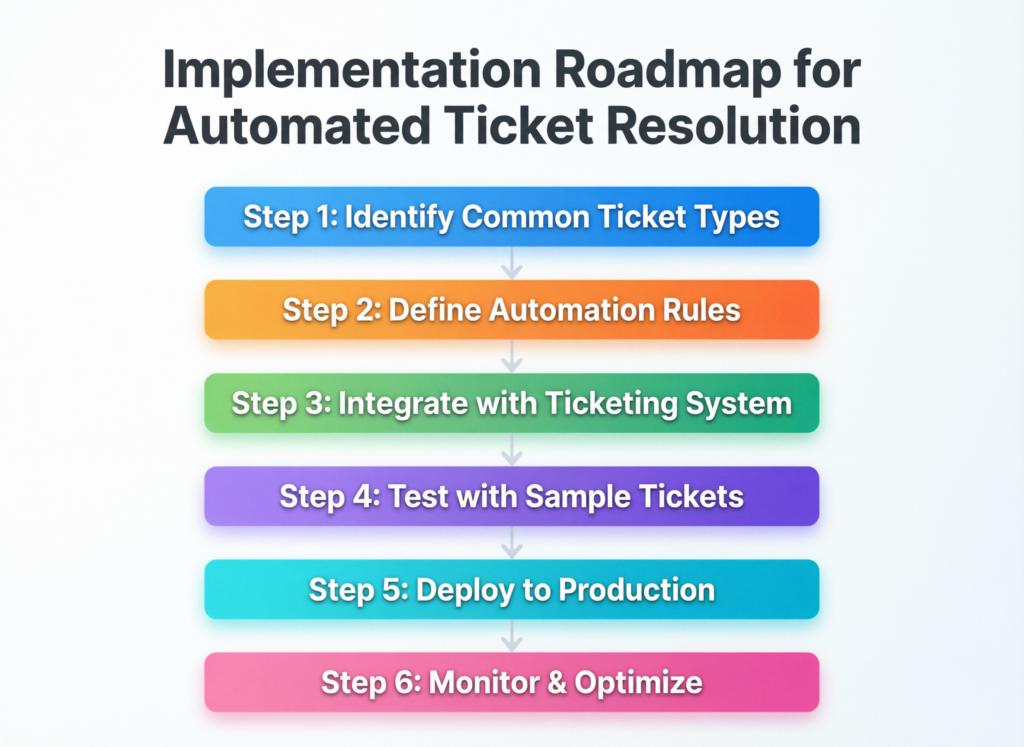
A practical roadmap for automated ticket resolution whether for US SaaS startups or EU-wide ITSM teams starts small and controlled:
Map top ticket types by volume and complexity across regions (e.g., password resets, shipping questions, plan changes, incident updates).
Identify “safe” flows where the risk is low and policies are clear (password resets, order status, basic subscription moves).
Choose 1–2 pilot journeys per region/segment (e.g., billing queries for US SMB customers, appointment rescheduling for UK healthtech, incident updates for EU MSP contracts).
Implement sandboxed AI workflows, initially with human-in-the-loop approval for all actions.
Gradually increase autonomy as metrics stabilise and stakeholders gain confidence.
This phased approach lets you prove value without betting the entire support operation on day one.
How an AI Support Agent Connects to CRMs, Billing and ITSM Tools
When teams ask “How does an AI support agent connect to CRMs, billing systems, and ITSM tools to resolve tickets automatically?”, the answer is that it uses secure APIs, webhooks and delegated credentials under strict access controls.
The typical pattern.
APIs & webhooks
The AI platform connects to helpdesk, CRM, billing and identity systems via OAuth-based apps or service accounts.
Secure credentials
Secrets live in a vault; the model never “sees” raw passwords or keys.
Role-based permissions
Each integration has scoped roles (e.g., “issue_refunds_up_to_200,” “reset_password”) aligned with least privilege.
Sandbox testing
New workflows are tested in non-production environments (e.g., staging Zendesk or ServiceNow) before going live.
Integrations with platforms like Shopify for e-commerce, ITSM suites for MSPs, and CRM/billing stacks in B2B SaaS are now standard features for modern AI helpdesk agent platforms.
Choosing Between AI Support Agent, AI Ticket Resolution Bot and Platforms
When evaluating tooling, you’ll see three main categories.
AI support agent platforms
Full-stack solutions for LLM-driven agents with policy engines, analytics and deep integrations.
Narrow AI ticket resolution bot tools
Focus on specific workflows (e.g., password resets, order tracking), often easier to implement but limited in scope.
Broader customer support automation suites
Traditional helpdesk or CRM vendors that have added AI and workflow builders.
Your choice should consider.
Integration depth with your CRMs, billing and ITSM tools.
Compliance posture and data residency for US, UK and EU operations.
Observability (dashboards, logs, replay tools).
Human handoff quality (context transfer, omnichannel support)
Pricing that aligns with ticket volumes and value, not just seats.
Bringing It All Together.
Launch Checklist for Automated Ticket Resolution
Before you scale an end-to-end ticket resolution workflow with CRM and billing integrations, run through a simple launch checklist:
Clear definition of which ticket types are in scope and which are explicitly out of scope.
Reference architecture documented (channels, orchestration, tools, data flows, logging)
Compliance review completed for GDPR/UK GDPR, HIPAA, PCI DSS and SOC 2 impacts.
Guardrails defined: safe vs high-risk actions, confidence thresholds, escalation rules.
Metrics and dashboards set up: resolution rate, CSAT, error rates, overrides.
Rollback plan agreed: how to pause or revert specific flows if metrics degrade.
Next Steps for US, UK and EU Support Teams
Region-aware next steps often look like.
US
Prioritise SOC 2 and HIPAA readiness for SaaS and telehealth use cases; align AI ticket flows with updated HIPAA Security Rule expectations around inventory, MFA and encryption (HHS.gov)
UK
Focus on UK GDPR alignment, public-sector and NHS-adjacent support flows, and Open Banking customer journeys in London.
Germany/EU
Emphasise DSGVO-konforme automatisierte Ticketbearbeitung für deutsche SaaS-Unternehmen, BaFin-style governance for financial services, and strict EU data residency.
Partners like Mak It Solutions can help you translate this blueprint into specific pilots, platform choices and integration designs tailored to your current stack.
Key Takeaways
Automated ticket resolution means full end-to-end handling of support tickets not just chat replies or routing.
The architecture hinges on a policy-aware AI support agent connected to CRM, billing, IAM and ITSM systems via secure APIs.
Compliance with GDPR/UK GDPR, HIPAA, PCI DSS and SOC 2 is about applying existing controls to AI workflows, not reinventing regulation.
The most important metrics are automated resolution rate, time to resolution, CSAT/NPS and explicit risk indicators like error and override rates.
A staged implementation roadmap (audit → safe flows → pilots → scaling) reduces risk for US, UK, German and EU teams.
Choosing between point bots and platforms depends on integration depth, compliance posture and how central autonomous customer support is to your strategy.
If you’re planning automated ticket resolution and want a realistic view of architectures, compliance and ROI across US, UK and EU operations, you don’t have to do it alone. The team at Mak It Solutions can help you map pilot use cases, pick the right AI support agent tooling and design SOC 2- and GDPR-aligned workflows.
Book a short architecture review or pilot workshop to see what an end-to-end AI support agent could look like in your own stack before you commit to a full platform rollout.( Click Here’s )
FAQs
Q : How do I know which support tickets are safe to automate end-to-end?
A : Start by analysing your ticket data by volume, complexity and financial/regulatory risk. Low-risk, high-volume tickets like password resets, order status checks, subscription changes and simple configuration questions are usually the best candidates for automated ticket resolution. Avoid automating flows that involve large financial movements, PHI or complex eligibility decisions until you have mature policies, human-in-the-loop approvals and strong monitoring in place.
Q : Can small support teams or startups benefit from automated ticket resolution, or is it only for enterprises?
A : Smaller teams and startups can benefit disproportionately, because every manually handled ticket consumes a meaningful chunk of limited capacity. Many AI helpdesk agent tools now offer usage-based or tiered pricing that fits US and European startups, and integrations with popular SaaS CRMs and billing tools lower the barrier to entry. The key is to start with 1–2 tightly scoped flows, prove value and reliability, and then expand as you grow rather than trying to automate everything from day one.
Q : How long does it typically take to roll out an AI support agent that fully resolves tickets?
A : Timelines vary, but most organisations can stand up a narrow, end-to-end pilot in 6–10 weeks if their systems and APIs are ready. The first few weeks usually cover ticket analysis, architecture decisions and security/compliance review; the next phase focuses on integration, sandbox testing and human-in-the-loop validation. Scaling into multiple geographies or regulated workflows will add time, especially if you introduce new data residency regions or need sign-off from infosec, legal and external auditors.
Q : What skills does my team need in-house to implement and maintain automated ticket resolution?
A : You don’t need a large research lab, but you do need cross-functional skills: someone who understands your support operations, someone comfortable with APIs and integrations, and someone who can own governance/compliance. Product managers or operations leaders are often well placed to define use cases and policies, while platform or integration engineers handle the technical plumbing. Over time, you may add AI/ML expertise, but many platforms abstract away the underlying models so your main focus is workflow design and monitoring.
Q : How does automated ticket resolution impact human support agent roles and headcount planning?
A : Done well, automated ticket resolution doesn’t just “cut heads”; it changes the shape of the work. Routine L1 tickets are increasingly handled by AI, while humans focus on complex, emotionally nuanced or high-risk cases and on building knowledge/article content. Many organisations use AI to create career paths from frontline support into QA, knowledge management or operations, while adjusting hiring plans to favour higher-skill roles over pure volume. Recent case studies in AI-assisted contact centres even show AI increasing sales and upsell capacity while agent headcount stays flat
Good day! Hope this message finds you well.
Your current project or personal need might be a perfect fit for a grant. I’m here to offer financial help. Message me on WhatsApp +447401141794
[…] AI has gone from side project to board-level priority in just a couple of years and your GPU invoice probably tells the story better than any slide deck. Worldwide AI spending is forecast to approach roughly $1.5 trillion in 2025, fuelled heavily by infrastructure and GPU demand. […]