


AI for Documentation That Stays Updated
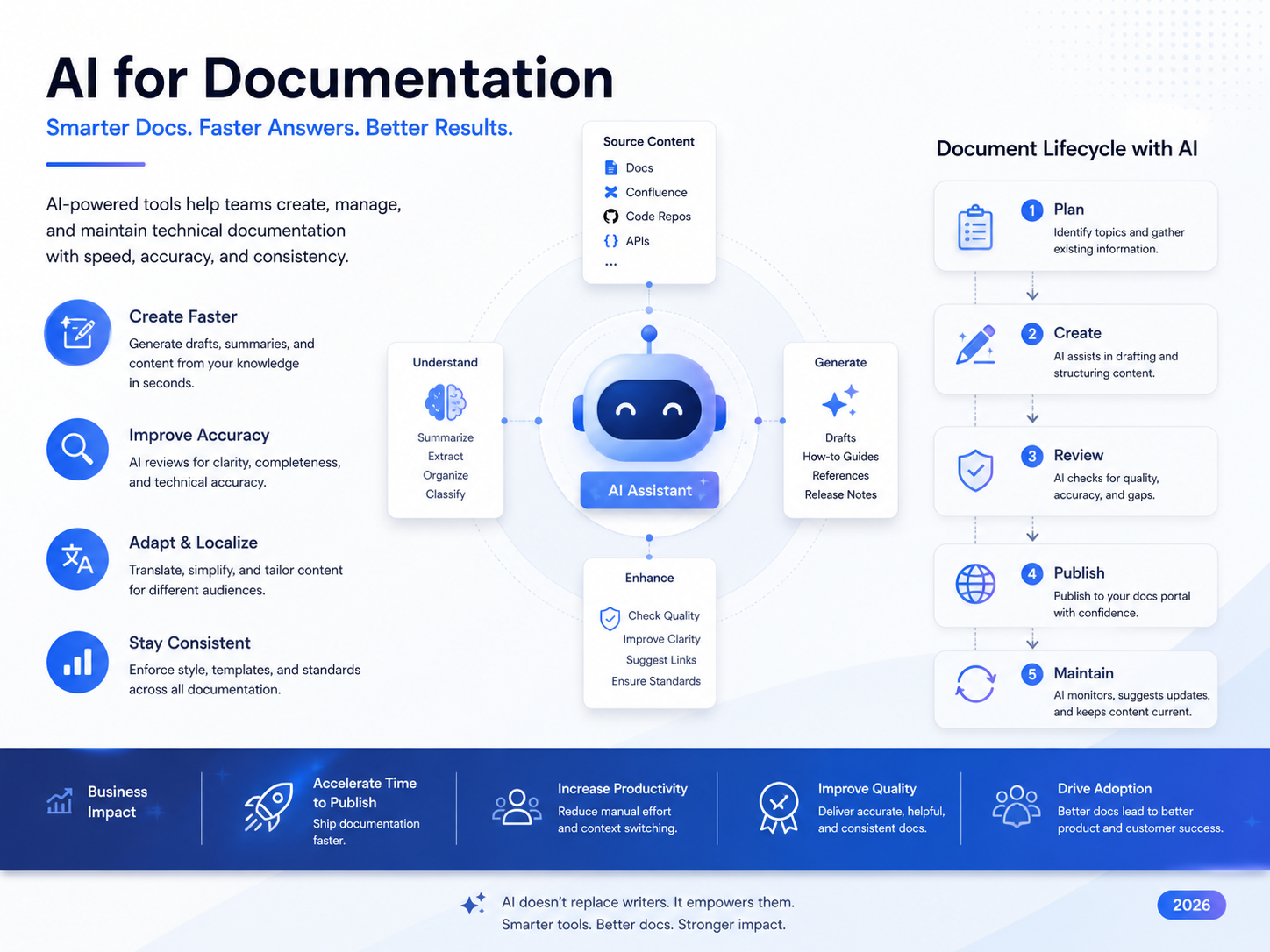
AI for documentation helps software teams create, update, summarize, and maintain technical docs with less manual effort. It keeps code, APIs, product changes, release notes, and compliance records closer to reality by combining automation with human review.
That matters because documentation drift is no longer a small annoyance. When teams ship fast, stale docs can slow onboarding, confuse customers, increase support tickets, and create risk during enterprise security or compliance reviews.
Why AI for Documentation Matters Now
Software changes faster than most teams can document by hand. Product updates, API changes, security fixes, and compliance notes move at sprint speed, while documentation often waits for “later.”
Later is where problems begin.
A SaaS team in Austin may ship a new API endpoint on Friday, while the customer success team is still sharing last month’s setup guide on Monday. Developers lose time. Buyers lose confidence. Support teams repeat the same explanations again and again.
AI for documentation reduces that gap by watching the systems where work happens: code repositories, tickets, pull requests, release notes, and workflows. It can suggest updates, draft summaries, flag stale pages, and route changes to the right human reviewer.
Google Cloud’s 2025 DORA research reported that 90% of respondents use AI at work, and more than 80% believe it has increased their productivity. That does not mean AI should publish technical docs without review, but it does show why teams are moving from static documentation to AI-assisted documentation workflows.
What Is AI for Documentation?
AI for documentation means using artificial intelligence to create, update, summarize, and maintain technical, product, process, or compliance documentation.
In simple terms, it works like a documentation assistant. It can read context, draft updates, explain code changes, summarize a feature release, produce API examples, or turn repeated support issues into knowledge base articles.
For teams using web development services or custom SaaS delivery, this matters because documentation should move with the product, not trail behind it.
How Automated Documentation Works
Automated documentation can connect with tools such as Git, GitHub, GitLab, CI/CD pipelines, API schemas, issue trackers, and internal knowledge bases.
When a developer changes an endpoint, the system can identify affected docs and suggest an update. When a product team ships a new workflow, AI can draft release notes or help center content. When support tickets repeat the same issue, AI can suggest a new troubleshooting article.
The strongest setup is not “AI writes everything.” It is.
Trusted source systems provide context.
AI suggests or drafts documentation updates.
Human owners review the changes.
Approved docs are published with version history.
Audit trails show what changed and who approved it.
Why Documentation Becomes Outdated So Quickly
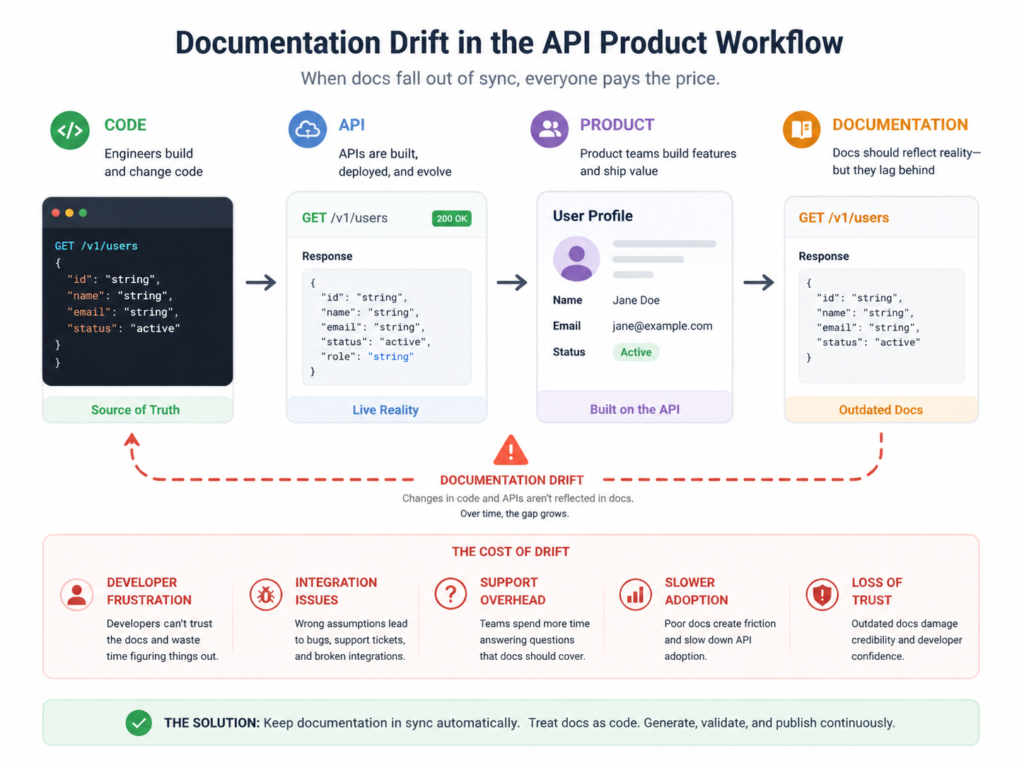
Documentation becomes outdated when code, APIs, workflows, and product behavior change faster than teams can update the docs. The gap between “what the product does” and “what the docs say” is documentation drift.
Documentation Drift Between Code, APIs, and Product Behavior
Documentation drift often happens because different teams update different systems at different speeds.
Engineering updates the code. Product updates the roadmap. Support updates scripts. Sales uses an older deck. Compliance keeps evidence in a separate folder.
A Berlin fintech, for example, may update onboarding logic for BaFin review while internal process docs still describe the old approval path. The product has changed, but the documentation ecosystem has not.
Manual Updates Struggle With Fast Releases
Manual documentation still works when releases are slow and simple. It breaks down when teams ship weekly, manage microservices, maintain multiple app versions, and serve customers across New York, London, Munich, and Dublin.
Stack Overflow’s 2025 Developer Survey reported that 84% of respondents were using or planning to use AI tools in development, up from 76% in 2024. That shift explains why documentation workflows are also changing: teams already use AI in development, so docs need to keep up with AI-assisted delivery.
Why Stale Docs Hurt the Whole Business
Stale documentation affects more than developers.
Developers waste time reading inaccurate setup steps. Support teams give inconsistent answers. Buyers question whether the product is mature. Enterprise customers may delay security reviews, procurement checks, or compliance approvals because documentation does not match the product.
In practice, outdated docs become a hidden tax on every team.
How AI Keeps Technical Documentation in Sync
AI keeps technical documentation in sync by detecting changes, suggesting updates, generating explanations, and routing drafts for human review.
The safest model is simple: AI drafts, humans approve.
Code-to-Docs Automation and Git-Based Workflows
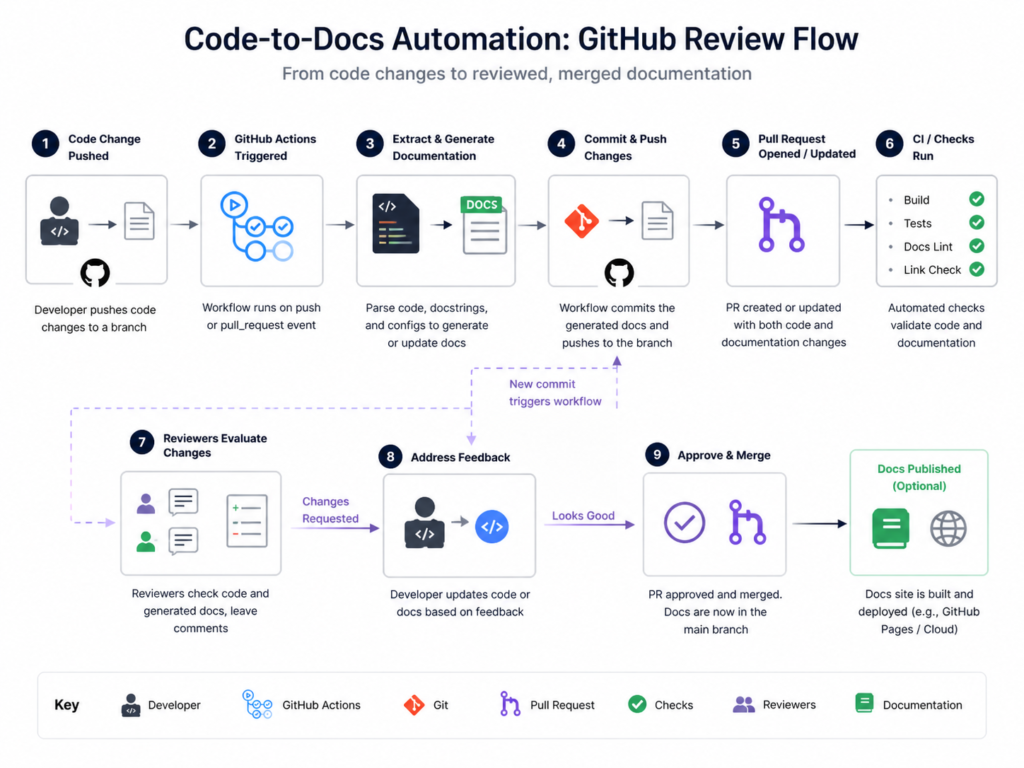
Code-to-docs automation links documentation to Git events such as pull requests, commits, branch merges, and release tags.
When a pull request changes authentication logic, AI can propose updates to implementation guides, API docs, onboarding notes, and changelogs. Reviewers can then approve, edit, or reject the suggestion before anything reaches customers.
For engineering teams, this pairs naturally with back-end development services and Python development, where APIs, integrations, and automation workflows often need precise documentation.
Auto-Updating API Docs and Knowledge Bases
AI documentation software can support.
Endpoint descriptions
SDK examples
Changelog entries
Release summaries
Customer-facing help articles
Internal SOPs
Troubleshooting guides
Compliance evidence notes
This is especially useful for SaaS teams where product, support, and engineering knowledge changes every week.
Reviewable AI Suggestions Reduce Risk
AI can hallucinate, miss context, or over-explain a simple change. That is why review workflows matter.
A good AI documentation workflow includes owners, approval rules, version history, comments, permissions, and audit trails. GitHub’s enterprise Octoverse insights describe AI coding tools as central to software development and cite productivity gains of up to 55%, but productivity only helps when teams also keep quality controls in place.
Best Use Cases for AI Documentation Tools
AI documentation tools work best where knowledge changes often, structure matters, and manual updates consume too much expert time.
Developer Documentation and API Documentation
Developer documentation needs accuracy, examples, versioning, and clear setup steps.
AI can help draft.
Getting started guides
Authentication examples
Endpoint descriptions
SDK usage notes
Migration guides
Error explanations
Release notes
For API-heavy products, AI can also compare code, Open API specs, and existing docs to flag mismatches.
SaaS Product Docs and Customer Knowledge Bases
SaaS teams can use AI to turn feature releases into help center updates, onboarding guides, troubleshooting articles, and release notes.
A customer success team in San Francisco, for example, can quickly adapt help content for US, UK, and EU users without rewriting every article from scratch.
Internal Process Documentation
Support, product, and operations teams can use AI-generated drafts for SOPs, escalation paths, workflow summaries, and internal FAQs.
For data-heavy teams, these docs can connect with business intelligence services so reporting definitions, dashboard notes, and internal terminology stay aligned.
AI Documentation Tools vs Documentation Automation Software
AI documentation generators and documentation automation software are related, but they do not solve the same problem.
AI documentation generators focus on creating or improving content. Documentation automation software focuses more on workflow, ownership, approvals, publishing, version control, and governance.
Many mature teams need both.
| Tool Type | Best For | Common Use |
|---|---|---|
| AI documentation generator | Drafting content quickly | Code explanations, API docs, help articles |
| Documentation automation software | Managing lifecycle and governance | Reviews, approvals, versioning, audit trails |
| AI knowledge management tool | Organizing internal knowledge | Search, summaries, internal FAQs |
| Compliance documentation workflow | Evidence and controls | Policies, reviewer logs, regulated docs |
What Engineering Teams Should Compare
Before choosing a tool, compare.
GitHub, GitLab, or Git support
API schema handling
Pull request comments
Permission models
Review workflows
Version history
Export options
Analytics
Data residency
Compliance features
Teams building mobile-first products should also consider how docs connect to mobile app development and React Native development workflows.
Compliance-Ready AI Documentation Across the USA, UK, Germany, and EU
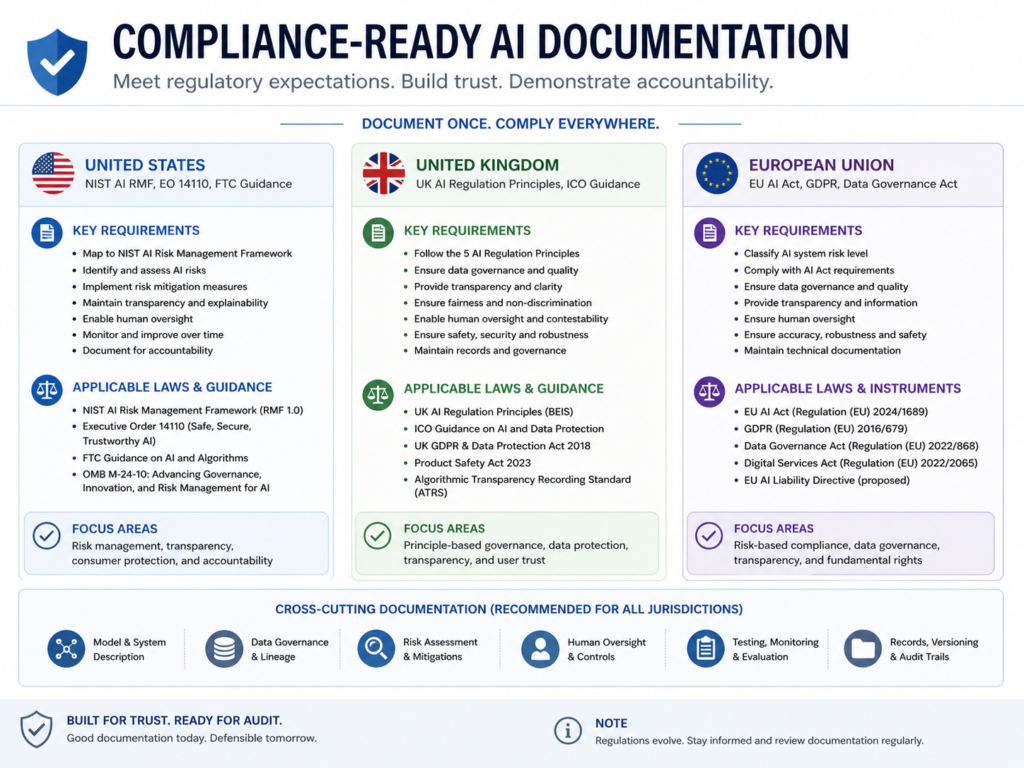
Regulated companies should use AI documentation tools with audit trails, access controls, human review, data protection safeguards, and compliance alignment.
Documentation should support evidence, not just content production.
USA.
In the USA, software buyers often ask for SOC 2 controls, HIPAA safeguards for healthcare, PCI DSS alignment for payment flows, and vendor security documentation.
A New York health tech team should avoid sending PHI into uncontrolled AI tools. Safer workflows use private repositories, restricted prompts, access logs, human review, and approved retention policies.
PCI DSS v4.0.1 was published as a limited revision, with no new or deleted requirements. Its purpose was to clarify requirements and guidance rather than change the core standard.
UK.
UK teams should consider UK-GDPR, ICO guidance, NHS documentation expectations, FCA-regulated workflows, and Open Banking evidence requirements.
A London fintech or Manchester NHS supplier should document model usage, data flows, prompt controls, reviewer approvals, and incident procedures before deploying AI documentation workflows.
Germany and EU.
Germany and EU teams should plan around GDPR/DSGVO, BaFin expectations, DORA, NIS2, eIDAS, PSD2, ISO 27001, and cloud data residency.
A Berlin or Munich SaaS company should check where documentation data is stored, whether AWS, Azure, or GCP regions meet customer requirements, and how AI-generated documentation changes are approved before publication.
How to Choose the Right AI Documentation Tool
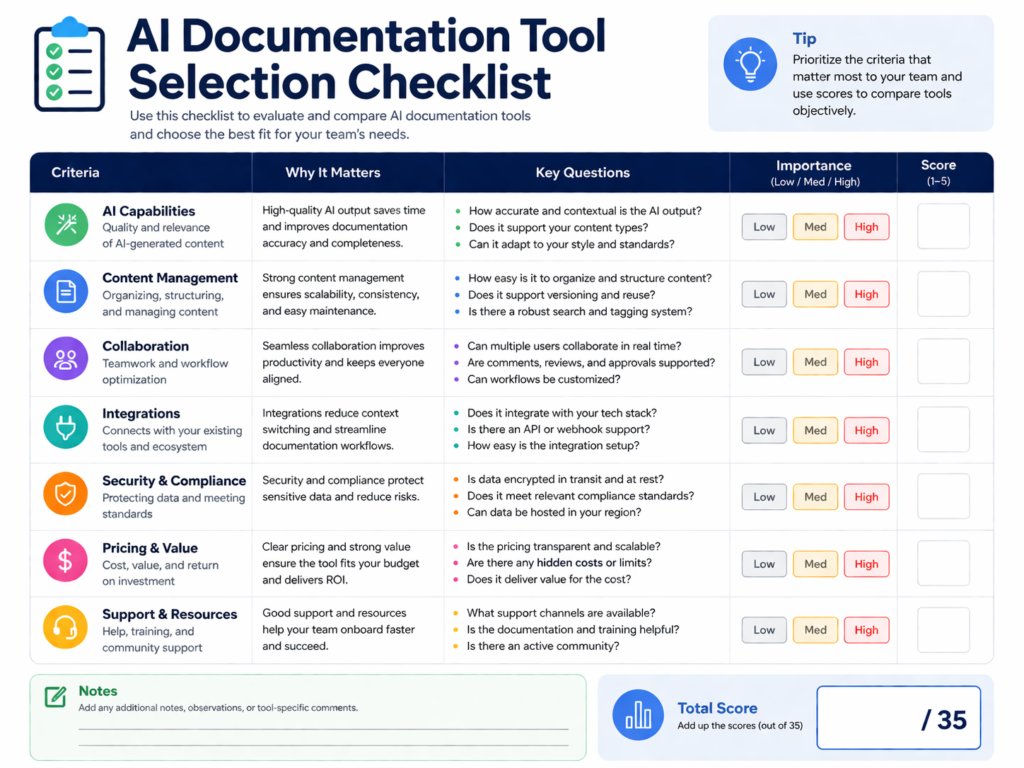
Choose the right AI documentation tool by matching it to your repositories, review workflows, security controls, and compliance obligations.
The best tool is not always the flashiest one. It is the one your team can govern consistently.
Must-Have Features
Look for.
GitHub, GitLab, or Git integration
API schema support
Versioned documentation
Review approvals
Changelog automation
Permission controls
Audit logs
Export options
SSO and role-based access
Clear data retention policies
For complex web platforms, align these choices with front-end development and Node.js development practices.
Security Questions to Ask Vendors
Before adopting a platform, ask.
Does the tool train on our data?
Where are prompts, logs, and outputs stored?
Can sensitive repositories be excluded?
Does it support private deployment?
Are audit exports available?
How does deletion work?
Which sub processors are involved?
Can AI suggestions require approval before publishing?
These questions are especially important for healthcare, fintech, payments, insurance, and public-sector suppliers.
Practical Checklist for Software Teams
Start with one high-value documentation workflow before scaling.
Map where documentation drift happens most often.
Connect AI suggestions to Git, tickets, APIs, or release workflows.
Assign human owners for high-risk documentation.
Block sensitive data from unapproved prompts.
Keep version history and audit trails.
Test the workflow on one product area before expanding.
Final Take
AI for documentation helps teams move from static files to living documentation that stays closer to code, APIs, products, and compliance evidence.
It reduces documentation drift by spotting changes, drafting updates, and helping teams maintain consistent knowledge across engineering, support, sales, and compliance.
Start with an AI documentation generator if your main problem is writing or refreshing content. Choose a broader automation platform if your bigger challenge is governance, approvals, ownership, and lifecycle management.
Before buying software, audit your current documentation workflow. Find where docs go stale, who owns each section, and which updates require review before customers, regulators, or auditors rely on them.
Mak It Solutions helps US, UK, German, and EU teams design secure, practical AI documentation workflows around real engineering systems. Book a free consultation or request a scoped estimate to review your documentation lifecycle, Git workflows, compliance needs, and automation opportunities.( Click Here’s )
Key Takeaways
AI for documentation reduces documentation drift by connecting docs to code, APIs, release notes, and workflow changes.
The strongest use cases include developer documentation, API docs, SaaS help centers, and internal process documentation.
Regulated teams need audit trails, access controls, human review, and data protection safeguards.
AI documentation generators help with content creation, while documentation automation software supports lifecycle governance.
US, UK, Germany, and EU teams should evaluate tools against HIPAA, PCI DSS, UK-GDPR, GDPR/DSGVO, BaFin, DORA, and ISO 27001 expectations.
FAQs
Q : Can AI documentation tools replace technical writers?
A : AI documentation tools should not replace technical writers in most serious software teams. They are best used to draft, summarize, detect gaps, and suggest updates, while writers and subject matter experts own clarity, accuracy, structure, and audience fit.
Q : Are AI-generated docs accurate enough for software teams?
A : AI-generated docs can be useful, but they should be treated as drafts until reviewed. Accuracy depends on source material, repository access, API schemas, prompts, and review workflows.
Q : What is the difference between AI documentation and a knowledge base?
A : AI documentation refers to using AI to create, update, or maintain technical, product, process, or compliance docs. A knowledge base is where information is stored and accessed, such as a customer help center or internal support portal.
Q : Can AI documentation tools work with GitHub or GitLab?
A : Yes. Many AI documentation tools can connect with GitHub, GitLab, or Git-based workflows. They may read pull requests, commits, branches, API specs, code comments, and release notes to suggest documentation changes.
Q : Is AI documentation safe for regulated industries?
A : AI documentation can be safe for regulated industries when governed properly. Healthcare, fintech, payments, and public-sector suppliers should use access controls, approved tools, private repositories, audit trails, human review, data minimization, and clear retention rules.