


Core Web Vitals Optimization Guide for 2026
Core Web Vitals Optimization Guide for 2026
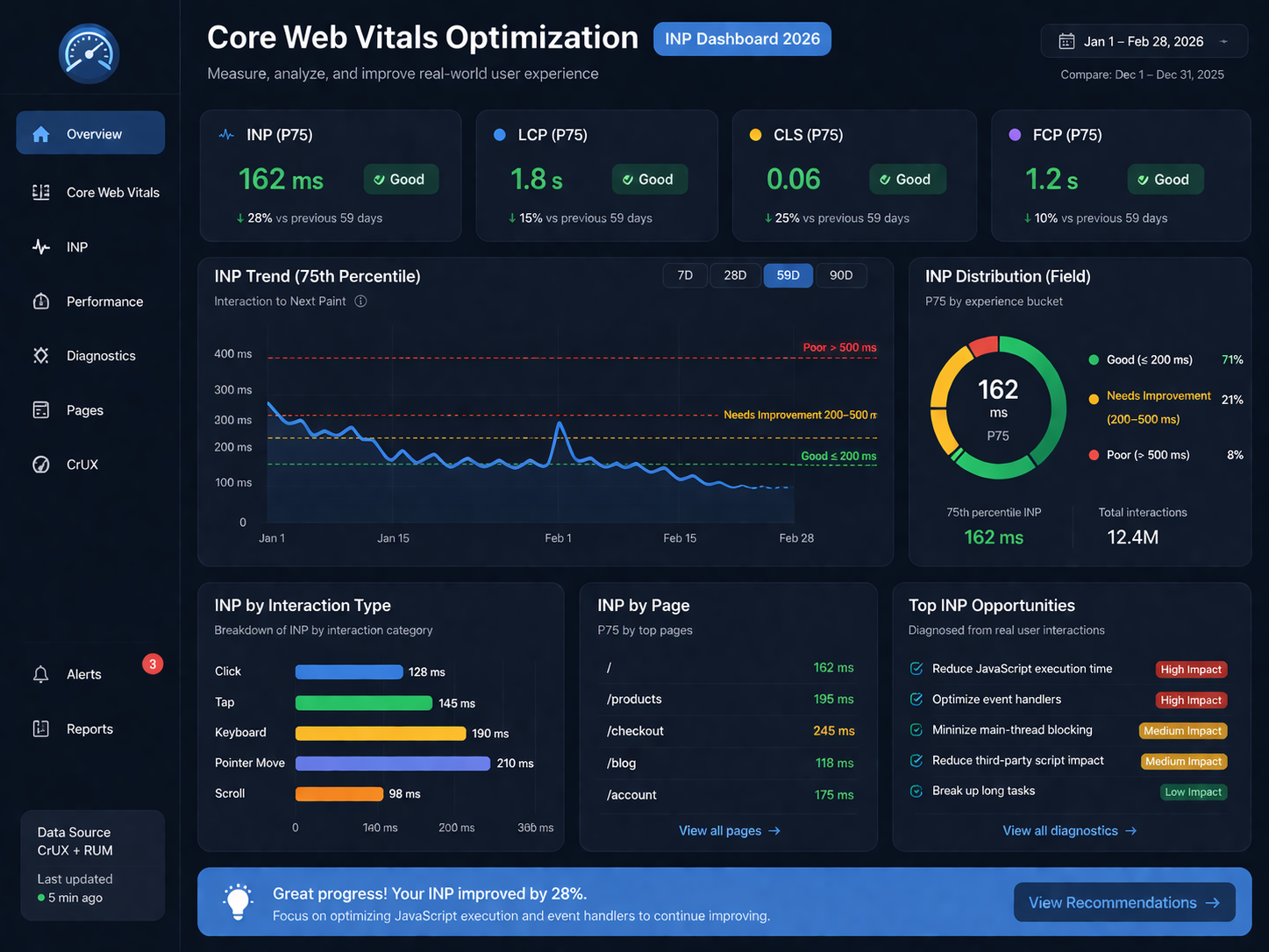
Core Web Vitals Optimization Guide for 2026
Core Web Vitals optimization in 2026 is really about one thing: making your site feel fast when people interact with it. Pages can look loaded and still frustrate users if filters lag, forms hang, or buttons respond too slowly. That is exactly why INP now matters so much.
If you want a direct answer, here it is: the fastest way to improve Core Web Vitals optimization for INP is to find the slowest real interaction on your highest-value pages, reduce main-thread JavaScript work, control third-party scripts, and make the interface update faster after input. For most sites, that produces bigger gains than a full redesign.
That matters whether you run an ecommerce store in the US, a SaaS platform in the UK, a regulated finance workflow in Germany, or a multilingual site serving the wider EU. Different markets bring different compliance layers, consent tools, and vendor stacks, but the technical pattern is usually the same: too much work happens at the exact moment a user expects the page to respond.
What Core Web Vitals Optimization Means in 2026
Core Web Vitals optimization still revolves around three metrics.
LCP for loading performance
INP for responsiveness
CLS for visual stability
The big shift is that INP has become the responsiveness metric teams have to manage seriously. A page can earn compliments for looking sleek and still fail the real user test if taps, clicks, and key presses feel delayed.
A good INP score is generally considered 200 ms or less. From a practical business point of view, that threshold matters because sluggish interactions often show up where revenue and lead quality are won or lost: product filters, search, forms, login flows, pricing toggles, cart actions, and checkout steps.
Why INP Replaced FID as the Bigger Priority
FID gave teams a narrow view of responsiveness. It focused on when the browser started handling the first input. INP is more useful because it looks at the full interaction journey, including processing and the next visual update.
That difference sounds technical, but users feel it instantly.
A site with decent loading performance can still feel broken when.
A size selector takes too long to react
A search suggestion box freezes
A menu opens late
A form submit button appears dead
A checkout step pauses before updating the screen
In practice, this is why Core Web Vitals optimization in 2026 is less about chasing a pretty Lighthouse screenshot and more about making real interactions smoother.
Why Fast-Looking Sites Still Get Poor INP Scores
This is one of the most common disconnects teams run into: “The page looks fast, so why is INP still poor?”
Because visual load and interactive responsiveness are not the same thing.
A homepage can render the hero section quickly while the browser is still busy with.
Large JavaScript bundles
Heavy event listeners
Synchronous third-party scripts
Expensive re-renders
Layout recalculations after input
Consent or analytics logic firing too early
That is why poor INP often shows up on websites that appear polished at first glance.
From a small business and growth-team perspective, this is also why the usual “just upgrade hosting” advice often falls flat. Hosting can help loading. It does not automatically fix interaction bottlenecks caused by front-end code, tag managers, or rendering behavior.
The Biggest Causes of Poor INP
Main-thread blocking
When the browser’s main thread is overloaded, user input has to wait. That delay is often the hidden reason a page feels sticky.
Common culprits include.
Long JavaScript tasks
Bulky frameworks or client-side bundles
Too much work inside click handlers
Heavy DOM updates triggered after user input

Third-party script overload
Many sites are slowed down by code the internal team did not even build directly.
This often includes.
Consent management platforms
Chat widgets
Session replay tools
A/B testing tools
Ad and retargeting pixels
Feature flags
Analytics tags
For US ecommerce stacks, personalization and aggressive tracking are frequent sources of interaction overhead. In the UK and EU, compliance layers can add extra script weight. In Germany, DSGVO-sensitive implementations and stricter governance often make consent tooling especially important to review.
Rendering delay after input
Sometimes the event is technically handled, but the visible update still arrives too late. That leaves users wondering whether the click worked.
Buttons should feel alive. Filters should acknowledge taps quickly. Forms should provide instant feedback. Even a small visual response can make an interaction feel dramatically better.
Lab data and field data mismatch
A team may run Lighthouse, see acceptable scores, and assume everything is fine. Then Search Console or CrUX tells a different story.
That gap happens because controlled lab tests do not reflect every real-world condition. Actual users bring slower devices, noisier networks, longer sessions, more script conflicts, and messier behavior patterns. Core Web Vitals optimization only becomes reliable when teams look at both debug data and real-user data together.
How to Diagnose INP Without Wasting Time
The fastest workflow is usually simple.
Start with Search Console
Search Console helps you spot which page groups or templates are struggling. That matters because one weak template can affect a large section of the site.
Look first at pages tied to business outcomes.
Product pages
Category or collection pages
Blog templates with heavy ad stacks
Lead forms
Account areas
Checkout flows
Dashboards
Use Page Speed Insights for context
Page Speed Insights is useful because it blends lab signals with field data. It helps you see whether the issue is showing up in real traffic, not just in a test environment.
Reproduce the interaction in Chrome Dev Tools
Once you know the page type, record the exact slow interaction in Dev Tools.
Examples.
Opening a mobile menu
Changing product variants
Applying filters
Submitting a form
Moving through checkout
Opening a modal
Interacting with a dashboard widget
This is where many teams finally see the real issue: a long task, a bloated listener, or a delayed paint after a click.
Add real-user monitoring where possible
If your team can do it, use page-level or interaction-level monitoring with a setup that reflects real visits. That helps you move beyond guesswork and see which interaction is actually dragging down the experience.

The Highest-Impact INP Fixes in 2026
Core Web Vitals optimization does not always require a rebuild. More often, it requires sharper priorities.
Break up long JavaScript tasks
This is still one of the most reliable fixes.
Focus on.
Splitting bulky scripts
Moving non-urgent logic out of event handlers
Deferring work that does not need to happen immediately
Reducing unnecessary client-side processing
For React or Next.js sites, review hydration, state updates, and re-render chains carefully. For WordPress or Shopify builds, review what themes, plugins, and apps are injecting into the front end.
Audit third-party scripts by business value
Not every script deserves to load early.
Map each vendor to a real purpose.
Revenue
Analytics
Compliance
Support
Experimentation
Personalization
Then decide what should load immediately, what can wait, and what should be removed entirely. Many buyers in the US and EU notice that performance problems accumulate gradually, not all at once. A site is often slowed down by years of “just one more tool.”
Improve visible feedback after clicks and taps
Users should never wonder whether an action worked.
Useful patterns include
Pressed states on buttons
Instant loading indicators
Optimistic UI updates
Lightweight skeleton states
Quick confirmation messages after form actions
This does not replace technical optimization, but it improves perceived responsiveness and reduces friction during high-intent actions.
Reduce layout thrashing and unnecessary rendering
Sometimes the page reacts slowly because the browser is recalculating too much after each action. That is common in filter-heavy ecommerce layouts, chart-heavy dashboards, and dynamic forms.
The fix is often a mix of front-end cleanup and better scheduling. Keep updates tight. Avoid triggering a cascade of re-renders for a small interaction.
Platform-Specific Tactics That Usually Work
WordPress
WordPress sites often struggle with INP when plugin count grows unchecked.
Start with.
Plugin audits
Script unloading by template
Lighter themes
Leaner consent tooling
Removing duplicate tracking layers
For many plugin-heavy sites, the front-end cost is not obvious until someone measures real interactions. That is why WordPress performance work should sit inside release governance, not as a one-off cleanup.
Shopify and ecommerce sites
Shopify stores commonly lose responsiveness on.
Collection filters
Minicart interactions
Upsells
Product option selectors
Dynamic checkout elements
The most useful wins usually come from cutting theme app bloat, reviewing collection-page scripts, and testing add-to-cart interactions on low-powered mobile devices. This matters even more for stores serving the US, UK, Germany, and the broader EU, where payment, tax, and consent layers often increase front-end complexity.
[Internal link: Shopify Development Services]
[Internal link: E-Commerce Solutions]
SaaS and enterprise platforms
SaaS sites and enterprise apps often have a different problem: dashboards, support tooling, feature flags, embedded charts, and personalization layers all competing at once.
In those environments, governance matters as much as code. Decide.
Who can add scripts
How scripts are reviewed
What performance budget they must fit inside
Which teams own regressions after release
That is often where Core Web Vitals optimization becomes a process issue, not just an engineering issue.

Regional Considerations Across the US, UK, Germany, and EU
The technical advice stays consistent, but implementation details change by market.
United States
US websites, especially in ecommerce and growth-heavy environments, often suffer from script-heavy personalization, retargeting, recommendation engines, and stacked analytics tools. The result is a site that looks sophisticated but feels slower during key buying actions.
United Kingdom
In the UK, performance work often overlaps with accessibility expectations, consent handling, and stricter vendor control. Teams that support healthcare-adjacent or finance-related experiences should be especially careful about adding tool after tool without a performance review.
Germany
German websites often carry more consent and governance complexity, especially where DSGVO sensitivity is high. That does not mean poor INP is unavoidable. It means consent architecture has to be efficient and intentionally scoped.
Wider EU
Across the EU, multilingual experiences, CMP behavior, and market-specific vendor stacks can create uneven performance. One template may behave very differently depending on which scripts are active in each country. That is why performance budgets should be reviewed by market when needed, not just by page type.
A Practical Workflow for Ongoing Core Web Vitals Optimization
One cleanup sprint will not protect your scores for long. Performance slips back when no one owns it.
A stronger workflow usually includes:
Set template-level performance budgets
Track key templates, not just the homepage.
Assign ownership clearly
SEO flags impact, engineering fixes root causes, analytics justifies tags, and CRO validates the UX outcome.
Review releases for script creep
Performance losses often come from routine launches, not major redesigns.
Monitor by device and market
Mobile issues often surface first, and regional stacks may behave differently.
Prioritize business-critical interactions first
Do not start with vanity pages. Start where conversions, leads, and user trust are at stake.
A 5-Step INP Improvement Checklist
If you need a starting point this quarter, use this shortlist:
Find the worst-performing templates in Search Console.
Reproduce the slowest interaction in Dev Tools.
Break up long JavaScript tasks and reduce handler work.
Delay, remove, or better govern non-essential third-party scripts.
Improve visual feedback so users get a faster response after input.
That is the practical core of Core Web Vitals optimization in 2026. Not theory. Not vanity scores. Just a more responsive site where real interactions stop getting in the user’s way.

Concluding Remarks
Core Web Vitals optimization is no longer mainly about whether a page loads quickly enough to impress a report. In 2026, the bigger question is whether the site responds smoothly when users actually do something.
That is why INP deserves a central place in your performance strategy. If your site looks fast but still feels slow, the issue is often hiding in JavaScript execution, third-party script behavior, or delayed rendering after input. Fix those first, and the gains are usually more meaningful than another round of surface-level speed tweaks.
For teams working across the US, UK, Germany, and the EU, the challenge is not just speed. It is balancing responsiveness with analytics, compliance, and business requirements. Done well, Core Web Vitals optimization improves SEO, UX, and conversion quality at the same time.( Click Here’s )
FAQs
Q : What is the best first step in Core Web Vitals optimization for INP?
A : Start by identifying the slowest real interaction on your most valuable page templates. That gives you a specific problem to fix instead of a vague goal to “make the site faster.”
Q : Can third-party tools hurt INP even if the site looks modern?
A : Yes. Many modern-looking sites still have poor responsiveness because consent tools, analytics scripts, chat widgets, and testing tools overload the main thread at the wrong moment.
Q : Should ecommerce sites focus on INP or LCP first?
A : It depends on where the friction is. If users leave before content appears, fix LCP first. If they reach product pages and interactions feel sticky, INP should move higher on the list.
Q : Why does Lighthouse sometimes look better than real-user data?
A : Because lab tests happen in a controlled environment. Real-user data includes slower devices, different networks, longer sessions, and more varied behavior, which often reveals bottlenecks that lab tests miss.
Q : Does Core Web Vitals optimization help SEO only, or conversions too?
A : It helps both. Better responsiveness can reduce friction in forms, product selection, and checkout, which often improves user satisfaction and conversion quality alongside search performance.