


Remote Work Security Best Practices for US & EU
Remote Work Security Best Practices for US & EU
Remote Work Security Best Practices for US & EU
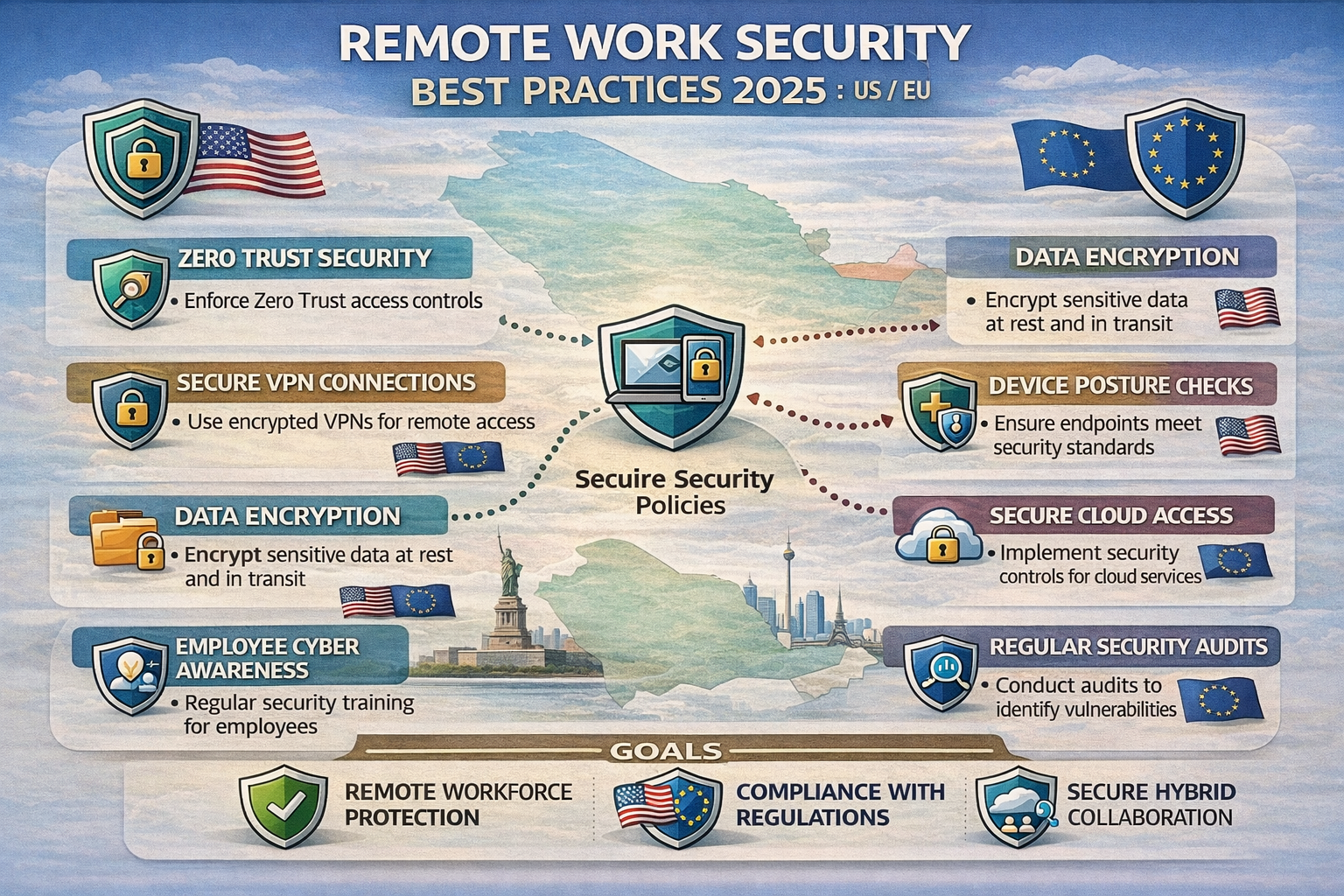
Remote work security best practices focus on strong identity and access management, hardened endpoints, secure remote access (VPN or Zero Trust), data protection, and continuous monitoring with phishing-aware employees. For hybrid teams in the US, UK, Germany and wider EU, these controls should be mapped to frameworks like NIST CSF, UK GDPR/NCSC guidance and GDPR/NIS2 so remote access stays compliant as well as secure.
Introduction
Remote and hybrid models increase cybersecurity risk because access moves off your controlled office network onto home Wi-Fi, co-working hubs and unmanaged devices. As soon as employees log into SaaS and VPNs from everywhere, one compromised account or laptop can expose entire cloud environments and regulated data. That’s why remote work security best practices in 2025 must treat identity, devices, networks and data as a single attack surface, not separate projects.
Recent studies suggest that over half of the global workforce now works remotely at least some of the time, with around 22% of the United States workforce roughly 30–35 million people working remotely by 2025. At the same time, the global average cost of a data breach has climbed to about $4.45–$4.9 million, and remote work is often an aggravating factor.
How remote and hybrid work change your attack surface
Remote and hybrid work expand your attack surface from a single office LAN to thousands of homes, hotels, coffee shops and co-working spaces. Employees in New York City, London or Berlin might all access the same CRM from very different networks, using a mix of corporate laptops, personal phones and tablets.
Shadow IT and SaaS sprawl accelerate this: teams sign up for tools outside IT’s control, sync regulated data to personal cloud storage, and forward work emails to private inboxes. Shared home PCs, “family” tablets and weakly protected Wi-Fi routers create easy paths for attackers. Once a phishing email steals a session cookie or a password, attackers often log in through the same remote channels as employees and blend in.
Common remote work security risks and real-world incidents
The most common remote work security risks still start with people.
Phishing and social engineering targeting remote employees’ inboxes and collaboration tools
Credential stuffing and reuse across SaaS apps
Weak or legacy MFA, or users approving malicious push prompts
Lost or stolen laptops and phones without disk encryption
Unapproved file sharing via personal email or consumer cloud drives
In UK government surveys, phishing remains the most common cyber incident type, affecting over 80% of businesses. Other research suggests insider and remote-driven incidents have risen sharply, with more than half of organizations reporting breaches linked to hybrid work and insider threats.
For a healthcare provider like the National Health Service (NHS), remote clinicians connecting from home must still meet HIPAA-like confidentiality and integrity expectations. In German financial institutions regulated by BaFin, remote access failures can trigger regulatory findings, not just IT incidents.
What “good” looks like for remote workforce cybersecurity
For remote and hybrid teams, “good” security looks like a prioritized control stack, not a random checklist.
Identity & access: SSO, phishing-resistant MFA, conditional access, least privilege
Devices & endpoints: managed and encrypted laptops/mobiles with EDR/XDR
Network & remote access: modern VPN or Zero Trust Network Access (ZTNA), DNS and web filtering
Data protection: encryption, DLP and sensible data classification
Monitoring & response: logging, SIEM/XDR, incident playbooks for remote scenarios
People & training: ongoing phishing and social-engineering training for remote employees
The goal is simple: even if an attacker compromises one remote account or device, the blast radius is limited, alerts fire quickly, and you can prove compliance to regulators in the United States, United Kingdom, Germany, France, the Netherlands and wider EU.
Core Security Controls for Remote & Hybrid Teams
The essential security controls for remote and hybrid teams are strong identity and access management, hardened and monitored endpoints, secure remote access, data protection and monitoring plus continuous phishing awareness training. If you implement these consistently in the US and Europe, you’ll address the majority of real-world remote work incidents without drowning in tools.
Identity & access management controls for remote workers
For remote work, identity is your perimeter. As the National Institute of Standards and Technology (NIST) and others stress, you should assume networks are hostile and verify users and devices explicitly each time.
Key identity and access management controls for remote teams include:
SSO with a modern IdP (e.g., Azure AD / Entra ID, Okta) across SaaS and internal apps
MFA everywhere, ideally phishing-resistant (FIDO2 security keys or platform passkeys)
Conditional access policies based on device health, location and risk
Least privilege and role-based access control, especially for admins and finance/HR data
Just-in-time elevation for privileged tasks, with approvals and audit logs
If you’re comparing vendors, look at identity-first approaches like Microsoft’s Zero Trust reference, as well as neutral guidance from players such as Netwrix on identity governance and admin hardening.
Endpoint and device security for distributed teams
For distributed teams, endpoint protection is non-negotiable. A stolen laptop from a café in Dublin should be an inconvenience, not a breach.
Baselines that work well across US/UK/EU include
Full-disk encryption on all laptops (BitLocker, FileVault, Linux equivalents)
EDR/XDR agents for malware, exploit and behavior detection
MDM/UEM (e.g., Intune-style) management for laptops and mobiles
Enforced OS and browser patching SLAs, ideally automated
Controlled BYOD: MAM and app-sandbox approaches for personal mobiles
Vendors from Microsoft to Kaspersky publish practical remote endpoint hardening guides and training material that you can adapt for your own workforce.
Network, data, and monitoring controls that matter most
For network and data, focus on secure remote access patterns that reduce trust in flat networks and align with your remote work security best practices:
Secure remote access
Modern VPN with split-tunneling policies, per-app rules and MFA; or
ZTNA that publishes only specific apps, not whole subnets
DNS filtering and secure web gateway functions (e.g., via Cloudflare)
Data loss prevention for remote workforce
Encrypt sensitive data at rest and in transit
DLP policies for email, cloud storage and endpoints
Clear rules for what may be stored locally vs only in SaaS
Monitoring and logging controls for remote work
Central logs from IdP, VPN/ZTNA, EDR, email and collaboration tools into SIEM/XDR
UEBA to spot anomalous remote logins, impossible travel or off-hours access from new devices
Incident playbooks tuned for remote scenarios (e.g., wiping a laptop in Frankfurt that was just reported stolen)
In many organizations, these controls are orchestrated through XDR platforms from vendors like Forcepoint or SSE/SASE stacks from providers such as Thales Group.
VPN vs Zero Trust Network Access for Remote Work Security
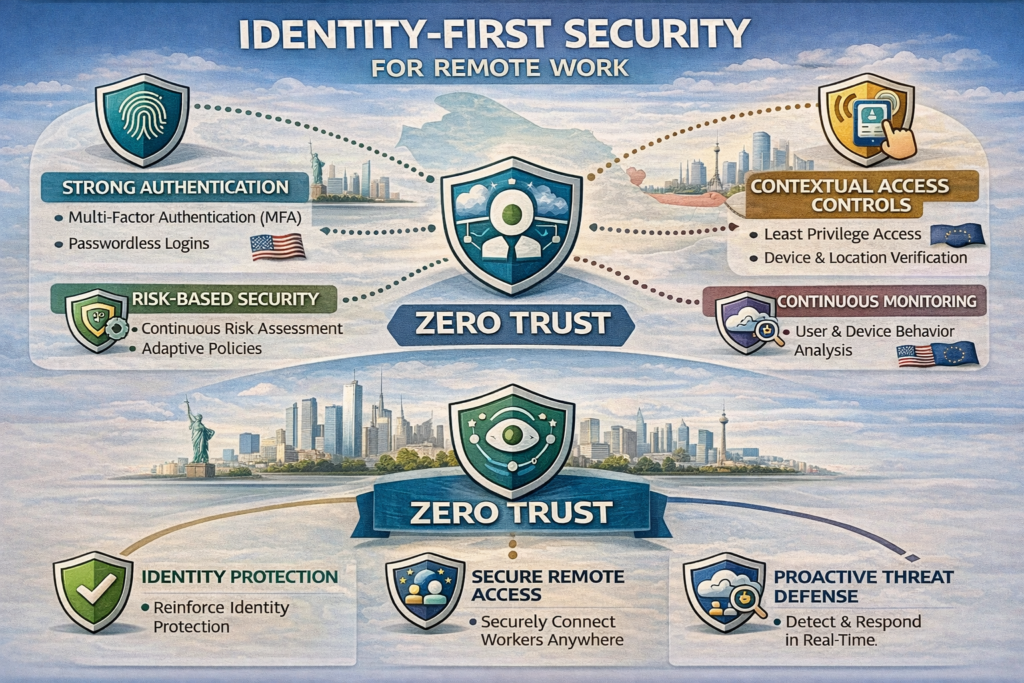
Traditional VPNs create an encrypted tunnel into your network but often grant broad access once connected, which is risky for compromised remote accounts or devices. Zero Trust Network Access assumes no implicit trust, continuously validates users and devices and grants only application-level access, which sharply limits lateral movement for remote workers.
Traditional VPNs for secure remote access.
A VPN remains a common baseline for secure remote access because it’s familiar, widely supported and easy to bolt onto legacy stacks. For smaller US or UK businesses with a few on-prem applications, a well-configured VPN plus strong MFA can be good enough in the short term.
Benefits
Widely supported by firewalls and operating systems
Straightforward user experience (“connect, then work”)
Suitable for legacy apps that expect network adjacency
Limitations
Often exposes broad internal subnets once connected
Encourages “trusted inside, untrusted outside” thinking
Makes it easier for attackers to move laterally after one credential theft
This is why many security teams now compare secure remote access VPN vs ZTNA rather than assuming VPN is the default future-proof answer.
Zero Trust Network Access & SASE.
Zero trust security for remote workers starts from the assumption that no user, device or network is trusted by default. Instead of a single network tunnel, users connect to an access broker that:
Authenticates user and device through the IdP
Evaluates posture (e.g., EDR status, OS version)
Grants app-level access only to specific services
Continuously re-evaluates risk as context changes
ZTNA is often delivered as part of a broader SASE stack that includes secure web gateways and CASB functions, frequently from providers like Cloudflare or similar. For teams in Dublin or Amsterdam, using EU-based PoPs helps with latency and GDPR data residency requirements.
How to choose between VPN and Zero Trust for your remote workforce
Your decision will depend on organization size, legacy footprint, regulation and budget. As a rough guide:
| Use Case / Constraint | VPN-First Approach | ZTNA / Zero Trust-First Approach |
|---|---|---|
| Small US or UK business with a few on-prem apps | Modern VPN + MFA, plan to evolve | Optional, might be overkill initially |
| Mid-size SaaS company with global remote workforce | Short-term only for legacy admin access | Primary model for workforce and contractor access |
| Regulated healthcare/finance (HIPAA, PCI DSS, BaFin) | Only if tightly segmented and monitored | Strongly recommended for remote and third-party use |
| NIS2-in-scope EU infrastructure provider | Consider only for very specific OT access | Preferred pattern for workforce and IT admins |
If you are already exploring identity-first architectures (for example, in parallel with work on identity-first security or IAM modernization), it usually makes sense to prioritize ZTNA and reduce your reliance on legacy VPN over 12–24 months.
Remote Work Security Checklists by Region (US, UK, Germany & EU)
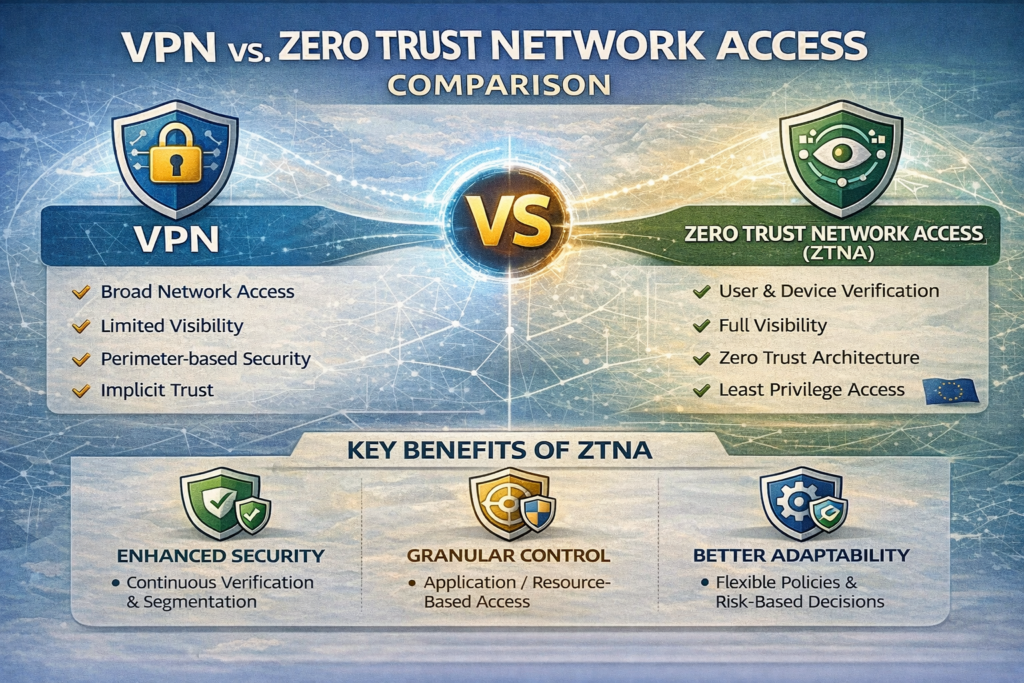
Core remote work security controls are similar across geographies, but the frameworks and regulators you answer to differ. US organizations tend to map to NIST CSF, HIPAA and SOC 2. UK firms align with UK GDPR and guidance from the National Cyber Security Centre (NCSC) and Information Commissioner’s Office (ICO). German and wider EU companies have to think hard about GDPR/DSGVO, NIS2 and works councils.
United States.
In the United States, many organizations structure remote work security controls around NIST CSF:
Identify: catalogue remote roles, devices, SaaS apps and data flows
Protect: deploy MFA, VPN/ZTNA, encryption and harden endpoints
Detect: centralize logs from IdP, VPN, EDR and SaaS into SIEM/XDR
Respond: have playbooks for remote account takeover and lost devices
Recover: test backups and SaaS restore options
For healthcare entities subject to HIPAA or insurers and banks in New York City, remote work security controls must also address ePHI and financial data access from home. SOC 2-bound SaaS startups often turn these into a concrete remote work security checklist for SOC 2 audits and customer questionnaires. For a small business in Austin or Atlanta, “remote work security controls for small business in the US” often means a practical bundle: managed IdP with MFA, device management, email security, basic SIEM and clear policies.
United Kingdom.
For UK organizations, remote work security best practices for UK small businesses start with UK GDPR plus NCSC and ICO guidance on home working. ICO explicitly expects employers to:
Give clear instructions on handling personal data at home
Ensure devices are appropriately secured and updated
Use encryption and access control for remote data
NCSC’s home-working guides cover VPNs, patching, password managers and incident reporting expectations. For an NHS trust or a financial services firm in London or Manchester, aligning remote work controls to these expectations is as important as picking tools.
Germany & wider EU.
In Germany and the wider EU, GDPR/DSGVO and NIS2 dominate the discussion. The European Union Agency for Cybersecurity (ENISA) provides practical tips for secure home working, and NIS2 raises the bar for critical sectors in Germany, France, the Netherlands and beyond.
German organizations additionally consider Betriebsrat/works council perspectives on monitoring and logging. “Homeoffice IT-Sicherheit Best Practices” might require:
Clear BYOD vs corporate device rules
Strong encryption and access control for remote access
Logging that is proportionate, privacy-aware and consulted with works councils
Many EU companies host data in hubs like Dublin or Frankfurt through providers such as Amazon Web Services (AWS), Azure or Google Cloud to align with GDPR and local data-residency requirements.
Building a Compliant Remote Work Security Policy
Every remote work security policy should define who can work remotely, required device standards, how data is accessed and stored, mandatory controls like MFA and encryption, rules for personal devices and how incidents are reported. For organizations in Ireland or the EU, it must also explain how remote work supports GDPR/DSGVO and NIS2 obligations; for US entities, it should align with HIPAA, PCI DSS or SOC 2 as needed.
Policy essentials: devices, data, access, and acceptable use
A practical remote work security policy and procedures document typically includes:
Scope & roles: who is covered, and who owns which controls
Devices: requirements for corporate laptops, mobiles and any BYOD
Access: how users authenticate (SSO, MFA), which VPN/ZTNA is mandatory
Data handling: what can be stored locally, printed or forwarded; use of personal email is usually forbidden
Acceptable use: rules about family use of work devices, public Wi-Fi and physical security
You can embed “work from home security tips for employees” directly, for example:
Don’t reuse work passwords on personal sites
Lock your screen whenever you step away
Avoid public Wi-Fi, or always use corporate VPN/ZTNA if you must
Report suspicious emails and lost/stolen devices immediately
Aligning policy with GDPR, NIS2, HIPAA, PCI DSS and SOC 2
Remote work GDPR compliance is about showing that personal data remains protected even when accessed from home. That typically means:
Documented DPIAs for remote work and key SaaS tools
Encryption and access control for personal data at rest and in transit
Clear retention and deletion rules for data on remote devices
For NIS2 sectors (critical infrastructure, digital providers), remote admin access and logging are especially important. In the US, HIPAA-compliant remote work security requires signed BAAs with cloud vendors, secure messaging and no casual use of consumer apps for PHI. PCI DSS and SOC 2 similarly expect you to control who can access cardholder and customer data from outside the office, and to log and monitor that access.
Vendor management for SaaS tools is central: assess data residency, certifications and remote work features (IP restrictions, device checks, detailed logs) before adoption.
Remote work security checklist & templates for US, UK, Germany/EU
Many organizations maintain:
A remote work security checklist for onboarding (MFA, device enrollment, awareness training)
A GDPR remote workers checklist EU for data-protection tasks (DPIA, records of processing, processor contracts)
Sector variations, e.g., healthcare (US/NHS), finance (BaFin-supervised banks in Frankfurt), or legal firms in London and Paris
You can publish these checklists internally in your wiki and refer to them from policy, with shorter one-page versions for employees.
Implementation Roadmap & Metrics for Securing Remote & Hybrid Teams
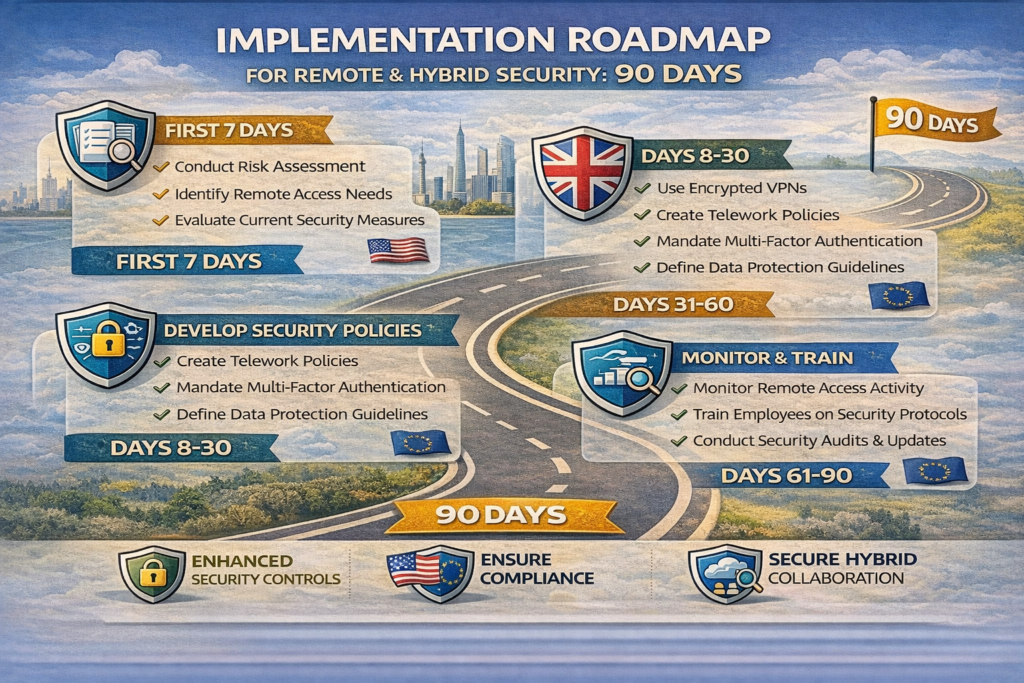
To prioritize security controls for remote and hybrid employees across multiple countries, start by identifying your highest-risk remote workflows, then roll out identity and endpoint controls, followed by secure remote access, data protection and monitoring. A 30–90 day phased rollout focused on regulated data and high-privilege users gives you visible wins without overwhelming teams in the US, UK, Germany or the EU.
Prioritizing controls across countries and business sizes
A simple phased approach works across most sizes:
Days 1–30: Discover & stabilize
Inventory remote roles, devices, SaaS apps and admin accounts
Turn on MFA everywhere and fix the worst password and access risks
For small businesses, this may be your main “remote work security controls for small business in the US” milestone
Days 31–60: Harden identity and endpoints
Implement SSO and conditional access for critical apps
Enroll all corporate laptops and mobiles in MDM/EDR
Standardize disk encryption and patching policies
Days 61–90: Secure remote access and data
Modernize VPN or pilot ZTNA for key apps and admin access
Enable DLP policies for email and cloud storage
Centralize logs in SIEM/XDR and define remote-specific incident playbooks
Enterprises spanning New York, London, Berlin and Amsterdam may run these phases region by region, starting with the most regulated or highest-risk business units.
Selecting and integrating tools (EDR, MDM, ZTNA, DLP, training)
When selecting tools, evaluate.
Security depth: coverage for endpoints, email, SaaS and identities
Usability: remote workers should not need a VPN for every cloud app
Regional data residency: can you keep logs and personal data in the EU/UK as needed?
Certifications & attestations: SOC 2, ISO 27001, HIPAA, PCI DSS, NIS2-oriented controls
Integration matters more than vendor badges: your IdP, SIEM/XDR, ticketing tools and training platform should share signals. Vendors like Forcepoint and Cloudflare provide examples of reference architectures, while Mak It Solutions can help you translate these into a pragmatic stack for your own environment.
KPIs, audits, and ongoing optimization
To prove progress, track.
MFA coverage and usage (especially phishing-resistant factors)
Endpoint enrollment and patch SLAs
Phishing-simulation click and report rates
Remote incident rate and time to contain
Audit findings for GDPR/DSGVO, NIS2, HIPAA, PCI DSS and SOC 2
Reports like IBM’s Cost of a Data Breach show that organizations with mature security automation and incident response save millions compared with laggards especially when remote work is involved.
Many organizations across the United States, United Kingdom, Germany, France and the Netherlands partner with specialists to design and operate these programs. Mak It Solutions works alongside security vendors, MSPs and in-house teams to build identity-first, Zero Trust-aligned remote work security programs that are realistic for your budget and skills.
If your remote and hybrid workforce still relies on “trust the VPN and hope for the best,” you’re carrying more risk than you need to especially across US, UK and EU jurisdictions. Mak It Solutions can help you turn these remote work security best practices into a practical roadmap: prioritizing controls, choosing between VPN and ZTNA, and aligning policies with NIST, GDPR, NIS2, HIPAA and SOC 2.
Whether you’re a SaaS scale-up in New York or London, or a regulated enterprise with teams in Berlin, Frankfurt or Dublin, our consultants blend security, cloud and product engineering so controls actually work for employees. Reach out to our Editorial Analytics Team and wider security specialists to scope a remote work security assessment and 90-day implementation plan tailored to your stack.( Click Here’s )
Key Takeaways
Remote and hybrid work massively expand your attack surface across home networks, SaaS and BYOD identity, devices, networks and data must be treated as one system.
The most impactful controls are identity-first security, hardened endpoints, secure VPN/ZTNA remote access, DLP and strong monitoring plus phishing training.
VPNs are still useful, but ZTNA and SASE provide finer-grained, app-level access that limits lateral movement and better fits hybrid work and cloud-native stacks.
US, UK, German and wider EU organizations should map remote work security best practices to NIST CSF, UK GDPR/NCSC and GDPR/NIS2, including DPIAs, logging and works council input.
A 30–90 day roadmap that starts with MFA and device baselines, then adds modern remote access, DLP and SIEM/XDR, gives you visible risk reduction without big-bang change.
Regular KPIs, audits and partnerships with experienced security and engineering teams help keep remote work security aligned with both threat trends and regulation.
FAQs
Q : What are simple remote work security tips employees can follow at home without IT help?
A : Employees can dramatically reduce risk by following a few simple habits: use unique passwords with a password manager, turn on MFA for every work and personal account, and always lock screens when stepping away from devices. Avoid public Wi-Fi where possible, and if you must use it, connect through your company VPN or ZTNA first. Keep your browser, operating system and apps updated, and never install unapproved software on work devices. Finally, treat unexpected links, attachments and MFA prompts with suspicion and report anything odd to your security or IT team immediately.
Q : How can small businesses secure remote workers if they don’t have a dedicated security team?
A : Small businesses without a full-time security team should lean on secure-by-default services and managed providers. Start with a business-grade email and productivity suite, enable SSO and MFA for everything, use a reputable managed endpoint protection solution and choose a user-friendly VPN or ZTNA. Many MSPs can bundle these into a fixed-fee package, including basic monitoring and incident response. Clear, one-page policies and short training sessions for staff are just as important as tools everyone should know how to spot phishing, report incidents and handle customer data.
Q : What’s the best way to secure Microsoft 365 or Google Workspace for remote and hybrid teams?
A : For Microsoft 365 and Google Workspace, start by enforcing MFA for all accounts, especially admins, and disable basic/legacy authentication protocols. Use conditional access to block high-risk sign-ins, restrict access from unmanaged devices where possible, and enable security baselines and recommended hardening from vendor documentation. Turn on built-in features such as Safe Links, Safe Attachments, anti-phishing policies and DLP rules for sensitive information. Finally, make sure audit logs are turned on and streamed into your SIEM or security monitoring platform so remote-driven anomalies are visible to your team or managed provider.
Q : How should companies handle personal devices (BYOD) in a remote work security policy?
A : Companies should decide upfront whether they allow BYOD for remote work and under what conditions. Common approaches include restricting BYOD to mobile email and collaboration apps with mobile application management (MAM) and containerization, while keeping laptops corporate-owned and managed. Policies should clearly state which data can be accessed from personal devices, what level of monitoring is in place and under what circumstances the company may wipe corporate data. Transparent communication with employees and, in Europe, consultation with works councils or employee representatives helps keep BYOD both secure and acceptable.
Q : How often should remote work security controls and policies be reviewed or audited?
A : At a minimum, remote work security policies and controls should be reviewed annually, and more often if there are significant changes in your tooling, regulations or threat landscape. Many organizations align reviews with SOC 2, ISO 27001 or internal audit cycles, performing formal risk assessments and technical tests on remote access paths and SaaS usage. In regulated sectors or NIS2-in-scope entities, more frequent checks—such as quarterly access reviews, phishing simulations and vulnerability scans are common. Whenever there is a major incident, merger or technology rollout (for example, a new ZTNA platform), plan an out-of-cycle review focused on remote impacts.