


Customer Support AI Agent Guide for Growth
Customer Support AI Agent Guide for Growth
Customer Support AI Agent Guide for Growth
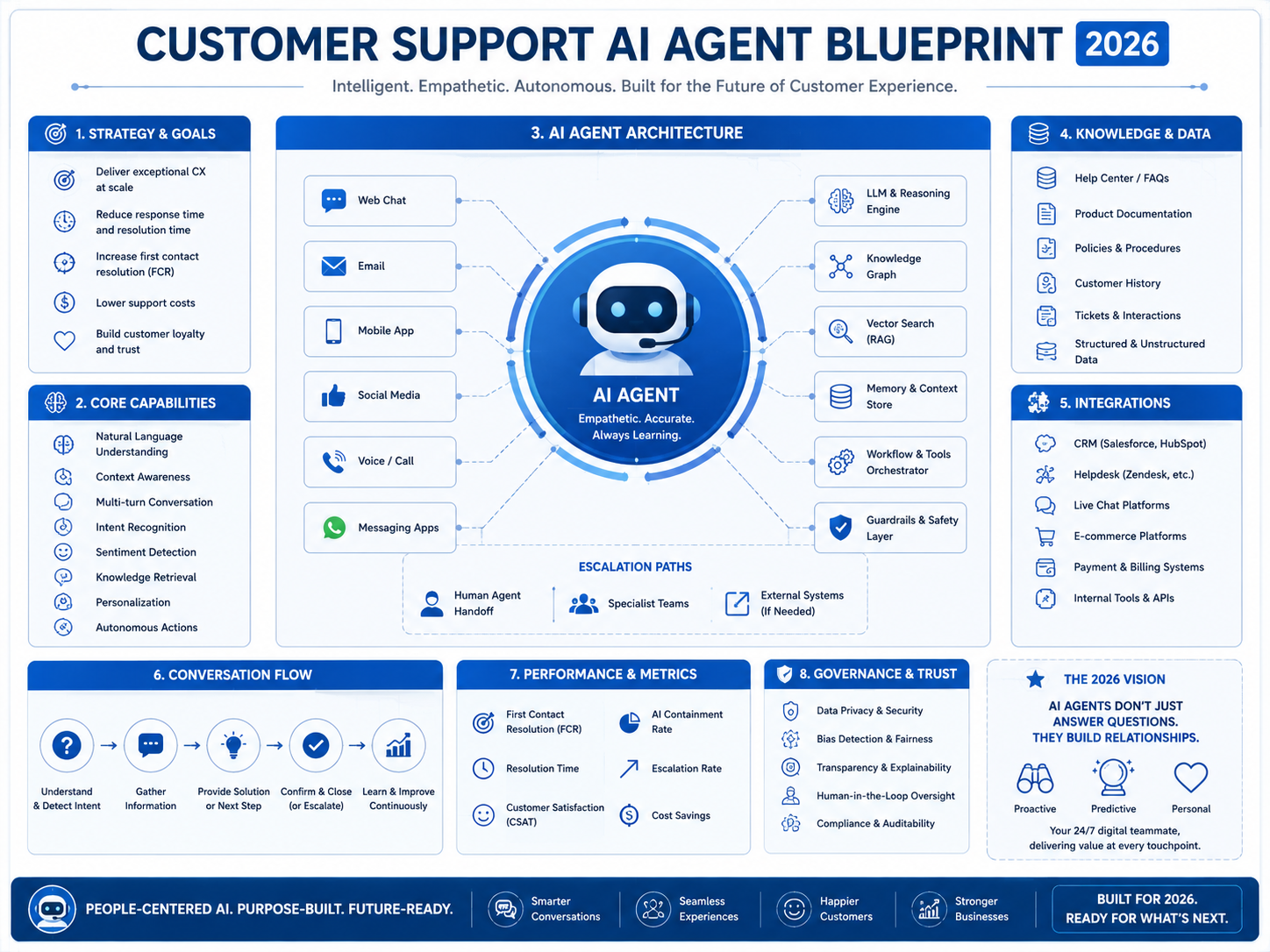
A customer support AI agent helps support teams resolve customer issues faster by understanding intent, using approved company knowledge, taking safe actions in business systems and escalating complex cases to humans. For teams in the USA, UK, Germany and the wider EU, the strongest results come from clean data, reliable integrations, privacy guardrails and clear ROI tracking.
This is not about replacing every human agent. The real value is building an AI-powered customer service layer that handles repetitive work, keeps support available across more channels and gives human agents more time for judgment, empathy and complex problem-solving.
What Is a Customer Support AI Agent?
A customer support AI agent is an AI system that can understand customer questions, retrieve trusted information, perform approved support actions and hand off risky or unclear cases to a person.
Think of it as a digital support teammate. It can read a customer’s message, identify the issue, search your knowledge base, check CRM or order data and respond with a useful answer.
For example, a SaaS company in Austin might use an AI customer service agent to answer onboarding questions, reset account settings and create follow-up tasks in HubSpot. A retailer in London might use one to check delivery status, confirm return eligibility and escalate payment disputes.
AI Customer Support Agent vs Chatbot
A basic chatbot usually follows scripted flows. A customer support AI agent works with context, live data and permission-based actions.
| Feature | Basic Chatbot | Customer Support AI Agent |
|---|---|---|
| Conversation style | Scripted | Context-aware |
| Data access | Limited | Can connect to CRM, helpdesk, billing and order tools |
| Actions | Usually basic | Can take approved workflow actions |
| Escalation | Often manual | Can route based on risk, sentiment or confidence |
| Best use | FAQs | End-to-end ticket support |
The difference matters. A chatbot may say, “Please contact support.” An AI agent may verify the customer, check the order, confirm refund rules, update Zendesk and hand off the case if it crosses a policy threshold.
Zendesk’s CX Trends 2026 reports that 83% of CX leaders see memory-rich AI agents as key to personalized customer journeys, while 85% say customers may leave brands over unresolved issues, even on first contact.
How Customer Support AI Agents Resolve Tickets
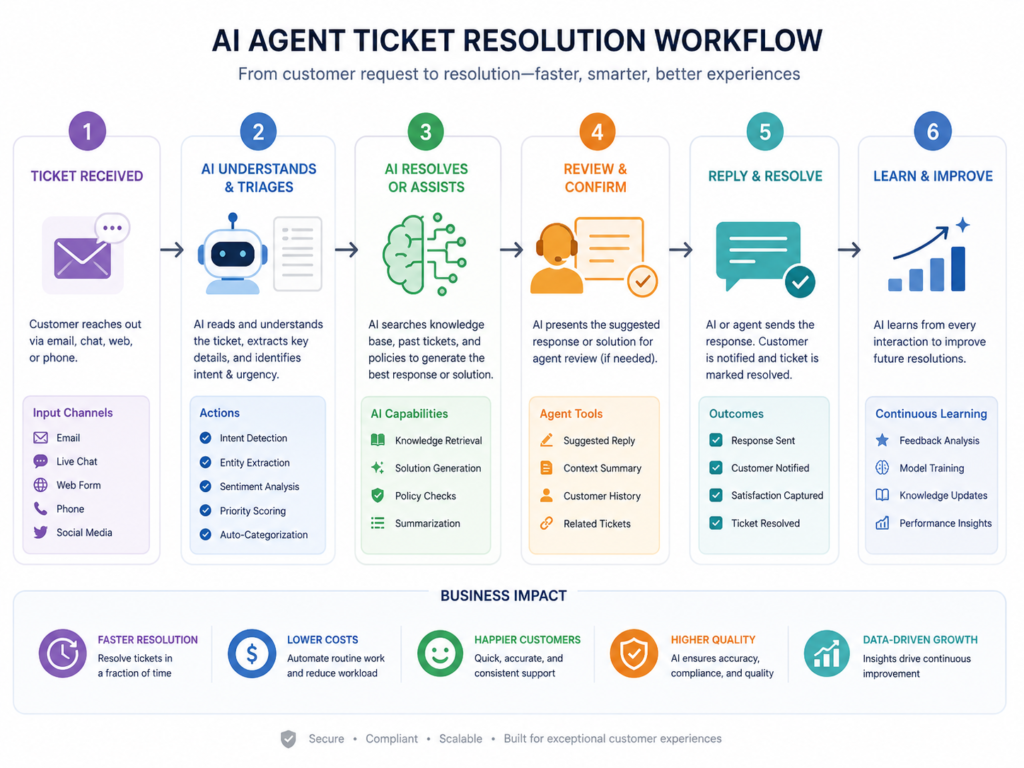
AI agents resolve tickets by identifying intent, retrieving verified knowledge, checking business data, taking permitted actions, updating systems and escalating complex or sensitive cases.
A typical automated ticket resolution flow looks like this:
The customer asks a question through chat, email, voice or messaging.
The AI identifies the intent, such as billing, login, shipping, refund or product help.
It checks approved knowledge sources and relevant customer data.
It decides whether it has enough confidence to answer.
It performs an approved action, such as creating a return request or updating a ticket.
It escalates to a human when the issue is risky, unclear or emotionally sensitive.
This is where conversational AI support becomes more useful than a standalone FAQ bot. The agent does not just answer. It helps move the case forward.
Data, Integrations and Workflow Design
A strong customer support AI agent connects to the systems support teams already use: Salesforce, Zendesk, Intercom, Freshdesk, HubSpot, Stripe, Shopify, internal databases, product documentation, billing platforms and helpdesk tools.
The goal is controlled access, not unlimited access. The AI should only see the data it needs to complete a specific task.
For example, Mak It Solutions’ business intelligence services can help turn support data into dashboards for resolution rate, CSAT, ticket volume and escalation trends. For custom workflows, portals and API integrations, the services hub is a useful starting point.
Human-in-the-Loop Guardrails
Human-in-the-loop escalation prevents automation from going too far.
An AI support agent should escalate when.
Confidence is low
Customer sentiment is negative
The customer is high-value
Personal or financial data is involved
The request touches legal, healthcare or regulated finance issues
A refund, cancellation or account closure exceeds policy limits
In practice, this is especially important for healthcare, fintech, insurance, banking and enterprise support teams. A wrong answer in these industries can create compliance risk and damage customer trust.
Benefits of AI Customer Service Agents
Support teams use AI customer service agents to reduce repetitive tickets, improve availability, speed up resolution and help human agents focus on cases that need deeper thinking.
Salesforce reports that service teams using AI agents expect service costs and case resolution times to decrease by an average of 20%.
Faster Response Times
AI agents can answer routine tickets instantly, even outside business hours.
For a New York SaaS support team, that may mean fewer “Where is my invoice?” tickets. For a Berlin ecommerce brand, it may mean faster order updates in German and English.
Lower Support Costs Without Losing Trust
Cost reduction should not mean careless automation. The best approach is to automate repetitive work while keeping accountability with the business.
That means clear logs, escalation rules, permission controls and visibility for human agents. The support team should always know what the AI did, which sources it used and why a case was escalated.
Better CX Across Channels
Modern customers move across channels. They may start in live chat, continue by email and follow up through WhatsApp or voice.
A well-designed customer support AI agent keeps context across these channels. Mak It Solutions’ mobile app development services and React Native development services are relevant for companies that want AI-powered support inside customer-facing mobile apps.
Implementation Blueprint for a Customer Support AI Agent
A customer support AI agent needs clean knowledge base content, CRM records, ticket history, product documentation, policy rules, order data and escalation logic. Without governance, even a powerful AI model can give inconsistent or unsafe answers.
Start With Repetitive Ticket Categories
Do not automate everything at once. Start with low-risk, high-volume ticket types, such as.
Password resets
Order status updates
Billing FAQs
Subscription changes
Product setup questions
Return eligibility checks
A practical pilot usually works best when it starts with two or three repetitive categories.
Clean Your Knowledge Base
The AI is only as reliable as the information it can access. Remove outdated policies, merge duplicate help articles and clearly label approved answers.
If your support content is messy, the AI may sound confident while giving the wrong answer.
Connect Read-Only Systems First
Begin with safe lookups before allowing the AI to perform live actions.
For example, let the AI check an order status before allowing it to create a refund request. Let it read CRM account data before allowing it to update fields.
Add Approved Actions Carefully
Once accuracy is stable, add limited workflow actions. These may include updating a ticket, creating a replacement request, routing a billing case or generating a summary for a human agent.
For custom API layers and front-end workflow design, Mak It Solutions’ front-end development services and AI agents for SMEs guide show related implementation thinking.
Measure and Improve Weekly
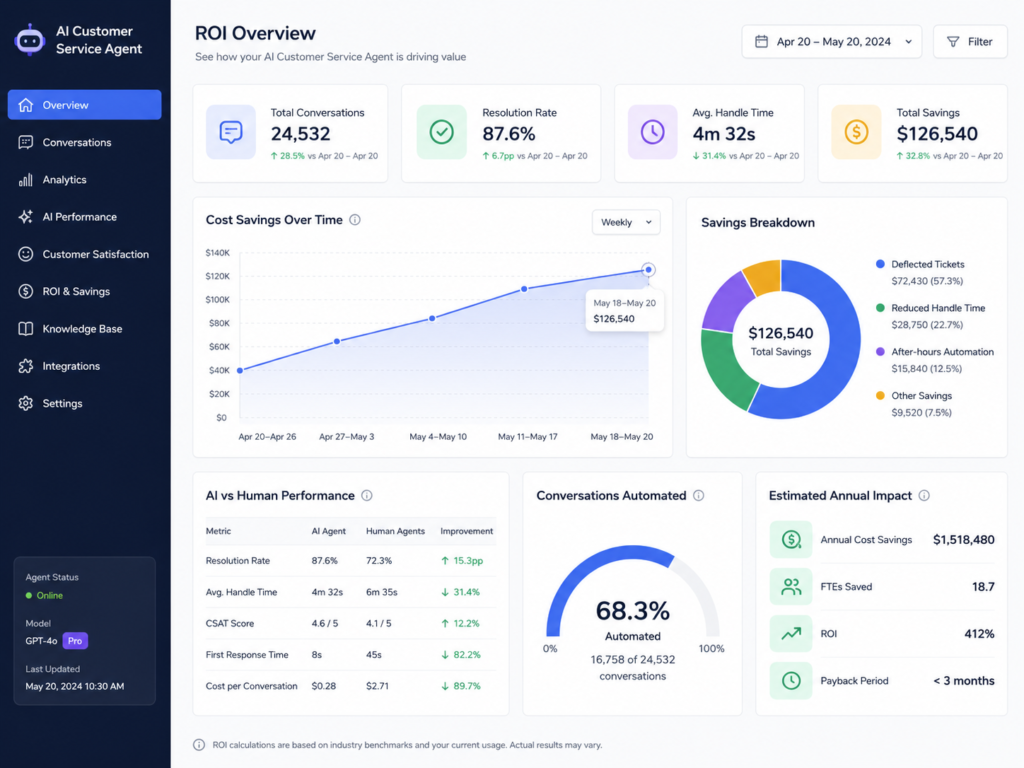
Track performance before and after launch. Useful KPIs include.
Automated resolution rate
CSAT
Average handle time
First response time
Escalation quality
Deflection rate
Cost per ticket
ROI
Mak It Solutions’ Business Intelligence Services can help turn raw support activity into decision-ready reporting.
Compliance for USA, UK, Germany and EU Teams
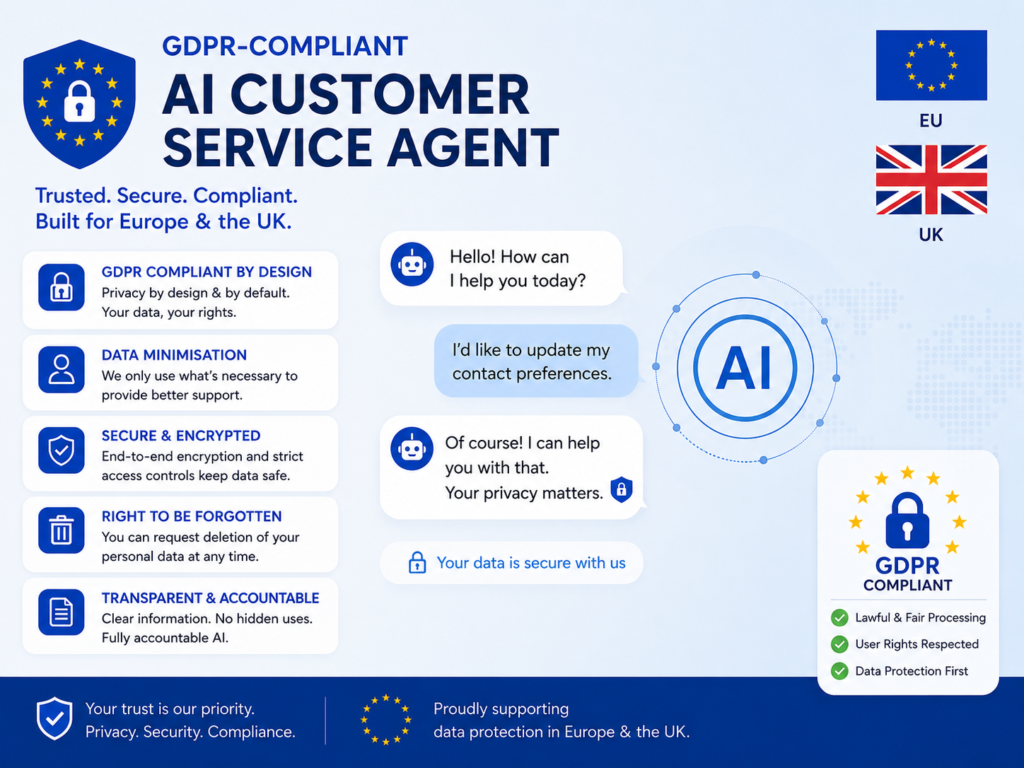
A customer support AI agent should be designed with privacy, auditability and access control from day one. Compliance cannot be treated as a final checkbox.
USA.
In the USA, SaaS and ecommerce teams commonly consider SOC 2 controls, PCI DSS for payment workflows and CCPA/CPRA for California privacy rights. Healthcare support teams must also assess HIPAA.
HHS explains that the HIPAA Privacy Rule protects individually identifiable health information held or transmitted by covered entities and business associates.
For example, a healthcare support workflow in San Francisco should avoid exposing PHI to an AI system unless contracts, access controls, logging and review processes are in place.
UK.
UK teams in London or Manchester should design AI support workflows around UK GDPR, FCA expectations in financial services and strict data handling where healthcare is involved.
The ICO explains that data minimisation means identifying the minimum personal data needed for a purpose and holding no more than that.
That principle fits AI support perfectly: restrict fields, mask sensitive values and avoid feeding unnecessary customer history into prompts.
Germany and EU.
In Germany and the wider EU, AI customer service automation should address GDPR/DSGVO, data residency, multilingual support, role-based access and audit logs.
A Munich fintech or Berlin SaaS company may need German-English support, EU-hosted processing and human review for sensitive complaints. If payment workflows are involved, PCI Security Standards Council guidance is also relevant because PCI SSC develops payment data security standards and resources for safe payments.
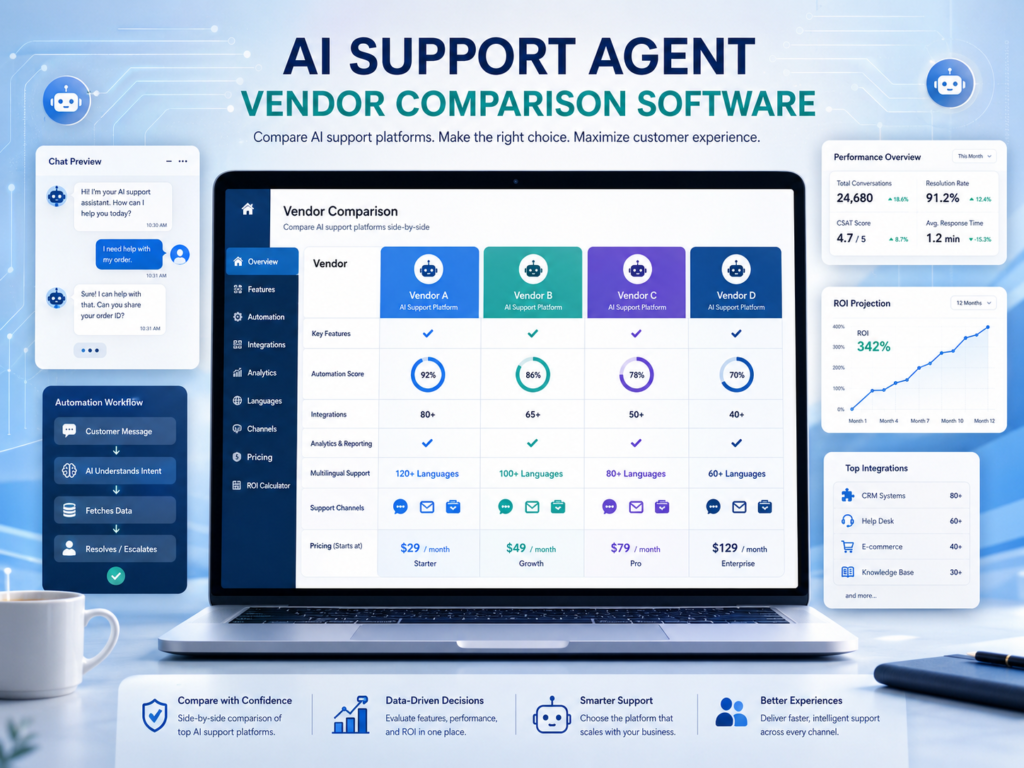
Best Customer Support AI Agent Software.
The best customer support AI agent software depends on your support channels, CRM stack, compliance needs, ticket volume, language coverage and desired level of autonomy.
Popular options include Zendesk AI agents, Intercom Fin, Salesforce Agentforce, Freshworks, IBM, Kore.ai, Cognigy and HubSpot.
Zendesk and Freshdesk are often natural choices for ticket-heavy teams. Intercom Fin fits conversational SaaS support. Salesforce Agentforce is attractive when Salesforce is already the system of record. IBM, Kore.ai and Cognigy may suit larger enterprise, contact centre and multilingual automation needs.
Vendor Comparison Checklist
Compare tools on.
Autonomy and approval controls
CRM, billing, helpdesk and order integrations
Multilingual support
Analytics and reporting
Human handoff quality
Transcript visibility
Data residency
Audit logs
Permission controls
Total cost of ownership
Do not choose only by demo quality. Choose by fit, governance and integration depth.
Customer Support AI Agent ROI
Customer support AI agent ROI usually comes from fewer repetitive tickets, faster resolution, lower cost per contact, improved CSAT and better agent productivity.
Start with your current ticket volume. Then calculate how many monthly tickets are repetitive, how long they take to handle and what each contact costs.
For example, if 30–40% of support tickets are repetitive, a pilot may target password resets, order status, billing FAQs and subscription changes first. Keep sensitive workflows out of scope until the AI has proven accuracy and escalation quality.
Assess AI Agent Readiness
Before buying software, assess your support workflow. Look at your knowledge base, integration stack, data sensitivity, ticket categories, escalation policies and reporting gaps.
A customer support AI agent works best when the foundation is strong. Clean content, connected systems, clear rules and measurable KPIs matter more than a flashy demo.
Mak It Solutions can support AI-enabled support operations through web development, secure integrations, mobile experiences and BI reporting.
Want to know where a customer support AI agent would create the fastest value in your workflow? Start with a scoped readiness assessment or request a practical estimate through the Mak It Solutions contact page.
To Sum Up
A customer support AI agent is most valuable when it is built around clean data, safe integrations, clear escalation rules, and measurable outcomes. For USA, UK, Germany, and EU support teams, it can reduce repetitive tickets, speed up responses, improve customer experience, and give human agents more time for complex cases.
Before choosing a platform, review your ticket categories, knowledge base, compliance needs, and current support tools. Start with a focused pilot, measure ROI through CSAT, AHT, resolution rate, and deflection, then expand carefully. With the right blueprint, AI support becomes a practical growth advantage.
Key Takeaways
A customer support AI agent is best for repeatable, rules-based support workflows with clear escalation paths.
Strong integrations with CRM, helpdesk, billing, order and knowledge systems determine how useful the agent becomes.
USA, UK, Germany and EU deployments need privacy, audit logging, access control and data minimisation from day one.
ROI should be measured through resolution rate, CSAT, AHT, deflection, escalation quality and cost per ticket.
Vendor choice depends on your stack, industry, language needs, compliance profile and desired autonomy level.
FAQs
Q : How much does a customer support AI agent cost for a growing SaaS company?
A : Costs vary by platform, ticket volume, integrations, compliance needs and custom workflow requirements. A growing SaaS company may start with Zendesk, Intercom, Freshdesk or Salesforce, then add custom integrations for CRM, billing, product analytics and reporting.
Q : Can a customer support AI agent handle refunds, cancellations or billing questions?
A : Yes, but only with clear permissions and escalation rules. The AI can explain policies, check eligibility and prepare requests, but high-value refunds, disputed charges, account closures and regulated billing issues should usually go to a human.
Q : What support tickets should not be fully automated?
A : Do not fully automate tickets involving legal threats, medical advice, fraud, identity verification failures, vulnerable customers, regulated finance, complex complaints, high-value refunds or sensitive personal data. The AI can still summarize history and suggest next steps, but final decisions should remain with trained staff.
Q : How long does it take to launch an AI customer support agent?
A : Launch time depends on knowledge quality, ticket complexity, integrations, compliance review and reporting needs. The fastest path is to start with two or three repetitive ticket types, test against real historical tickets and expand only after accuracy, CSAT, escalation and ROI metrics are stable.
Q : Do AI customer support agents work for multilingual EU teams?
A : Yes, they can work well when content, data residency and escalation rules are designed properly. A Germany/EU workflow may need German-English support, GDPR/DSGVO controls, EU-hosted processing and human review for sensitive cases.