


AI Coding Assistant Risks for Safer Teams
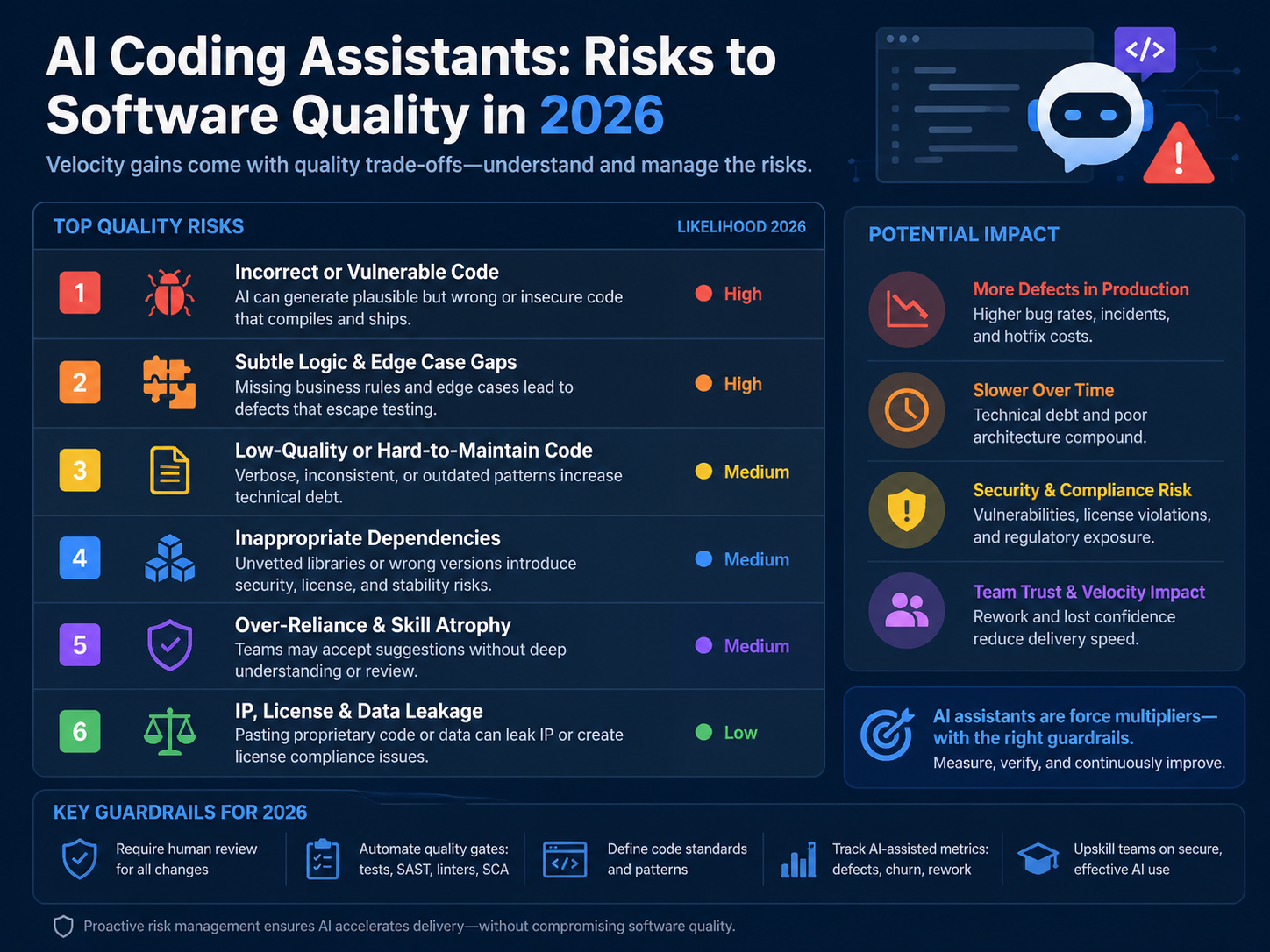
AI coding assistant risks are not just about bad prompts or imperfect tools. The real danger is moving faster than your review, security, and architecture controls can handle.
AI coding assistants can help developers write, refactor, and test code faster. But if teams accept AI output without proper review, they can ship insecure code, hidden technical debt, licensing problems, and software nobody fully understands.
What Are AI Coding Assistant Risks?
AI coding assistant risks include insecure code, weak architecture, duplicated logic, poor testing, IP exposure, unsafe dependencies, and weak governance. Teams can reduce these risks by treating AI-generated code as a draft, not a finished product.
Tools like GitHub Copilot, Cursor, Amazon Q Developer, Tabnine, Replit, and Claude Code can support experienced engineers. They should not replace engineering judgment.
Stack Overflow’s 2025 Developer Survey reports that 84% of respondents use or plan to use AI tools in development, while 51% of professional developers use them daily. That level of adoption makes governance urgent, not optional.
For teams modernizing software products, Mak It Solutions’ software and web development services can help balance delivery speed with secure, maintainable engineering.
Why Faster Code Can Become Bad Software
Fast code feels productive. But software quality depends on more than how quickly a function appears on the screen.
Good software needs.
Clear architecture
Secure design
Reliable tests
Maintainable code
Reviewed dependencies
Useful logs and monitoring
Human ownership
A feature shipped quickly in Austin, London, Berlin, or Dublin can still create months of rework if the code is brittle, duplicated, or poorly understood.
The biggest risk is not that AI writes code. The bigger risk is accepting AI-generated code without the same discipline used for human-written code.
The Biggest AI Coding Assistant Risks for Engineering Teams
Security vulnerabilities in AI-generated code
AI coding assistants may suggest outdated APIs, weak input validation, missing authorization checks, unsafe cryptography, insecure deserialization, or risky error handling.
OWASP highlights prompt injection and insecure output handling as major risks in systems that use large language models. That matters because AI-assisted development often connects model output directly to code, workflows, and developer decisions.
In practice, AI-generated code should always go through secure review before it reaches production.
Poor code quality and brittle architecture
AI tools often optimize for the immediate task. They may solve the local problem while ignoring the wider system.
That can lead to.
Duplicate helper functions
Inconsistent error handling
Leaky abstractions
Hard-coded assumptions
Poor naming
Weak separation of concerns
Code that passes a small test but breaks the architecture
This is especially risky for SaaS platforms, fintech products, healthcare software, and enterprise systems where long-term maintainability matters more than a quick demo.
Hidden technical debt
AI coding assistants can increase technical debt when developers accept suggestions without understanding the trade-offs.
Small shortcuts compound over time. Duplicated validation, inconsistent data models, missing tests, and unclear ownership can become expensive later.
GitHub’s 2024 Octoverse reported more than 5.2 billion contributions across more than 518 million open source, public, and private projects. Software creation is scaling fast, and AI-assisted development adds even more speed to that trend.
Speed without quality gates is how “fast software” becomes “fast bad software.”
IP, licensing, and open-source compliance concerns
AI-generated code can create license uncertainty, especially when it resembles public examples or introduces dependencies without review.
Teams should use.
Software composition analysis
SBOM tracking
Approved dependency workflows
Legal review for sensitive components
Open-source policy checks before merge
This is especially important for commercial SaaS products, enterprise software, fintech platforms, and products distributed across multiple countries.
AI Code Security Risks for DevSecOps Teams
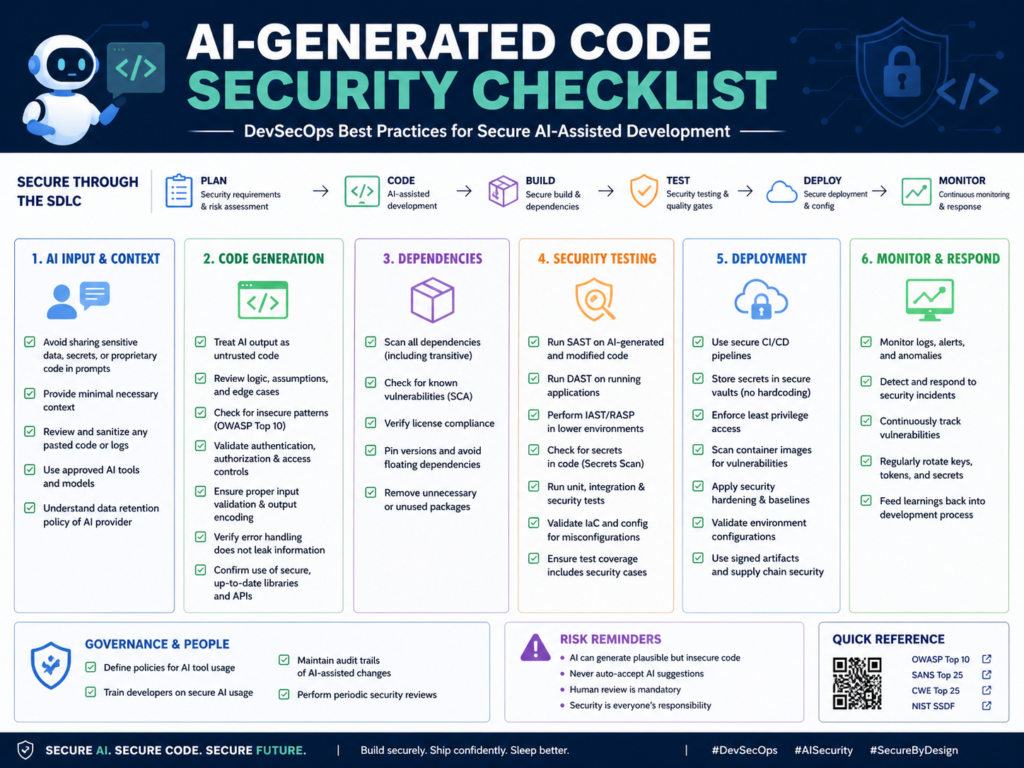
AI-generated code should be scanned for vulnerabilities, secrets, dependency risks, license issues, insecure patterns, and architecture misalignment before it is merged.
Common AI-generated security problems
AI tools may suggest.
Vulnerable packages
Unpinned dependencies
Missing authorization logic
Unsafe database queries
Weak authentication flows
Insecure file uploads
Risky copy-paste snippets
Poor error handling that leaks sensitive data
Sonatype reported 704,102 logged malicious open-source packages in 2024, with malicious packages growing 156% year over year. That makes dependency review a serious part of AI coding governance, not a checkbox.
Prompt injection, secrets exposure, and data leakage
Developers should never paste sensitive data into unapproved AI tools.
Avoid sharing.
Customer data
Credentials
Private keys
Proprietary source code
Payment data
Health data
Internal architecture diagrams
Regulated business data
Prompt logs, browser extensions, shared workspaces, and vendor retention policies can all become leakage paths.
For cloud-heavy products, pair AI-assisted development with posture reviews like Mak It Solutions’ guide to cloud security misconfigurations.
Security checks before accepting AI-generated code
Before merging AI-assisted code, teams should run.
SAST
SCA
Secrets scanning
Dependency review
SBOM generation
Unit tests
Integration tests
IaC scanning
Container scanning where relevant
Threat modeling for sensitive workflows
NIST’s Secure Software Development Framework recommends integrating secure development practices across the software development lifecycle, which fits naturally with AI-assisted coding controls.
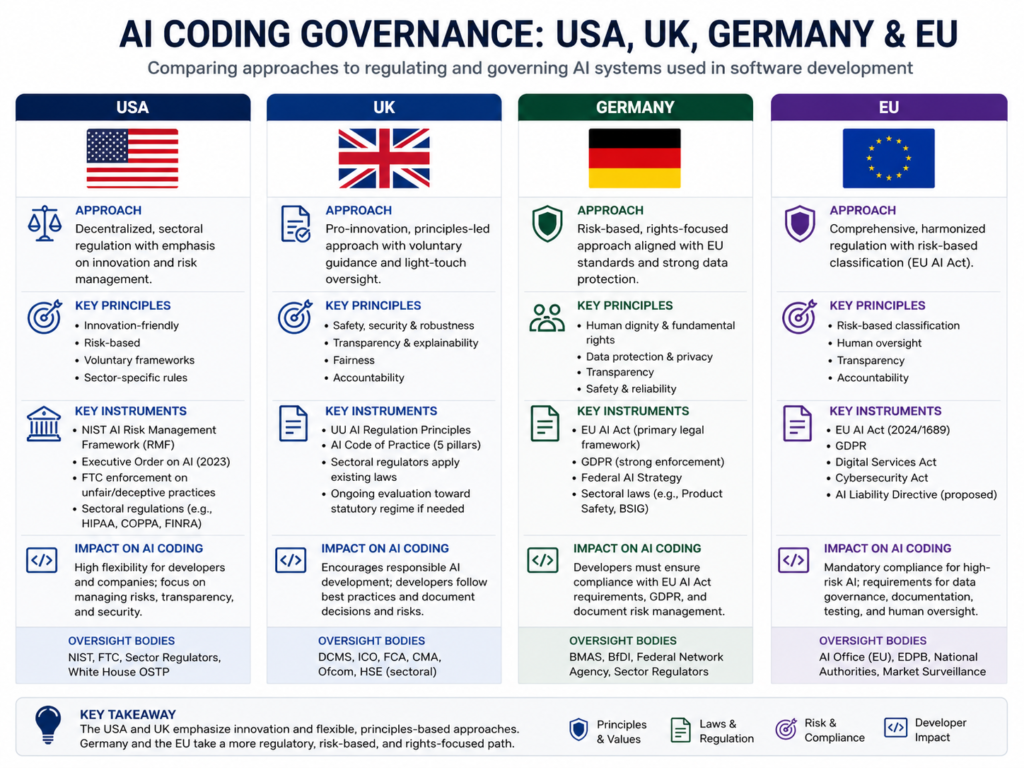
GEO Compliance Risks: USA, UK, Germany, and EU
Regulated teams in the US, UK, Germany, and the wider EU need AI coding policies that cover data handling, audit logs, secure review, vendor risk, and human approval before deployment.
USA.
In the US, SaaS teams in New York, San Francisco, Seattle, Austin, and Boston should connect AI coding controls to SOC 2, HIPAA, PCI DSS, and FedRAMP requirements where applicable.
Sensitive code touching protected health information, payment data, or federal workloads needs stricter review and clear evidence trails.
A practical rule: if the feature is regulated, AI output should receive extra review before it enters the pull request.
UK.
In London, Manchester, Cambridge, and Edinburgh, engineering teams should consider UK-GDPR, NHS data protection, FCA expectations, and Open Banking security.
The UK ICO says AI systems that process personal data should follow data protection law and data protection by design. That principle applies when developers use AI tools around code, data models, logs, or customer workflows.
Germany and EU.
In Berlin, Munich, Frankfurt, Hamburg, Amsterdam, Paris, Dublin, and Zurich, AI coding governance should address GDPR/DSGVO, BaFin expectations, DORA, NIS2, PSD2, data residency, and works council concerns.
The European Commission’s AI Act guidance says high-risk AI rules apply in staged timelines, with key rules coming into effect in August 2026 and August 2027.
For regulated EU teams, the safest approach is simple: document which AI coding tools are approved, what data is restricted, and who is accountable for accepting AI-assisted code.
AI Coding Governance for Engineering Teams
AI coding governance should define approved tools, restricted data, review rules, security scans, documentation requirements, and accountability for code accepted from AI assistants.
Create an AI coding assistant policy
A useful policy should answer.
Which AI coding tools are approved?
Which repositories are restricted?
What data must never be pasted into prompts?
When must developers disclose AI-assisted code?
What review steps are required before merge?
Which scans are mandatory?
Who approves production releases?
How are incidents or policy violations handled?
The policy should be clear enough for developers to follow during real work, not just written for compliance folders.
Add responsible AI software development guardrails
Responsible guardrails include.
Human-in-the-loop review
Prompt hygiene
Secrets controls
Secure coding standards
Architecture checkpoints
Required tests
Clear pull request ownership
Measurable quality gates
Mak It Solutions’ article on human-in-the-loop AI workflows is a useful companion for teams designing review systems that do not slow delivery unnecessarily.
Evaluate AI coding tools before rollout
Before adopting Copilot, Cursor, Amazon Q, Tabnine, Replit, Claude Code, or any other assistant, evaluate each tool against:
| Evaluation Area | What to Check |
|---|---|
| Security | Enterprise controls, access management, secrets handling |
| Privacy | Data retention, training settings, prompt logging |
| Compliance | Audit logs, policy controls, regional requirements |
| Developer fit | IDE support, workflow integration, language coverage |
| Governance | Admin controls, reporting, approval workflows |
| Code quality | Test support, refactoring behavior, review compatibility |
For analytics-heavy teams, connect AI coding governance with data workflows using services like Business Intelligence Services.
How to Prevent AI Coding Assistants from Creating Bad Software
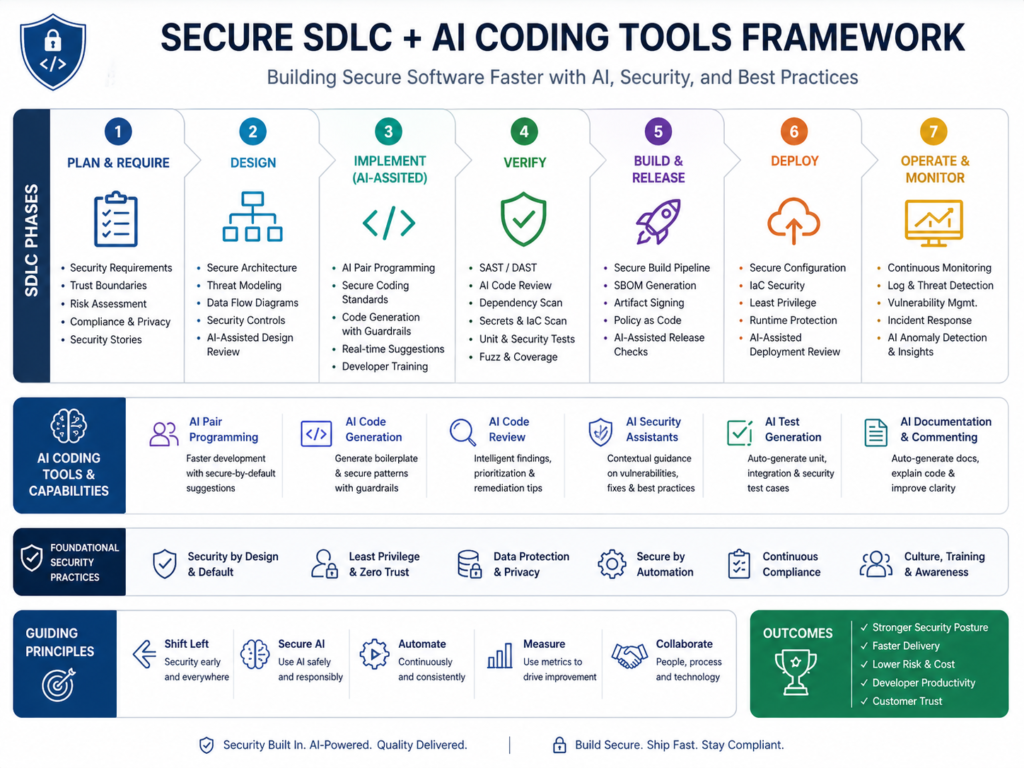
To reduce AI coding assistant risks, teams should combine AI-assisted development with secure SDLC controls, mandatory code review, automated security testing, compliance checks, and clear developer accountability.
Build a secure SDLC policy for AI coding tools
Start with a written AI-assisted development lifecycle.
Define.
Where AI tools can be used
Which repositories are restricted
What data cannot be used in prompts
Which scans are required
What evidence is needed before release
Who owns the final code
For backend-heavy systems, Mak It Solutions’ back-end development services can help establish scalable architecture and review practices.
Use automated testing and security scanning
Make checks automatic in CI/CD.
At minimum, teams should consider.
Unit tests
Integration tests
SAST
SCA
Secrets scanning
Dependency scanning
IaC scanning
SBOM generation
Container scanning where relevant
Automation does not remove human responsibility. It gives reviewers better evidence before approving the code.
Require human ownership and production approval
Every AI-assisted change needs a human owner.
The reviewer should confirm that the code is.
Understandable
Secure
Maintainable
Tested
Compliant
Aligned with architecture
Safe to deploy
For front-end and cross-platform teams, Mak It Solutions’ React Native development services and Flutter development services can support review-ready mobile delivery.
For larger product transformations, Mak It Solutions’ mobile app development services and contact page are useful next steps for scoping support.
Final Words
AI coding assistant risks can be managed, but only when teams build the right controls around the tools.
Use AI assistants for drafts, refactoring ideas, test scaffolding, documentation, and repetitive coding tasks. Do not use them as an unchecked path to production.( Click Here’s )
Before scaling AI-assisted development, assess your tools, repositories, policies, data exposure, and release controls. Mak It Solutions helps engineering teams adopt AI-assisted development without sacrificing quality, security, or compliance. To reduce AI coding assistant risks before they scale, request a scoped estimate or explore our software development services.
Key Takeaways
AI coding assistants can improve developer speed, but unchecked output can create security flaws, technical debt, and compliance gaps.
Treat AI-generated code as a draft. Review it, test it, scan it, document it, and assign a human owner before production.
The best results come when AI supports skilled engineers instead of bypassing engineering discipline.
FAQs
Q : Are AI coding assistants safe for production software?
A : AI coding assistants can be safe for production software when teams apply strong review, testing, and security controls. They are not safe when developers accept code blindly or paste sensitive data into unapproved tools.
Q : Can AI-generated code violate open-source licenses?
A : Yes, AI-generated code can create open-source compliance concerns if it closely resembles licensed material or introduces packages with restrictive obligations. Companies should use SCA, SBOMs, approved dependency workflows, and legal review for sensitive components.
Q : Should developers disclose when code was written with AI?
A : In many teams, yes. Disclosure helps reviewers understand that a change may need closer inspection for hidden assumptions, unsupported dependencies, weak edge-case handling, or compliance risk.
Q : What security tools should scan AI-generated code?
A : AI-generated code should be scanned with SAST, SCA, secrets scanning, dependency scanning, IaC scanning, container scanning, and SBOM tools where relevant. Teams should also use secure code review checklists and threat modeling for sensitive workflows.
Q : How often should companies audit AI coding assistant usage?
A : Companies should audit AI coding assistant usage at least quarterly, and more often for regulated software, healthcare, finance, payments, or government workloads. Audits should review tool access, prompt data handling, code quality metrics, vulnerability trends, license risks, and policy compliance.