


EDR Implementation Guide for USA, UK & EU
EDR Implementation Guide for USA, UK & EU
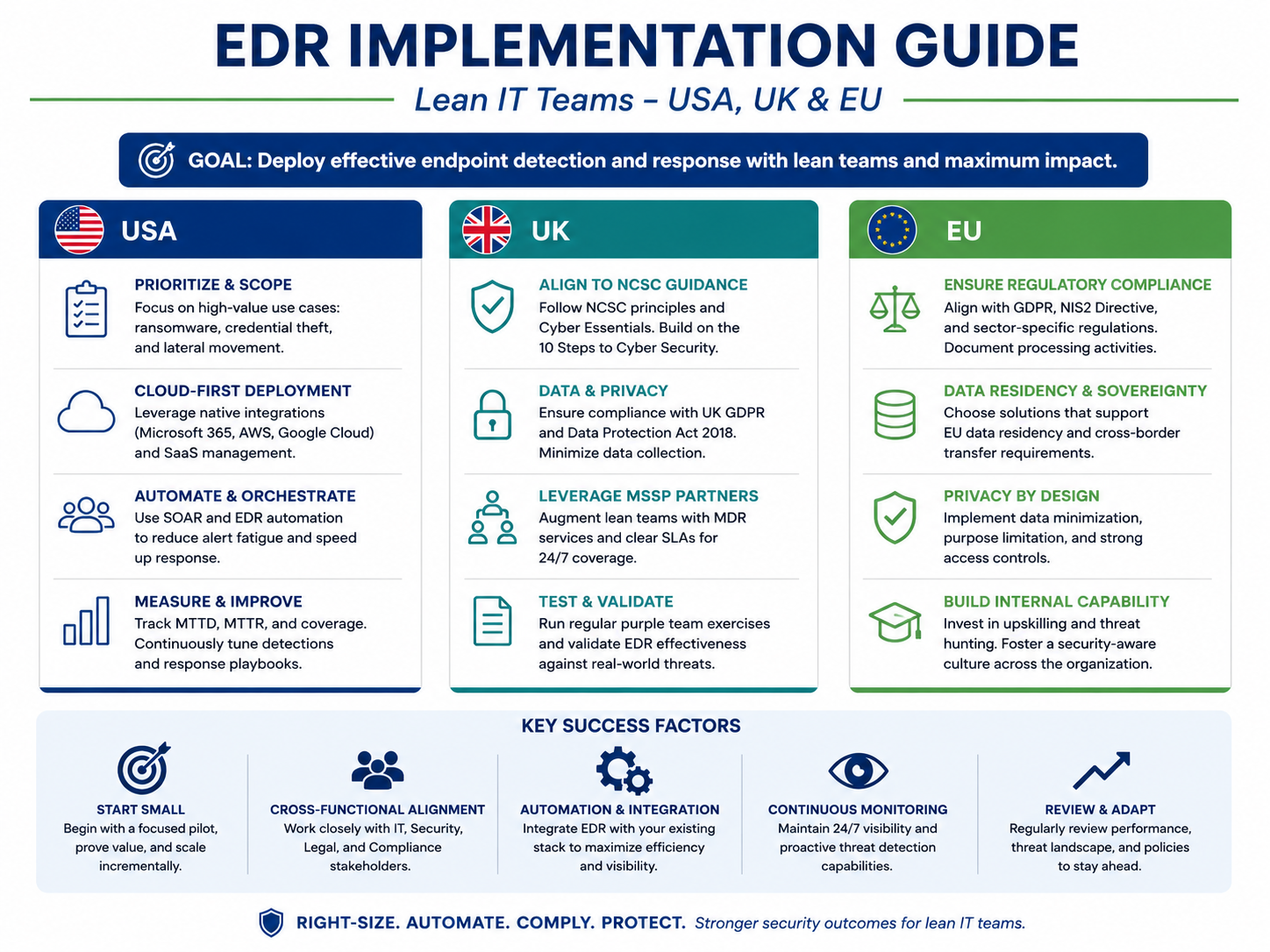
EDR Implementation Guide for USA, UK & EU
Small businesses do not need a full security operations center to get real value from endpoint detection and response. This EDR implementation guide shows lean IT teams how to plan coverage, deploy agents, tune alerts, respond faster, and collect evidence for compliance without drowning in dashboards.
In simple terms, EDR helps you see what is happening on laptops, servers, and remote endpoints, then act quickly when behavior looks suspicious. For SMBs in the USA, UK, and EU, the goal is not “more alerts.” The goal is faster containment, cleaner response workflows, and security evidence you can explain to leadership, insurers, auditors, and customers.
The risk is not theoretical. Verizon’s 2026 DBIR highlights that 48% of all breaches now involve ransomware, while IBM’s 2025 report places the global average cost of a data breach at USD 4.4 million. Sophos also reports that in 2025, ransomware recovery costs averaged an additional USD 1.53 million, excluding the ransom itself.
What EDR Implementation Means for Small Businesses
EDR implementation means putting the right endpoint monitoring, detection, investigation, and response process in place. It is not just installing another agent.
A practical EDR rollout usually includes.
Endpoint inventory
Agent deployment
Detection policies
Alert routing
Response playbooks
Evidence collection
Reporting for compliance and leadership
Traditional antivirus mainly looks for known malicious files. EDR goes deeper into behavior: suspicious scripts, unusual PowerShell activity, credential abuse, ransomware patterns, lateral movement, and attacker persistence.
For cloud-first teams using Microsoft 365, Google Workspace, AWS, Azure, or GCP, that endpoint visibility matters. Many real incidents start with a user device, then spread into identity, email, cloud apps, or admin accounts.
Why Lean IT Teams Need EDR
Lean IT teams need EDR because attackers do not work around your office hours. A small SaaS company in San Francisco, a healthcare startup in Boston, or a finance firm in New York may all have remote laptops outside the office firewall.
In the UK, SMEs in London, Manchester, or Birmingham may need stronger evidence for Cyber Essentials, customer security reviews, NHS supplier checks, or FCA-related risk conversations.
In Germany and the wider EU, companies in Berlin, Munich, Amsterdam, or Dublin also need to think about GDPR, DSGVO, data residency, works council expectations, and how employee endpoint monitoring is documented.
EDR gives lean teams a practical way to answer three important questions.
What happened on this device?
Has the threat spread anywhere else?
What action did we take, and can we prove it?
EDR vs Antivirus vs MDR vs XDR
Antivirus is still useful, but it is limited. It usually focuses on blocking known malware and suspicious files.
EDR adds investigation and response. It can show process timelines, isolate endpoints, kill malicious processes, and preserve forensic evidence.
MDR, or managed detection and response, adds human analysts who monitor alerts, investigate threats, and escalate incidents for you. XDR connects endpoint, identity, email, cloud, and network signals into a broader detection layer.
Lean teams often start with EDR, then move to MDR when they need 24/7 monitoring or expert triage. For a fuller comparison, see Mak It Solutions’ guide on MDR vs XDR vs SOC.
EDR Implementation Checklist Before Deployment
Before installing anything, decide what you need to protect and who owns response. A clean EDR implementation checklist helps avoid tool sprawl, alert fatigue, and unclear responsibilities.
Map Your Endpoints, Users, and Cloud Risk
Start with your real environment.
Laptops and desktops
Servers and virtual machines
Remote devices
Developer workstations
Privileged admin devices
Finance and executive laptops
Cloud-connected workloads
Do not forget unmanaged or lightly managed devices. In practice, the endpoint that “nobody owns” often becomes the one that causes the most trouble.
If your team is also improving cloud posture, Mak It Solutions’ article on cloud security misconfigurations is a useful companion.
Define Detection and Response Goals
Do you need ransomware rollback, USB control, suspicious login correlation, PCI DSS evidence, HIPAA-aligned documentation, or SOC 2 reporting?
PCI DSS is especially relevant for teams that process payment card data, while the HIPAA Security Rule requires regulated healthcare entities to protect electronic protected health information through administrative, physical, and technical safeguards.
Write your goals down before vendor selection. A small team should buy for operational fit, not just a long feature list.
Choose Internal EDR, MSP Support, or Managed EDR
Internal EDR can work if someone reviews alerts daily and knows how to respond.
MSP-supported EDR is useful when you need help with deployment, patch coordination, policy setup, and reporting.
Managed EDR is usually the better fit when your team lacks security analysts, needs after-hours monitoring, or must meet customer and insurance expectations.
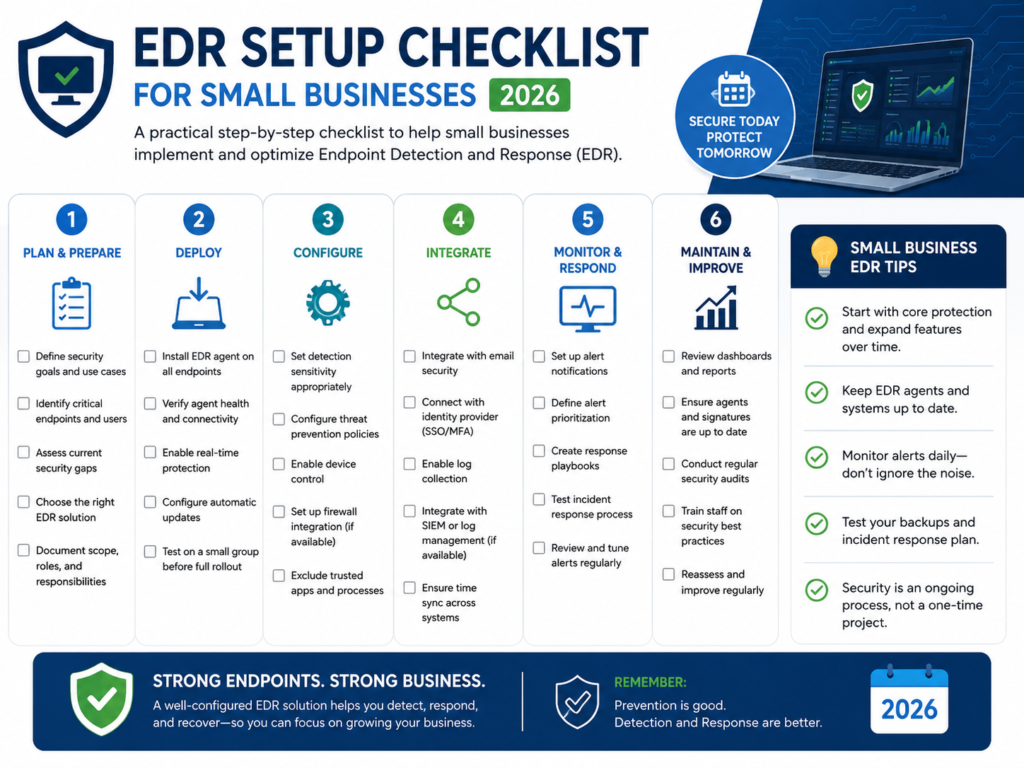
Step-by-Step EDR Deployment Guide
A safe EDR rollout starts small, proves value, then expands. Do not push agents everywhere on day one unless your team is ready to handle the noise.
Pilot EDR on High-Risk Endpoints First
Start with executives, finance users, IT admins, remote workers, and servers. These devices usually carry privileged access, sensitive data, or business-critical workflows.
A Boston healthcare startup may begin with EHR admin laptops. A London fintech may prioritize finance operations and developer endpoints. A Berlin SaaS company may start with cloud engineering laptops that have production access.
Deploy Agents and Validate Coverage
Use the deployment method your team already trusts: Intune, Jamf, RMM, MDM, group policy, or scripted deployment.
Then validate the basics.
Is every endpoint reporting healthy?
Are policies applied correctly?
Is telemetry flowing?
Can the tool isolate a device?
Are updates and tamper protection working?
Teams building secure digital products should also align endpoint security with secure delivery across mobile app development and front-end development.
Test Detection, Isolation, and Remediation
Do controlled testing before full rollout. Use safe simulations such as EICAR test files, suspicious PowerShell activity, unauthorized persistence attempts, phishing payload handling, and endpoint isolation drills.
Document each test. That documentation can support SOC 2 reviews, PCI DSS evidence, HIPAA security risk reviews, cyber insurance questionnaires, and customer vendor assessments.
Alert Tuning for Lean IT Teams
EDR can create noise if nobody tunes it. For a lean team, alert tuning is not optional.
Start with severity. Critical alerts should route immediately to named IT owners. Medium alerts can be reviewed during business hours. Known-good software deployment tools, backup agents, admin utilities, and developer scripts should be allow listed carefully.
Tie alert priority to business impact. A suspicious process on a payment server matters more than the same event on a test laptop.
For analytics-heavy teams, endpoint data should flow into reporting that leadership can understand. Mak It Solutions’ Business Intelligence Services can support clearer dashboards across security, operations, and management.
Simple Incident Response Playbooks
A lean IT team does not need a 60-page playbook for every scenario. It needs clear first steps.
For common EDR alerts, define who will.
Isolate the endpoint
Collect evidence
Disable or reset user accounts
Check email forwarding rules
Review related cloud logins
Notify leadership
Record what happened
Decide whether external support is needed
The first hour of response should feel clear, not chaotic.
For e-commerce teams handling payments, managed EDR can also support secure storefront operations and checkout protection across e-commerce solutions.
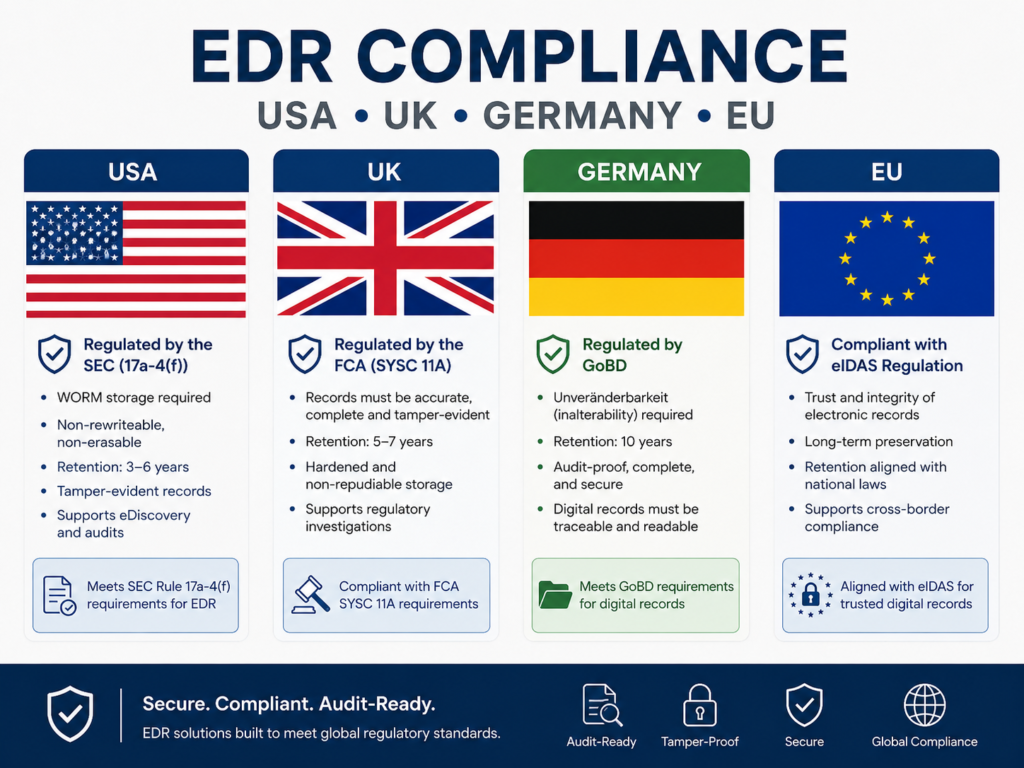
Compliance and Regional EDR Requirements
EDR is not a compliance checkbox by itself. Still, it can help prove monitoring, detection, response, investigation, and risk management.
USA.
In the USA, EDR can support HIPAA security risk management, PCI DSS monitoring evidence, SOC 2 controls, and cyber insurance questionnaires.
A New York healthcare provider may need endpoint logs for HIPAA-aligned risk analysis. A San Francisco SaaS company may need incident response evidence for customer security reviews.
UK.
In the UK, EDR can support UK GDPR security expectations, Cyber Essentials alignment, NHS supplier assurance, and FCA-related operational risk reviews.
The ICO says UK GDPR requires appropriate technical and organizational measures based on risk. NCSC Cyber Essentials also includes five technical controls, including malware protection and security update management.
Germany and EU.
In Germany and the wider EU, EDR planning should consider GDPR, DSGVO, ISO 27001, works council sensitivity, and data residency.
Financial entities may also need to consider DORA, which strengthens digital resilience requirements for EU financial organizations and entered into application on 17 January 2025. NIS2 establishes a unified cybersecurity framework across 18 critical sectors in the EU.
EDR for Small Business.
The best EDR for small business is the one your team can actually deploy, monitor, tune, and explain during an incident.
Look for.
Strong endpoint telemetry
Automated remediation
Device isolation
Ransomware behavior detection
Identity and cloud integrations
Clear reporting
Multi-OS support
Managed response options
Simple policy management
Vendors such as Microsoft Defender, Sentinel One, Sophos, Palo Alto Networks, Huntress, and MSP/MSSP bundles can all fit different environments. Your pilot results matter more than a feature comparison table.
For app-led companies, endpoint security should also connect with engineering workflows. Mak It Solutions’ React Native Development Services show how product security needs to run from design to support.
30-Day EDR Implementation Roadmap
Here is a practical rollout path for lean IT teams.
| Timeline | Focus | Outcome |
|---|---|---|
| Week 1 | Inventory endpoints, define risk, choose pilot users | Clear scope |
| Week 2 | Deploy agents to high-risk endpoints | Early visibility |
| Week 3 | Expand by department, region, or device type | Wider coverage |
| Week 4 | Tune alerts, test isolation, document evidence | Stable workflow |
Keep ownership clear. Every alert category should have a named reviewer, escalation path, and response expectation.
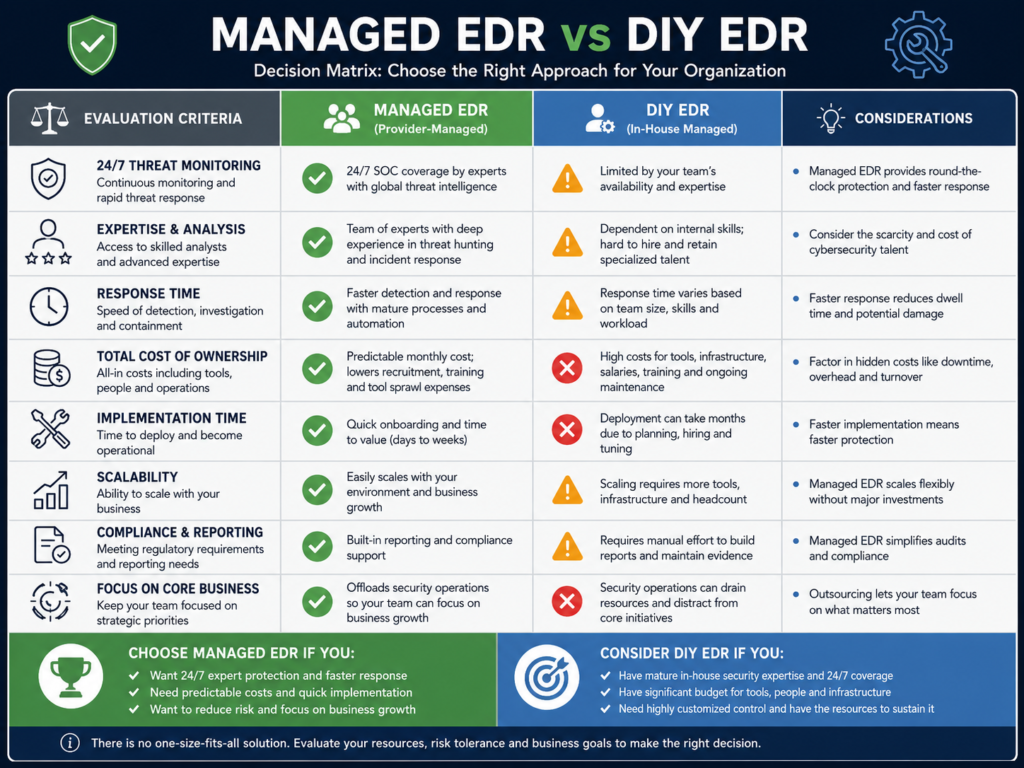
Internal EDR vs Managed EDR Decision Matrix
Use internal EDR when your team has security skills, time to review alerts, and clear response ownership.
Use managed EDR when you need 24/7 coverage, faster escalation, compliance support, or help reducing false positives.
For many SMBs, the value of managed EDR is not only the tool. It is expert triage, after-hours monitoring, and better incident confidence when something serious happens.
To Sum UP
EDR implementation is most effective when lean IT teams keep it practical: know every endpoint, start with high-risk users, validate coverage, tune alerts, and document every response. A strong EDR implementation guide helps SMBs move beyond antivirus and build a workflow that supports faster detection, containment, and compliance evidence.
The next step is simple: review your current devices, decide who owns alerts, and choose whether internal EDR, MSP support, or managed EDR fits your team best. With the right setup, EDR becomes less of a noisy security tool and more of a clear, repeatable protection process for long-term business resilience.
Mak It Solutions can help turn EDR from a noisy tool into a practical security workflow. Book a scoped consultation through the Mak It Solutions contact page to assess endpoints, cloud exposure, compliance needs, and whether internal EDR or managed EDR is the better fit for your team.
Key Takeaways
EDR helps lean IT teams detect suspicious behavior, investigate attacks, and contain endpoints faster than antivirus alone.
A good EDR implementation guide starts with inventory, risk mapping, logging goals, and response ownership. Alert tuning matters just as much as deployment because small teams cannot afford endless false positives.
Regional compliance needs differ across the USA, UK, Germany, and EU, especially for HIPAA, PCI DSS, UK GDPR, DORA, and NIS2. Managed EDR is often the better fit when SMBs need stronger monitoring without hiring a full SOC.
FAQs
Q : How long does EDR implementation take for a small business?
A : Most small businesses can complete an initial EDR implementation in about 2–4 weeks. A simple environment with fewer than 100 endpoints may move faster, while regulated healthcare, finance, or multi-country teams may need more time for testing and documentation.
Q : Can a company deploy EDR without a security operations center?
A : Yes. A company can deploy EDR without a SOC, but it must define who reviews alerts, who can isolate devices, and how incidents are escalated after hours. Without ownership, EDR becomes another dashboard nobody watches.
Q : What endpoint data does EDR collect?
A : EDR usually collects process activity, file changes, command-line events, network connections, login behavior, registry changes, script execution, and threat detections. In GDPR-sensitive environments, teams should document what is collected, why it is needed, retention periods, and access controls.
Q : Is managed EDR worth it for companies with fewer than 300 users?
A : Managed EDR is often worth it for companies under 300 users if they lack security analysts, support remote staff, face ransomware risk, or need compliance evidence. DIY EDR can work when internal ownership and response skills are strong.
Q : How does EDR help with ransomware response?
A : EDR helps by detecting suspicious encryption behavior, isolating affected endpoints, killing malicious processes, and preserving investigation evidence. Some platforms include rollback or automated remediation, but EDR should still be paired with backups, patching, MFA, and access control.
[…] Endpoint security can complement these controls; see Mak It Solutions’ EDR Implementation Guide for USA, UK & EU. […]