

Cloud Repatriation: A Smarter Cloud Exit Strategy
Cloud Repatriation: A Smarter Cloud Exit Strategy
Cloud Repatriation: A Smarter Cloud Exit Strategy
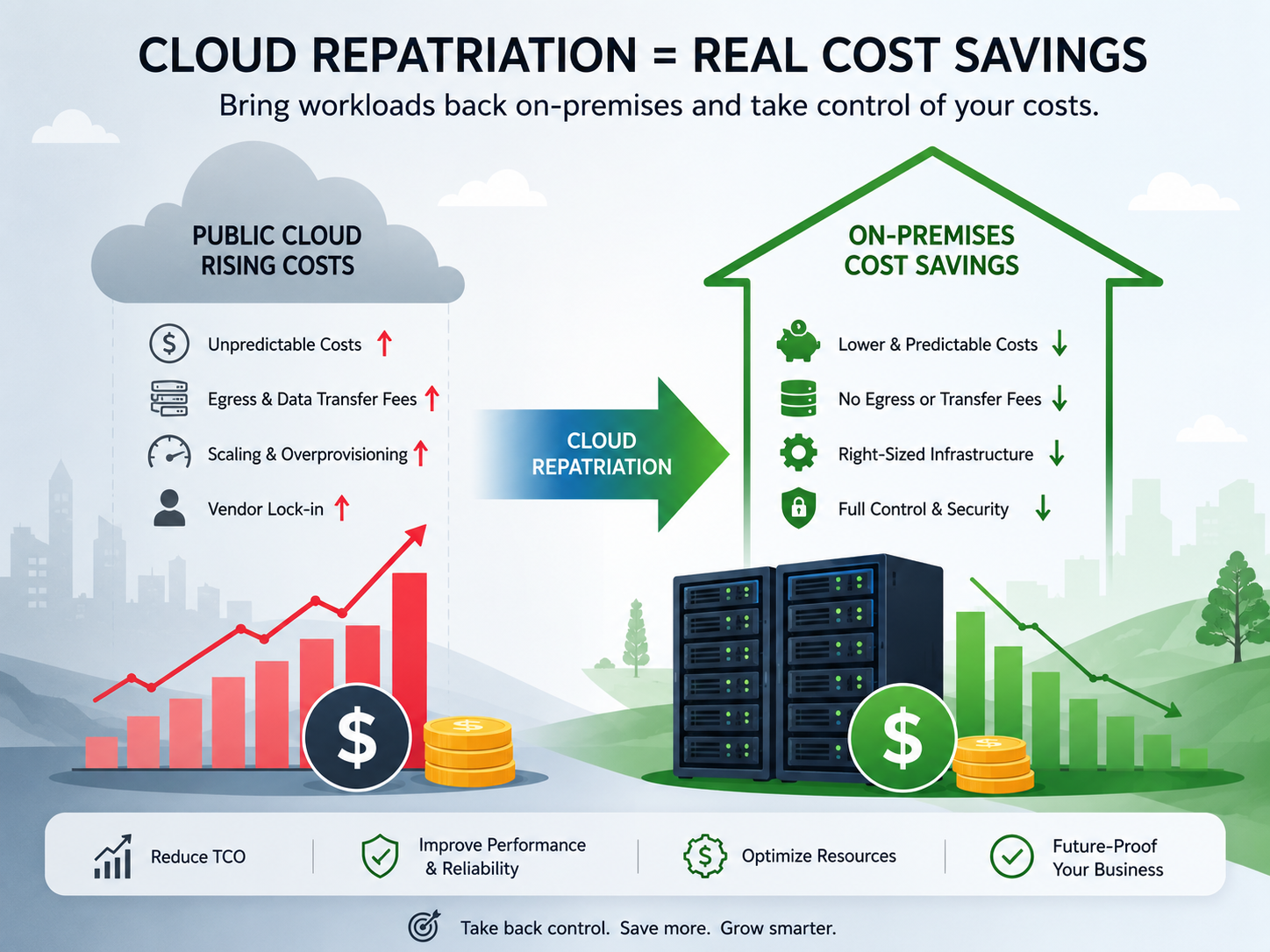
Cloud repatriation can reduce infrastructure costs when workloads run continuously, use predictable capacity, transfer large volumes of data, or generate significant GPU, storage, and egress charges. However, the strongest strategy is rarely a complete cloud exit. Most organizations benefit from selectively moving suitable workloads to on-premises infrastructure, private cloud, or colocation while keeping elastic and cloud-native services in the public cloud.
Rising cloud bills alone are not a reason to bring every application back into the data center. The decision should be based on workload utilization, data movement, operational capability, compliance requirements, resilience, and total cost of ownership.
A healthcare platform in New York may prioritize HIPAA controls and predictable database costs. A London fintech may focus on operational resilience and provider concentration risk. A manufacturer in Munich may need low latency, data sovereignty, and tighter control over industrial data.
In each case, the right answer may be hybrid rather than cloud-only or on-premises-only.
Global cloud infrastructure spending reached approximately $90.9 billion in the first quarter of 2025, representing year-over-year growth of about 21%.
What Is Cloud Repatriation?
Cloud repatriation is the process of moving applications, data, or infrastructure from a public-cloud provider to an on-premises environment, private cloud, or colocation facility.
It is usually selective rather than organization-wide. Businesses may repatriate workloads to reduce costs, improve latency, strengthen resilience, meet regulatory requirements, or gain greater control over infrastructure and data.
Cloud Repatriation vs Hybrid Cloud
Cloud repatriation is a migration event. Hybrid infrastructure is an ongoing operating model that combines public-cloud services with privately controlled systems.
For example, a company may repatriate a predictable production database while keeping development environments, disaster recovery, and seasonal web traffic in AWS, Microsoft Azure, or Google Cloud.
Containers, Kubernetes, infrastructure-as-code, and standardized monitoring can make workloads easier to operate across these environments.
For related planning considerations, see Mak It Solutions’ guide to sovereign cloud versus hyperscalers.
Cloud Repatriation vs a Full Cloud Exit
Moving one expensive workload out of the cloud is not the same as abandoning public cloud entirely.
A reverse cloud migration strategy may involve.
Moving selected systems to private infrastructure
Distributing workloads across multiple providers
Reducing reliance on proprietary managed services
Creating contractual and technical exit procedures
Retaining public cloud for elastic or short-term demand
The objective is to reduce unnecessary cost and lock-in without losing the flexibility and innovation benefits public cloud can provide.
Why Companies Move Workloads Back On-Premises
Organizations consider cloud repatriation for several reasons:
Predictable infrastructure costs
High data-egress charges
Expensive storage or GPU consumption
Low-latency requirements
Data-gravity challenges
Regulatory or sovereignty concerns
Operational resilience
Greater control over security and access
Cloud spending can become difficult to forecast when applications create cross-region traffic, retain unnecessary snapshots, run oversized instances, or scale without effective FinOps controls.
Migration planning should therefore be supported by clear ownership, cost governance, and appropriate cybersecurity staffing.
When Cloud Repatriation Saves Money
Cloud repatriation is most likely to save money when demand is stable, infrastructure can remain highly utilized, data-transfer charges are significant, and the workload will operate long enough to recover its migration costs.
Bursty, experimental, seasonal, or uncertain workloads are often more economical in public cloud.
Workload Economics That Favor On-Premises Infrastructure
Strong financial candidates commonly have.
Predictable, continuous demand
High CPU, GPU, or storage utilization
Long-lived datasets
Heavy data-transfer volumes
Strict latency requirements
Strong data gravity
A three-to-five-year operating horizon
A stable AI inference platform, for example, may use dedicated GPUs more efficiently than continuously rented cloud instances. That only works when demand remains high and the organization can operate the hardware reliably.
Hidden Public-Cloud Cost Drivers
A cloud bill includes far more than compute.
Common cost drivers include.
Data egress
Cross-region traffic
Idle or abandoned resources
Premium managed databases
Long-term snapshots and backups
Unused reserved capacity
Enterprise support plans
Software licensing
Oversized instances
AWS, Microsoft Azure, and Google Cloud represented approximately 65% of global cloud infrastructure spending in the first quarter of 2025.
This market concentration makes workload portability, contract reviews, and cloud-exit planning commercially important.
When Public Cloud Is Still the Better Choice
Public cloud often remains the stronger option for.
Seasonal e-commerce traffic
New or experimental products
Development sandboxes
Temporary analytics projects
Globally distributed services
Serverless applications
Workloads dependent on proprietary managed services
It may also be the safer choice when a small internal team cannot reliably support hardware, networking, monitoring, backups, security, and round-the-clock incident response.
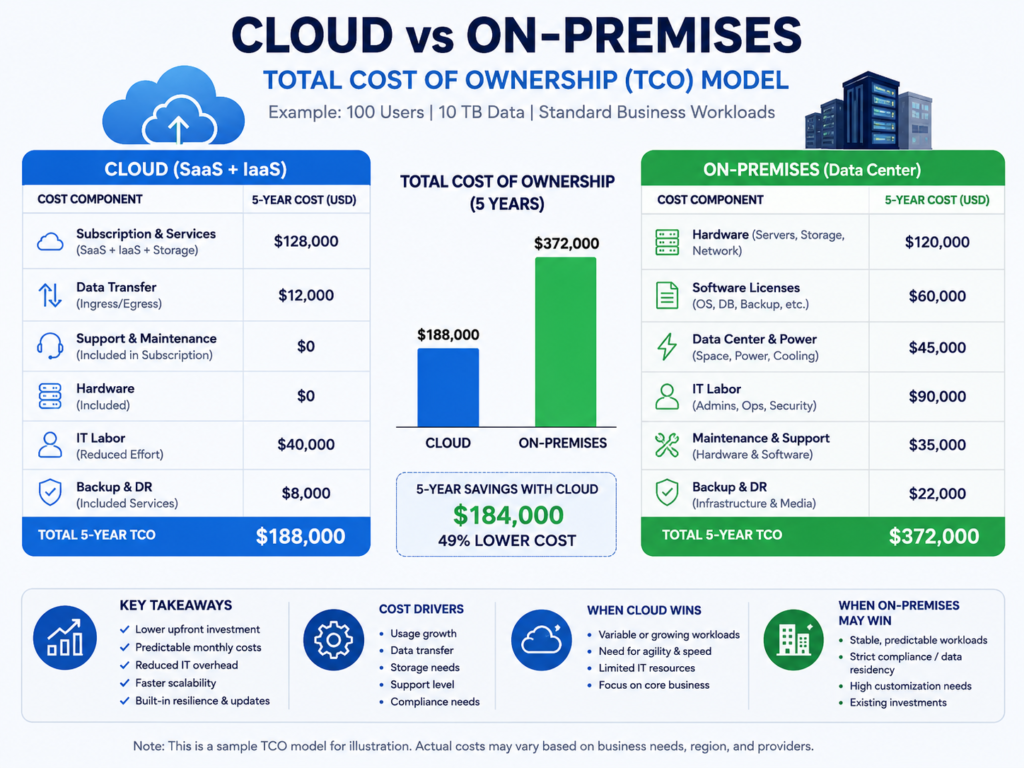
Public Cloud vs On-Premises Cost.
Predictable, high-utilization workloads can cost less on-premises because owned or colocated infrastructure is reused continuously instead of being billed for each unit of consumption.
However, the comparison is only meaningful when both options include their complete total cost of ownership.
What to Include in Cloud TCO
A realistic cloud TCO model should include.
Compute, storage, and networking
Data egress and cross-region traffic
Managed databases and platform services
Reserved instances or savings plans
Enterprise support
Licensing
FinOps and governance overhead
Idle and overprovisioned resources
Do not base the decision on one unusually expensive month. Review at least 12 months of billing data and account for expected growth.
What to Include in On-Premises or Colocation TCO
Private-infrastructure costs may include.
Hardware purchases or financing
Rack space
Power and cooling
Network connectivity
Platform and infrastructure engineers
Security tools
Software licensing
Disaster recovery
Maintenance contracts
Depreciation
Hardware refresh cycles
A colocation facility in Dallas, London, Manchester, Frankfurt, or Amsterdam may offer private control without the cost of building and maintaining a company-owned data center.
Calculating ROI and the Break-Even Point
Use the following formula.
Break-even period = Migration and setup costs ÷ Monthly net savings
Monthly net savings equal the current cloud run rate minus the expected cost of operating the private environment.
Consider a stable AWS workload that costs $120,000 per month. A high-utilization colocation environment may cost $75,000 per month after hardware depreciation, staffing, connectivity, and support.
The estimated monthly saving would be $45,000.
If migration and setup cost $540,000, the estimated break-even period would be 12 months.
This calculation should be tested under best-case, expected, and worst-case scenarios. Include refactoring, dual running, testing, data transfer, procurement delays, and contingency costs.
Which Workloads Should Be Repatriated?
The strongest candidates have predictable demand, high utilization, substantial data movement, strict latency requirements, or regulatory constraints.
Elastic, experimental, globally distributed, and deeply cloud-native applications are usually weaker candidates.
Strong Candidates for Cloud-to-On-Premises Migration
Potential candidates include.
High-utilization virtual machines
Predictable production databases
Long-term object storage
GPU-intensive AI workloads
Manufacturing and edge systems
Stable customer platforms
Regulated healthcare or financial workloads
Organizations operating data-heavy applications may also require integration, automation, or modernization support through specialist Python development services.
Workloads That May Belong in Public Cloud
Weaker repatriation candidates include.
Seasonal e-commerce systems
Early-stage products
Development and testing environments
Short-lived analytics workloads
Globally distributed services
Serverless applications
Systems tightly coupled to proprietary cloud platforms
For commerce environments, improving performance through specialist WooCommerce development services may deliver more value than moving the underlying infrastructure.
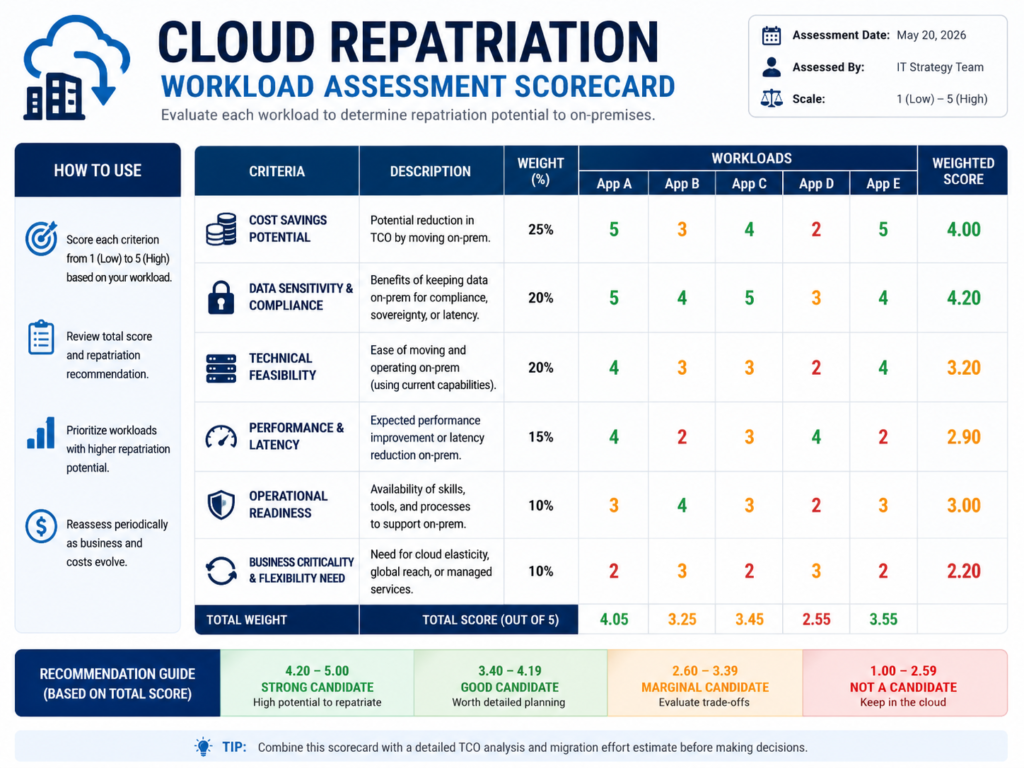
Cloud Repatriation Assessment Scorecard
Score each workload from 1 to 5 across the following areas.
Demand predictability
Resource utilization
Egress exposure
Storage growth
Latency requirements
Refactoring complexity
Internal staff capability
Compliance pressure
Portability
Business criticality
Break-even period
Rollback feasibility
The assessment should lead to one of three recommendations.
Repatriate.
Economics and control requirements strongly favor private infrastructure.
Retain in public cloud.
Elasticity, global reach, or managed services provide greater value.
Use hybrid or colocation.
Requirements are mixed and selective workload placement offers the best balance.
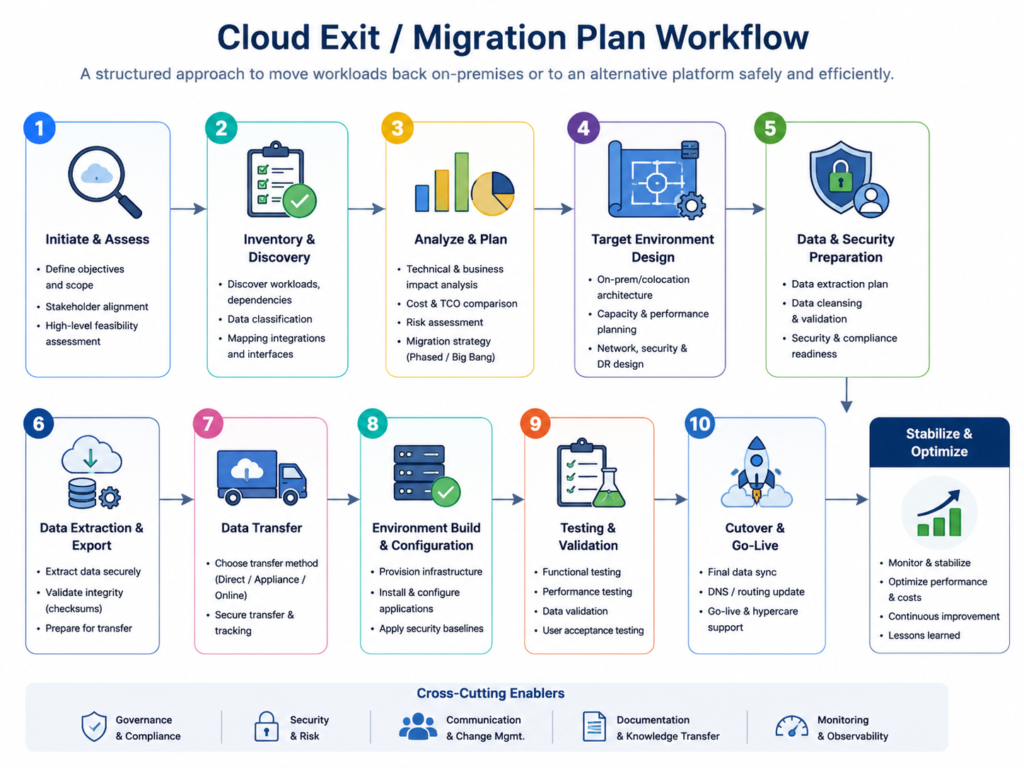
How to Build a Cloud Exit and Migration Plan
A cloud-exit plan should document application dependencies, data flows, contracts, security controls, target infrastructure, testing requirements, cutover procedures, rollback processes, and post-migration optimization.
Regulated organizations should also retain evidence showing that services can be transferred without unacceptable disruption or data loss.
Discover Applications, Dependencies, and Data Flows
Inventory workloads, APIs, databases, identity services, monitoring tools, backups, and managed-cloud dependencies.
Map cross-region traffic and identify cloud-native services that will need to be replaced, redesigned, or refactored.
Review.
Reserved-capacity commitments
Contract notice periods
Data-export formats
Licensing terms
Termination charges
Data-transfer restrictions
Design the Target Environment
Choose between on-premises infrastructure, private cloud, colocation, sovereign cloud, or a hybrid model.
Define capacity, connectivity, identity, encryption, Kubernetes portability, monitoring, backup, and disaster-recovery requirements.
Access controls should follow a practical zero-trust roadmap, regardless of where the workload is hosted.
Migrate, Test, Cut Over, and Roll Back
Use a controlled sequence.
Pilot a low-risk workload.
Transfer and validate the data.
Run the source and target environments in parallel.
Test performance, security, recovery, and integrations.
Approve measurable cutover criteria.
Maintain and test a rollback procedure.
Decommission unused cloud resources after stabilization.
Compliance, Sovereignty, and Regional Exit Requirements
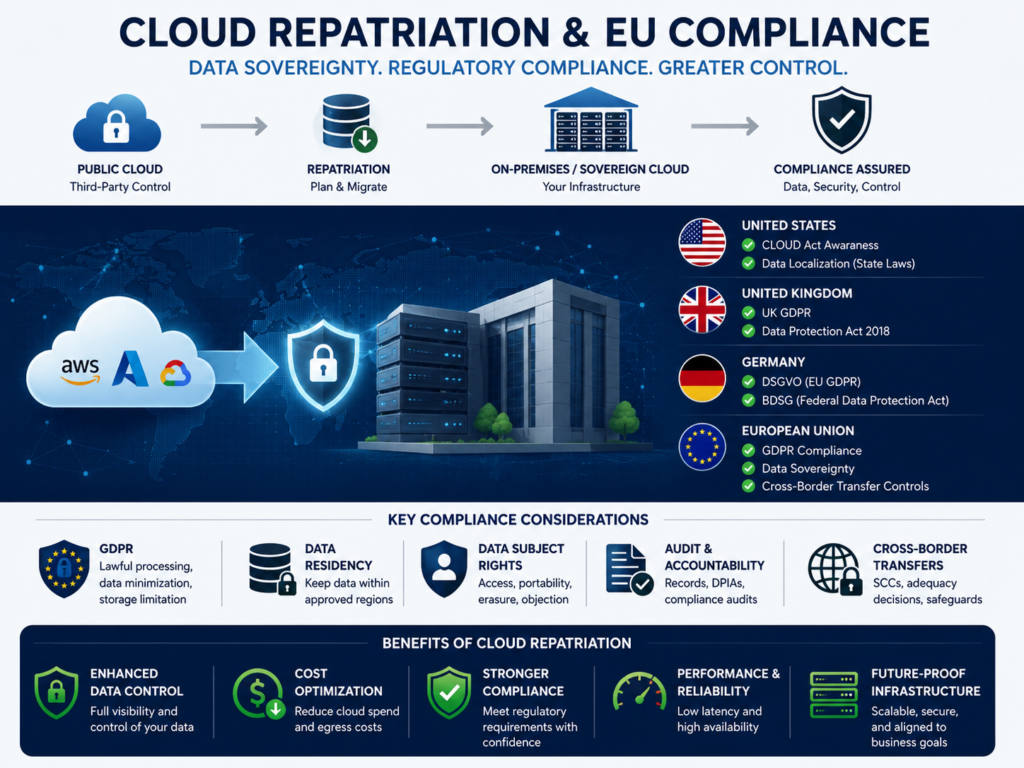
Cloud repatriation may improve operational control, but it does not automatically guarantee compliance.
Organizations must still assess data location, jurisdiction, administrative access, outsourcing obligations, portability, resilience, and security controls.
USA.
US healthcare organizations must evaluate HIPAA safeguards and the responsibilities of technology vendors.
Payment environments should align with PCI DSS, while government workloads may require FedRAMP-authorized services. CCPA and CPRA obligations may also affect data inventories, access requests, deletion processes, and vendor contracts.
A healthcare platform in New York might repatriate a predictable patient-data workload while retaining public-cloud capacity for non-sensitive analytics.
UK.
UK organizations should consider UK GDPR, international data transfers, NHS data governance, and FCA or PRA expectations relating to operational resilience, outsourcing, provider concentration, and exit planning.
The UK Competition and Markets Authority concluded its cloud infrastructure investigation in July 2025 and identified competition concerns requiring further consideration.
A company in London or Manchester considering an on-premises deployment should still document resilience testing, supplier dependencies, recovery objectives, and exit procedures.
Germany and the EU.
German and EU organizations may need to consider GDPR or DSGVO, BaFin requirements, BSI C5, DORA, NIS2, KRITIS, Schrems II, and the EU Data Act.
The EU Data Act requires cloud and edge providers to support interoperability and switching. It also provides for the removal of switching charges, including relevant data-egress charges, from January 12, 2027.
A manufacturer in Munich might keep industrial systems close to production while using an AWS or Azure region in Frankfurt for elastic analytics.
Data residency alone does not equal sovereignty. Jurisdiction, privileged access, encryption-key control, and potential foreign-government access should also be assessed.
Cloud Repatriation Risks and How to Reduce Them
Migration and Downtime Risk
Incomplete dependency maps, inconsistent data, weak testing, performance regression, and poorly defined rollback procedures can quickly erase expected savings.
Reduce these risks through pilots, parallel operation, reconciliation checks, load testing, recovery exercises, and business-approved cutover criteria.
Skills and Operational Maturity
Private infrastructure requires expertise in.
Platform engineering
Networking
Hardware operations
Capacity planning
Monitoring
Cybersecurity
Backup and disaster recovery
Vendor management
Security governance should align with the frameworks discussed in Mak It Solutions’ preemptive cybersecurity guide.
Financial and Strategic Risk
Potential risks include:
Underutilized hardware
Underestimated migration costs
Energy-price volatility
Hardware obsolescence
Reduced elasticity
New forms of vendor lock-in
Assumptions should receive an independent review. A repatriation project should not be approved simply because the latest cloud invoice was unexpectedly high.
How to Choose Between Cloud, On-Premises, and Hybrid Infrastructure
Repatriate When
Cloud repatriation may be appropriate when.
Demand is predictable
Utilization is consistently high
Storage or egress costs are material
Latency favors local infrastructure
Greater operational control is required
Qualified staff are available
The break-even period meets investment criteria
Stay in Public Cloud When
Remain in public cloud when.
Demand is volatile
Rapid experimentation is important
Global scale is required
Managed services provide substantial value
Migration costs exceed realistic savings
Internal operational capability is limited
Choose Hybrid or Colocation When
A hybrid or colocation model may be the best choice when only selected workloads justify repatriation, regional infrastructure is required, or the business wants private control without owning a facility.
For most mature organizations, this balanced approach to workload placement is more practical than a complete cloud exit.
Last Words
Cloud repatriation is not about abandoning the cloud; it is about placing each workload where it delivers the best balance of cost, performance, control, and resilience. For stable, data-heavy, high-utilization systems, on-premises infrastructure or colocation can create meaningful long-term savings, especially when egress, storage, and GPU charges remain consistently high.
The smartest approach is selective and evidence-based. Compare complete three-year and five-year TCO, include migration and staffing costs, test a low-risk workload, and keep rollback options ready. Public cloud should remain where elasticity and managed services add value, while hybrid infrastructure can provide flexibility without unnecessary dependence or overspending overall.
Key Takeaways
Cloud repatriation is usually selective, not an anti-cloud strategy.
Stable, data-intensive, high-utilization workloads offer the strongest potential savings.
Compare complete three-year and five-year TCO rather than server prices alone.
Include migration, staffing, resilience, security, and refresh costs.
US, UK, German, and EU compliance requirements must be assessed separately.
Hybrid infrastructure or colocation is often the lowest-risk outcome.
Start With One Workload
Begin with one stable, high-cost workload and compare its three-year and five-year economics across public cloud, on-premises infrastructure, and colocation.
Contact Mak It Solutions to request a scoped cloud repatriation assessment, workload-placement workshop, or cloud-exit readiness review.( Click Here’s )
FAQs
Q : How long does a cloud repatriation project take?
A : A focused workload may take several weeks, while a complex application portfolio can take many months. The timeline depends on data volume, cloud-service dependencies, refactoring, procurement, connectivity, security testing, and regulatory approvals.
A pilot migration should establish realistic transfer rates, testing requirements, downtime limits, and rollback procedures before a wider program begins.
Q : Can a company repatriate data without moving the entire application?
A : Yes. A company can move archival data, backups, analytics datasets, or a primary database while leaving application services in public cloud.
This may reduce storage or egress costs, but latency, consistency, encryption, access control, and recovery must be evaluated across both environments.
Q : Does cloud repatriation reduce cybersecurity risk?
A : Not automatically.
Cloud repatriation may improve control over infrastructure, encryption keys, administrators, and data location, but it also transfers more security responsibility to the organization. Security depends on controls and operational maturity—not infrastructure location alone.
Q : What internal skills are required for repatriated workloads?
A : Teams may need platform engineers, network specialists, security analysts, database administrators, hardware support, capacity planners, and disaster-recovery expertise.
Organizations without these capabilities should consider managed private cloud, colocation, or an experienced infrastructure partner.
Q : Is colocation better than building an on-premises data center?
A : Colocation is often more practical because it provides secure facilities, redundant power, cooling, connectivity, and physical controls without requiring the organization to construct its own data center.
The final decision should compare contract flexibility, staffing, compliance, connectivity, regional coverage, and long-term capacity requirements.